SKU: 11363188476
five fingers plant indoor or outdoor

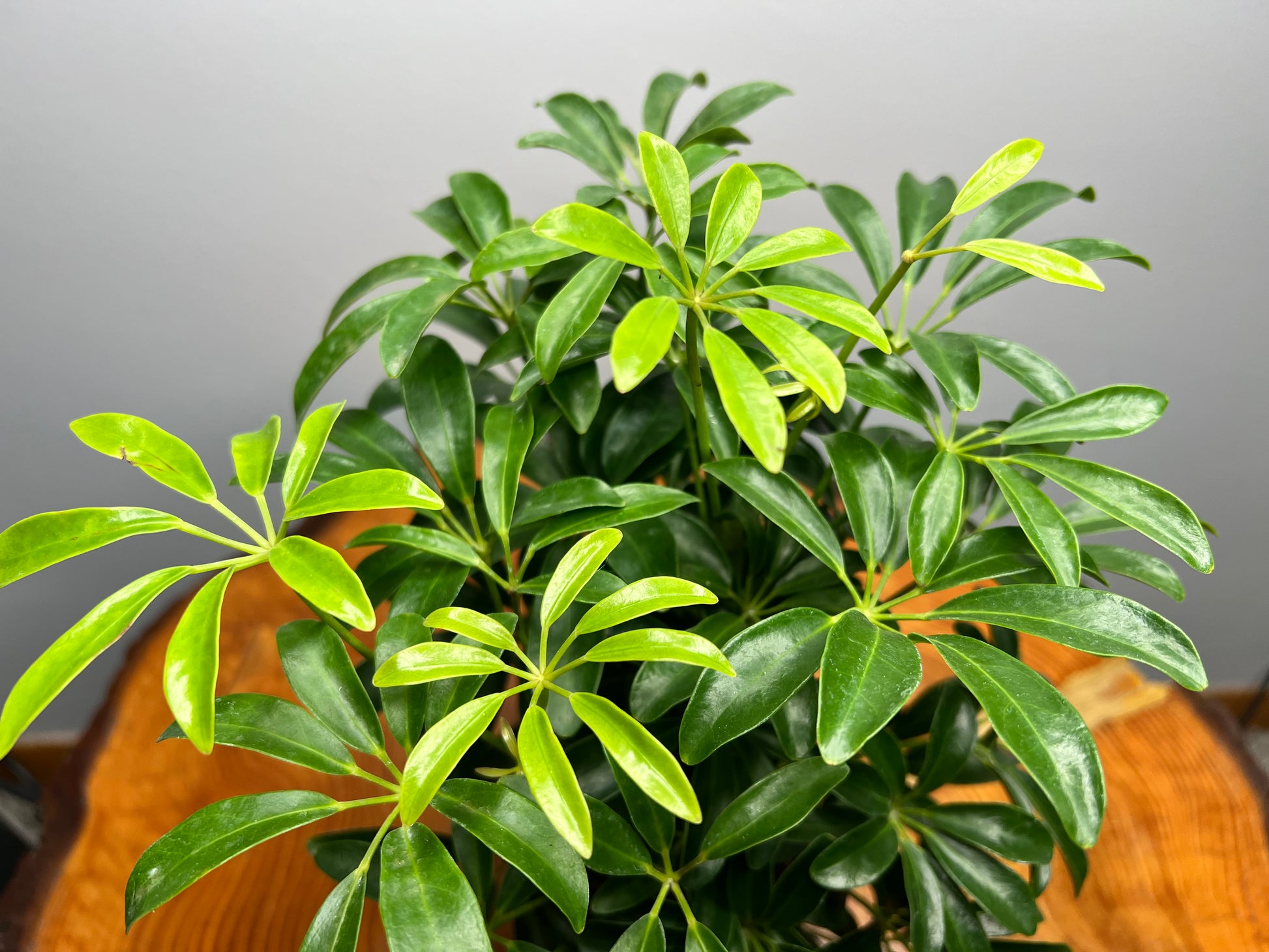
five fingers plant indoor or outdoor Schefflera Arboricola 4" pot

Sale price$25.03 Regular price$27.81
Save 10%

Pay in installments of $6.95 with ShopPay, AfterPay and Klarna

Shipping Estimate
USA
  • USA
  • CAN

Ships within 48 hours · Estimated delivery Sep 22 - Sep 27

Promo Codes Available:

For Your Every Summer RSVP, with Code: SUMMER15

Description

five fingers plant indoor or outdoor Schefflera Arboricola 4" potSchefflera arboricola, commonly called Umbrella Tree or Dwarf Schefflera, is a tropical plant grown for its glossy, palm like leaf clusters. Native to Taiwan and southern China, it grows as a shrub or small tree in warm climates. What makes this plant special is the way multiple oval leaflets radiate from a central point, creating an umbrella shape, along with its ability to grow full and bushy or be trained into a tree form. The leaves are smooth,

Schefflera arboricola, commonly called Umbrella Tree or Dwarf Schefflera, is a tropical plant grown for its glossy, palm-like leaf clusters. Native to Taiwan and southern China, it grows as a shrub or small tree in warm climates. What makes this plant special is the way multiple oval leaflets radiate from a central point, creating an umbrella shape, along with its ability to grow full and bushy or be trained into a tree form. The leaves are smooth, deep green or variegated, and slightly leathery, giving it a clean, structured look.

Light requirements
Place Schefflera arboricola in an east or south window for the best growth, positioned at the window or within 1 to 3 feet depending on intensity. A west window can also work, but monitor for harsh late-day sun, and a north window will slow growth and thin the plant out. Under grow lights, use 5000K to 6500K and keep the light 10 to 14 inches above the canopy. It performs best around 200 to 600 foot-candles. Brighter light will keep it fuller and more compact.

Watering & environment
Allow the soil to dry about halfway down before watering, and always check the root zone with a chopstick or meter. Use a well-draining mix and avoid letting the plant sit in excess moisture. It prefers average indoor humidity and benefits from steady airflow.

What your plant is telling you
If leaves begin to droop or feel lighter, it is ready for water. If leaves yellow and drop, especially from the base, the soil is staying too wet. If the plant becomes leggy or sparse, it needs more consistent light.

Shipping Notes
  • Free Standard Shipping on $100+ Orders to the USA.
  • Except Preorder products are shipped in 48 hours.
  • Delivery to the USA:
  1. Standard Shipping : 3-10 business days
  • If time is of the essence, please consider selecting expedited delivery for faster service.
Exchange/Return Notes
  • We offer a 30-day return/exchange service after receiving.
  • Final sale items are not eligible for returns or exchanges.
  • To process your return/exchange, please contact us at [email protected]
  • Please click here for more details>>> Return & Exchange Policy
SKU: 11363188476

Discover Niche Categories That Outsell five fingers plant indoor or outdoor

Top-Converting Item to Boost Your Average Order

4.4 ★★★★★
Based on 20 reviews
Sort
Highest Rating
Newest First
Oldest First
Product Reviews
A
Verified Purchase
AH
Lake Worth, US
★★★★★ 5
Works pretty well for a cheap monitor
Size: 15.6" 1080P
I work remote and travel, so I miss my multi monitor setup. Not anymore. I took this on a trip with me and it was great. The stand folded over to not take up too much desk space, the cables wear just long enough, another 6” would have been great but they worked. Quality of the screen is plenty good enough for office work, I have no gaming or artwork experience with it though. If you need an inexpensive 2nd monitor , this works great for on the go or even for a regular desk.
WAS THIS REVIEW HELPFUL?YesReportShare
Reviewed in the United States on May 3, 2026
H
Verified Purchase
Hunter Blauvelt
Houston, US
★★★★★ 4
Great portable second screen
Size: 15.6" 1080P
Really convenient for a second screen on the go. The display looks sharp and it’s lightweight enough to carry around easily. Setup is simple, just plug and play. Not super bright, but works well for most uses.
WAS THIS REVIEW HELPFUL?YesReportShare
Reviewed in the United States on April 10, 2026
J
Verified Purchase
Jason K.
Belleville, US
★★★★★ 5
Very Straightforward and Easy to Use
Reload type: One Time Reload
I have used this several times, and it has always been a smooth and convenient experience. The biggest advantage is how intuitive the process is. Reloading the balance is simple, quick, and easy to understand without unnecessary steps or confusion. It is especially useful for managing spending, setting a shopping budget, or keeping funds ready for future purchases. Instead of entering payment details every time, having balance available makes checkout faster and more convenient. I also appreciate how quickly the funds are applied, allowing immediate use once the reload is completed. This is one of those simple Amazon features that works exactly the way it should. Overall, easy, efficient, and user-friendly. I have been very satisfied with it. Five stars.
WAS THIS REVIEW HELPFUL?YesReportShare
Reviewed in the United States on April 21, 2026
M
Verified Purchase
Martini81
Alexandria, US
★★★★★ 5
Easy and simple: Exact Step-by-Step Guide to Reloading Your Balance
Reload type: One Time Reload
I found reloading my Amazon gift card balance much easier than expected. The process was simple and took about 5 minutes at most. Here are the exact steps to do it: ​Login: In the Amazon app or on Amazon.com, log in to your account. ​ Menu: Tap the 3 lines on the bottom right corner of your screen (next to Rufus, Amazon's AI). ​ Find Category: In the section highlighted "Shop by category," tap on Gifting & Registry (3rd option down in that section) and a drop-down menu will appear. ​ Select Gift Cards: On the drop-down menu, tap Gift Cards (first option). ​ Choose Your Action: "The Gift Card Shop" will appear. There you will have three options: "Redeem a gift card," "View your balance," and "Reload." ​ Start Reload: To add funds, tap Reload. ​ Select Type: Scroll down to "Add funds directly to your Amazon Gift Card balance" and tap which reload type you want (one-time, low balance auto-reload, or scheduled auto-reload). ​ Enter Amount: Choose your reload amount. The default is $25, but you can type in your own amount as well (the minimum amount is $5.00). ​ Finish: Tap the orange "Buy Now" tab. ***I used the Amazon app using the u i OneUI version 8.0 these Amazon app on Android version 16 (Baklava) on a Samsung Galaxy S25 Ultra. Others may have a slight variation of the menu setup on the Amazon app.***
WAS THIS REVIEW HELPFUL?YesReportShare
Reviewed in the United States on April 22, 2026
K
Verified Purchase
Kenneth Lucas
Omaha, US
★★★★★ 5
Easy way to add balance
Reload type: One Time Reload
Reloading my Amazon gift card balance has been easy and convenient. I like using it when I want to keep a little money set aside for Amazon orders or make checkout quicker without thinking about which card I want to use. The process is straightforward, the balance shows up fast, and it has been reliable every time I have used it. It is also helpful for budgeting because I can add a set amount and then use that balance for regular purchases. Nothing complicated about it, which is exactly why I like it.
WAS THIS REVIEW HELPFUL?YesReportShare
Reviewed in the United States on May 28, 2026

recommand products