Pay in installments of $7.19 with
 ,
,
 and
and

Shipping Estimate
USA
- USA
- CAN
- USA
- CAN
Ships within 48 hours · Estimated delivery Oct 15 - Oct 20
 Promo Codes Available:
For Your Every Summer RSVP, with Code: SUMMER15
Description
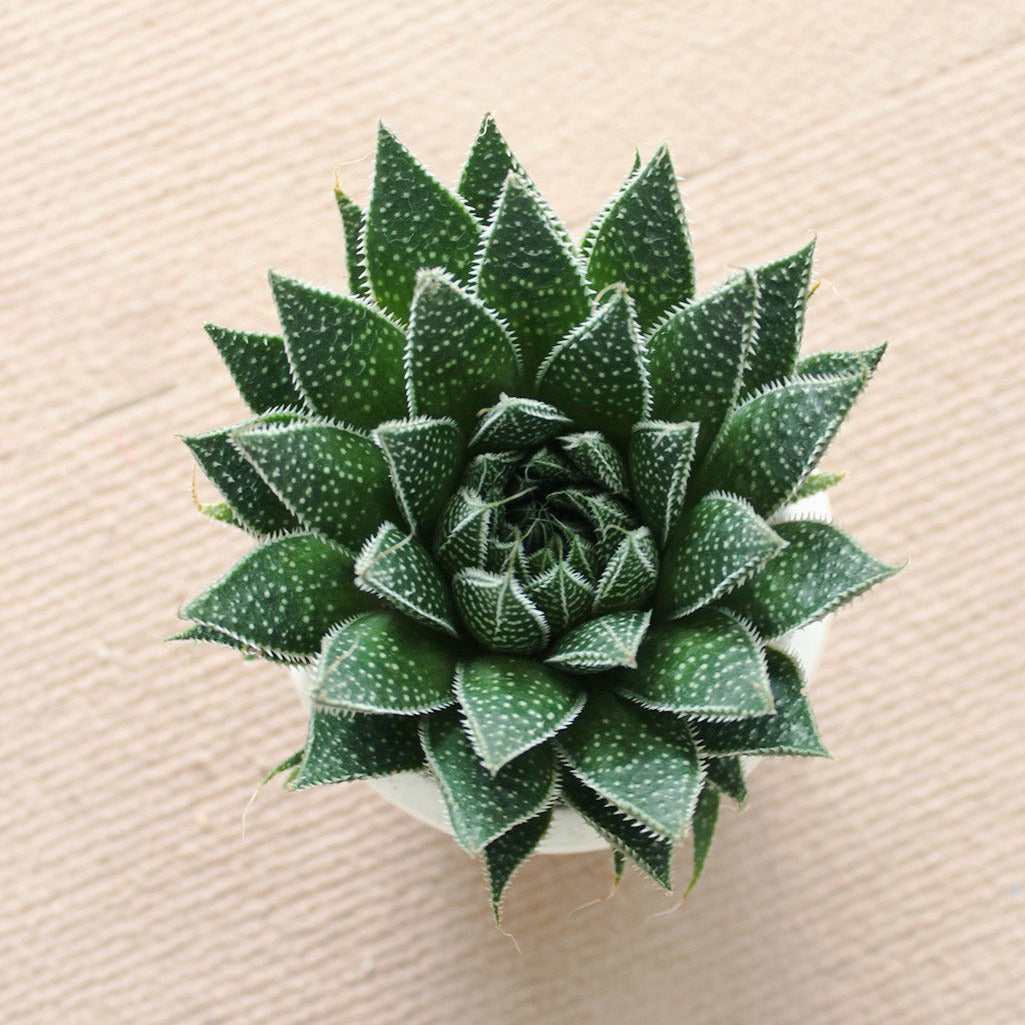
spiky aloe succulent Gasteria Flow Spiky AloeDescription Light Soil Water Hardiness Gasteria Flow also called Aloe Flow, Gasteraloe or Lace Aloe Aloe aristata is a hybrid between Gasteria and Aloe plants with a wonderfully unusual appearance. Gasteria Flow is a striking variety, with dark green, triangular shaped, succulent leaves arranged in a rosette, with a lot of white spots scattered upon the leaf surface. The leaves margin is toothed. It's also easy to multiply from offsets or with leaf
- Gasteria Flow also called Aloe Flow, Gasteraloe or Lace Aloe/ Aloe aristata is a hybrid between Gasteria and Aloe plants with a wonderfully unusual appearance.
- Gasteria ‘Flow’ is a striking variety, with dark green, triangular-shaped, succulent leaves arranged in a rosette, with a lot of white spots scattered upon the leaf surface. The leaves’ margin is toothed. It's also easy to multiply from offsets or with leaf propagation. It’s perfect for growing as a houseplant, even for succulent beginners, where it will require little maintenance.
- All of the plants may be shipped bare root.
-
The tubular flowers develop on an inflorescence which is a raceme on the top of a tall stem.
- Bright light, but not direct sunlight.
- Cactus mix or very fast-draining potting soil mixed with sand.
- Prefers warm weather from 70ºF (21ºC) to 80ºF (27ºC), but can survive temperature as low as 40ºF (4.5ºC).
- Feed with a cactus fertilizer in the summer only (Aloes go dormant in the winter).
- Water thoroughly when soil is dry to the touch. Avoid letting water sit for too long in the soil. Do not overwater.
- USDA Hardiness Zones 9b to 11b: from 25°F (-3.9 °C) to 50 °F (+10 °C).
Shipping Notes
- Free Standard Shipping on $100+ Orders to the USA.
- Except Preorder products are shipped in 48 hours.
- Delivery to the USA:
- Standard Shipping : 3-10 business days
- If time is of the essence, please consider selecting expedited delivery for faster service.
Exchange/Return Notes
- We offer a 30-day return/exchange service after receiving.
- Final sale items are not eligible for returns or exchanges.
- To process your return/exchange, please contact us at [email protected]
- Please click here for more details>>> Return & Exchange Policy
4.4 ★★★★★
Based on 12 reviews
Sort
Product Reviews
★★★★★ 4
Not the sorry copper coated aluminum.
Size: 16 AWG-100 ft
The wire is 16 gauge plenty big for my system. Heck, the wires supplied with my stereo, copomonet speakers, and amplifiers are about 20 or 24 gauge. I'm quite sure the wire will be more than suffeceint. I, m installing a mono sub amplifier a four-way amplifier to the sub amp outputs and the front of lines of the stereo. I'm gonna be pushing 20 speakers all except the sub woofer only pushing 100 watts a channel and the sub will push 150 watts. That makes 21 altogether. Not much just good clean sound. I've been working on the project going on 5 years now. Been bargain hunting, besides the work I've only got about $650 in the project. Can't wait to get it completed here around the end of July.
Hopefully, it will sound great didn't want to pay anyone. Seen too many "professional" jobs that were subpar. I've seen some nightmares. Figured if l did the job then who could I blame at least I can only blame myself and didn't pay $1,000 for it. 😁🤔
WAS THIS REVIEW HELPFUL?YesReportShare
Reviewed in the United States on June 30, 2021
★★★★★ 5
It's a good one, buy it.
Size: 16 AWG-100 ft
Actual 5 stars!
OFC, copper stranded wire, takes solder nicely when tinned, stiff and pliable enough to stay bent.
covering melts INTO wire as expected.
I was hoping for a good deal and got one.
WAS THIS REVIEW HELPFUL?YesReportShare
Reviewed in the United States on August 15, 2025
★★★★★ 5
good product
Size: 16 AWG-100 ft
good product
WAS THIS REVIEW HELPFUL?YesReportShare
Reviewed in the United States on December 21, 2025
★★★★★ 5
Good product at a great price
Size: 16 AWG-100 ft
Used to wire my door speakers and it worked amazing
WAS THIS REVIEW HELPFUL?YesReportShare
Reviewed in the United States on May 21, 2026
★★★★★ 5
Smaller than the original, but works well.
When I received it, it was so small that I thought it was a toy, or maybe for some 4cyl engine. It is significantly smaller than the original one. When I looked closer, the mount holes did line up, so I tried it. I did have to get shorter mount bolts.
To my surprise, it works great! I don't know what the longevity will be, but it made it through a busy august!
Considering the price and how small it is, I might just buy a second one to keep on board. Just in case.
WAS THIS REVIEW HELPFUL?YesReportShare
Reviewed in the United States on September 14, 2025