Pay in installments of $5.20 with
 ,
,
 and
and

Shipping Estimate
USA
- USA
- CAN
- USA
- CAN
Ships within 48 hours · Estimated delivery Sep 22 - Sep 27
 Promo Codes Available:
For Your Every Summer RSVP, with Code: SUMMER15
Description
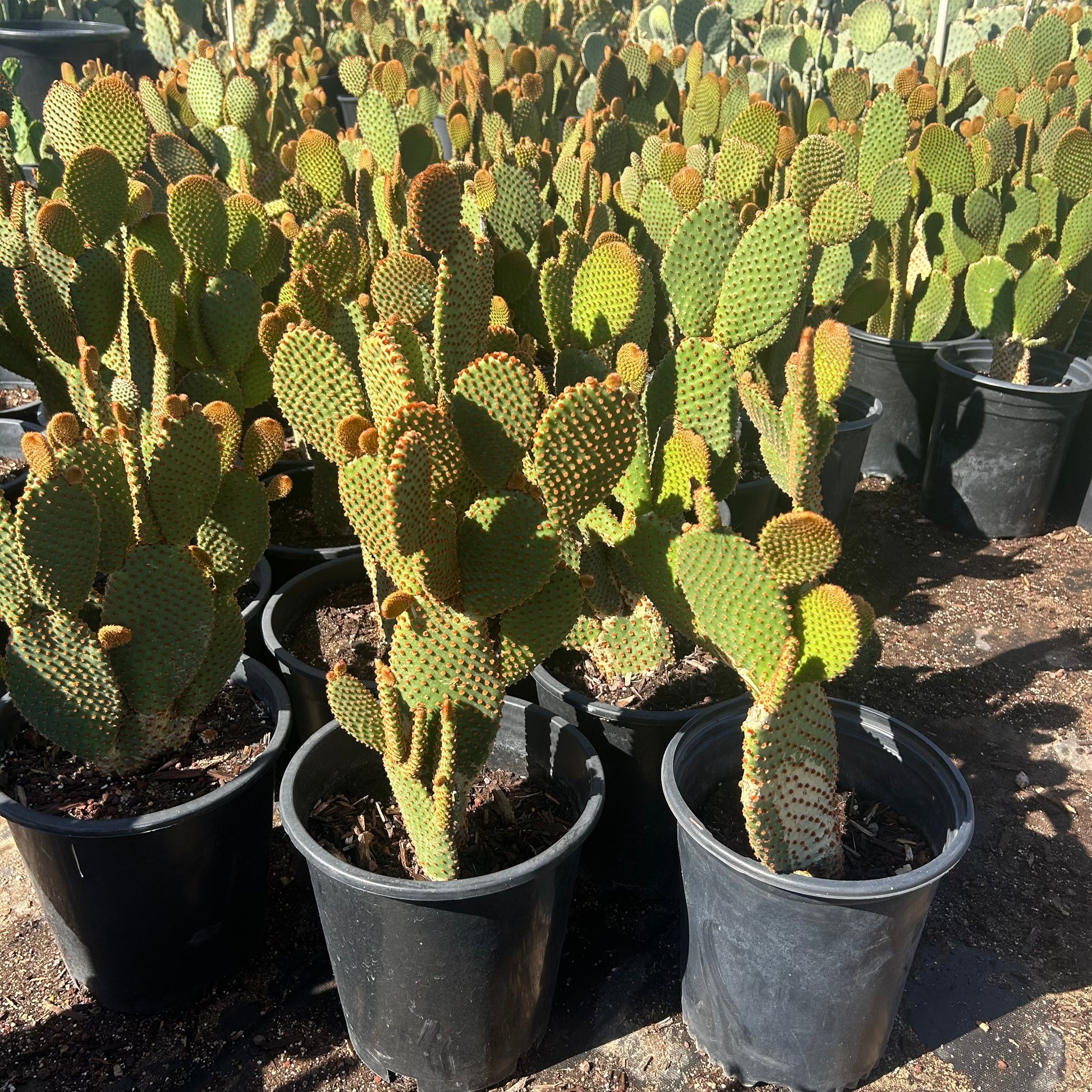
cactus similar to prickly pear Buy Cinnamon Prickly Pear Phoenix, AZ | O. microdasysPhoenix's Warmest Bunny Ear Cactus Cinnamon Brown Dots That Glow in Desert Light Cinnamon Dot Prickly Pear (Opuntia microdasys 'Cinnamon') is the warm toned sibling of the classic Bunny Ear Cactus family and one of the most unique small cacti you can grow in the Phoenix Valley. This compact Mexican native forms neat, bushy clumps of bright green pads covered in dense clusters of reddish brown glochids that give the plant a warm, cinnamon speckled
Phoenix's Warmest Bunny Ear Cactus — Cinnamon-Brown Dots That Glow in Desert Light
Cinnamon Dot Prickly Pear (Opuntia microdasys 'Cinnamon') is the warm-toned sibling of the classic Bunny Ear Cactus family — and one of the most unique small cacti you can grow in the Phoenix Valley. This compact Mexican native forms neat, bushy clumps of bright green pads covered in dense clusters of reddish-brown glochids that give the plant a warm, cinnamon-speckled appearance. Growing just 1–2 feet tall and 2–3 feet wide, it's perfectly sized for containers, rock gardens, and accent plantings. In late spring, it may produce yellow to orange blooms that complement the warm-toned dots beautifully. Whether you're building a desert container collection in Scottsdale, adding warm texture to a Gilbert rock garden, or creating a unique indoor display in Tempe — Cinnamon Dot Prickly Pear adds warmth, character, and zero-fuss charm.
Cinnamon Dot Prickly Pear Plant Details
| Attribute | Detail |
|---|---|
| Scientific Name | Opuntia microdasys 'Cinnamon' |
| Common Names | Cinnamon Dot Prickly Pear, Cinnamon Bunny Ear Cactus |
| Mature Height | 1–2 feet |
| Mature Width | 2–3 feet |
| Growth Rate | Moderate — 1–2 new pads per season in Phoenix |
| Sun | Full sun to partial shade (6+ hrs ideal). Handles reflected heat. |
| Water | Very low once established. Highly drought-tolerant. |
| USDA Zones | 9–11 (Phoenix is Zone 9b–10a) |
| Soil | Well-draining sandy or loamy soil. Adapts to Arizona caliche with added drainage. |
| Foliage | Evergreen — bright green pads year-round |
| Bloom Color | Yellow to orange, late spring to early summer |
| Special Feature | Dense cinnamon-brown glochids create a warm, speckled appearance |
Cinnamon Dot Prickly Pear Uses in Phoenix Landscapes
Container and Patio Gardens
Cinnamon Dot Prickly Pear is one of the best cacti for decorative containers. Its compact size and warm-toned dots make it a conversation piece on any patio, porch, or pool deck. Use a wide, shallow pot with well-draining cactus mix and a gravel top-dressing. Pair with its White Dot sibling for a stunning warm-and-cool contrast in matching pots on a Scottsdale courtyard or Chandler front entry.
Rock Garden Accent
The cinnamon-brown dots create beautiful warm contrast against gray decomposed granite, flagstone, and light-colored boulders. Plant among a curated desert bed with Agave, Golden Barrel Cactus, and Desert Spoon for a textured, low-water rock garden. The compact form means it won't outgrow its space — perfect for small planting pockets and garden vignettes.
Indoor Desert Display
Like its White Dot cousin, Cinnamon Dot does well indoors near a bright, south-facing window. Its small size and moderate growth make it ideal for windowsill collections, sunroom displays, or as a living sculpture on a desk or shelf. Just ensure good drainage and minimal watering indoors.
Color-Contrast Companion Planting
Plant Cinnamon Dot alongside White Dot Prickly Pear for a striking warm-and-cool pairing. The cinnamon-brown and white glochid clusters create visual contrast on otherwise identical plant forms — one of the most eye-catching combinations in desert container and rock garden design. Add a Purple Prickly Pear behind them for a three-color desert palette.
Best Time to Plant Cinnamon Dot Prickly Pear in Phoenix
Fall (October–November) is ideal for planting. Warm soil promotes root growth while cooler air reduces transplant stress, giving the plant 6–8 months to establish before its first Phoenix summer. Spring (February–April) is the second-best window. Avoid summer planting when possible — the extreme heat makes establishment harder for small plants.
How to Plant Cinnamon Dot Prickly Pear
- Dig wide, not deep — excavate a hole 2x the root ball width but only as deep as the root ball itself.
- Check for caliche — break through any hardpan layer for drainage. Standing water will rot cactus roots quickly.
- Backfill with amended soil — mix native soil with 30–40% pumice, perlite, or decomposed granite for sharp drainage.
- Spacing — 2–3 feet apart for a grouped planting; 3–4 feet for standalone specimens.
- No water basin needed — keep the grade flat or slightly mounded to prevent water pooling around the base.
- Gravel mulch — 2–3 inches of decorative gravel around the base keeps moisture away from the crown and prevents rot.
Watering Cinnamon Dot Prickly Pear in Phoenix
First Year Watering Schedule
- Weeks 1–2: Water deeply every 3–4 days to settle soil around roots.
- Month 1–3: Every 7–10 days, deep and slow.
- Month 3–6: Every 2–3 weeks.
- After Year 1: Little to no supplemental water needed. Once a month during extreme summer heat is more than sufficient. No winter irrigation required.
Drip Irrigation
If using drip, place a single 0.5–1 GPH emitter 8–12 inches from the base. Run it very infrequently — overwatering is the most common mistake with this cactus. Once established, it can survive on rainfall alone in most Phoenix Valley locations.
How fast does Cinnamon Dot Prickly Pear grow in Phoenix?
Moderately. Expect 1–2 new pads per growing season. A 1 gallon plant will fill out to its mature 2 foot spread in about 3–4 years with minimal care.
Is Cinnamon Dot Prickly Pear drought tolerant once established?
Extremely. This is one of the most drought-tolerant plants you can grow. Once established, it thrives on rainfall alone and needs almost no supplemental water.
What's the difference between Cinnamon Dot and White Dot Prickly Pear?
Both are varieties of Opuntia microdasys with the same growth habit and care needs. The difference is the glochid color — Cinnamon Dot has warm reddish-brown clusters while White Dot has white clusters. Both make excellent companions when planted together for color contrast.
Can Cinnamon Dot Prickly Pear grow indoors?
Yes — it's one of the few prickly pears that does well indoors. Place it near a bright south or west-facing window, use well-draining cactus mix, and water sparingly. It makes an excellent desk or windowsill plant.
Will it produce flowers?
It can produce yellow to orange blooms in late spring to early summer, though flowering is less consistent in cultivation than in wild plants. The warm cinnamon-dotted pads are the main attraction regardless of bloom.
You May Also Like
- White Dot Prickly Pear — Same adorable bunny ear shape with bright white dots instead of cinnamon. Plant them together for beautiful warm-and-cool contrast.
- Beavertail Prickly Pear — Spineless pads with stunning magenta-pink spring blooms. Another compact, pool-friendly prickly pear.
- Baby Rita Prickly Pear — Compact purple-tinted pads with bright magenta flowers. A colorful dwarf prickly pear perfect for small spaces.
- Blind Prickly Pear — Smooth, virtually spineless pads with a clean modern look. Great for pool areas and high-traffic landscapes.
- Purple Prickly Pear — Dramatic purple-tinted pads that intensify in cold and drought. Pairs beautifully with both Bunny Ear varieties.
How Many Cinnamon Dot Prickly Pear Do I Need?
Cinnamon Dot is a compact prickly pear that matures just 2 to 3 feet wide, so it shines in containers and small planting pockets rather than long runs. Plant single as a container or rock-garden accent, or in a small cluster of 3 spaced about 2.5 feet apart for a fuller low mound. For a low accent border, figure roughly 2.5 foot centers:
| Border Length | Plants Needed (2.5 ft spacing) |
|---|---|
| 5 ft | 2 to 3 plants |
| 10 ft | 4 to 5 plants |
| 15 ft | 6 to 7 plants |
| 20 ft | 8 to 9 plants |
The reddish-brown glochids detach on contact and are tedious to remove from skin, so keep pots and plantings off the edges of walkways, patios, and pool decks.
Cinnamon Dot Prickly Pear Season-by-Season in Phoenix
- Spring (Feb to Apr): New pads flush as soil warms, and the plant may open yellow-to-orange blooms in late spring. A strong second planting window once frost risk passes.
- Summer (May to Sep): Tough in heat and reflected sun, though in the most brutal west-facing spots a little afternoon shade keeps the pads from scorching. Monsoon humidity (Jul to Sep) is the time to back off water so the fast-draining mix never stays soggy.
- Fall (Oct to Nov): Prime planting season. Warm soil and mild air let this small plant settle in before winter.
- Winter (Dec to Jan): Evergreen green pads hold, but this is a frost-tender Mexican species. Expect damage in the mid to upper 20s°F: site it in a warm microclimate, grow it in a pot you can move, or cover it on hard frost nights.
At a Glance
✔ Heat-Loving (Reflected-Heat Tolerant) ✔ Drought-Tolerant ✔ Evergreen ✔ Low-Maintenance ✔ Deer & Rabbit-Resistant
Plant It With
- Crested Microdasys: a crested cousin in the same Opuntia microdasys family, perfect alongside for a collector's container grouping.
- Baby Rita: a compact purple-tinted dwarf prickly pear that adds color contrast next to the warm cinnamon dots.
- Beavertail Prickly Pear: a low, magenta-blooming prickly pear that fills the next size up in a small desert bed.
- Blind Prickly Pear: a smooth, fuller prickly pear that anchors the back of a rock-garden vignette.
Is Cinnamon Dot Prickly Pear Right for Your Yard?
Cinnamon Dot is an ideal fit for containers, rock-garden pockets, and small warm-toned accents in a bright spot with sharp drainage, and it is one of the few prickly pears that also does well indoors at a sunny window. Give it fast-draining soil and protect it from hard frost. It is not a fit for an unprotected, frost-exposed bed or for a low-spine planting near a pool deck or busy walkway, where the fine detaching glochids become a nuisance.
Shipping Notes
- Free Standard Shipping on $100+ Orders to the USA.
- Except Preorder products are shipped in 48 hours.
- Delivery to the USA:
- Standard Shipping : 3-10 business days
- If time is of the essence, please consider selecting expedited delivery for faster service.
Exchange/Return Notes
- We offer a 30-day return/exchange service after receiving.
- Final sale items are not eligible for returns or exchanges.
- To process your return/exchange, please contact us at [email protected]
- Please click here for more details>>> Return & Exchange Policy