Pay in installments of $5.95 with
 ,
,
 and
and

Shipping Estimate
USA
- USA
- CAN
- USA
- CAN
Ships within 48 hours · Estimated delivery Oct 1 - Oct 6
 Promo Codes Available:
For Your Every Summer RSVP, with Code: SUMMER15
Description
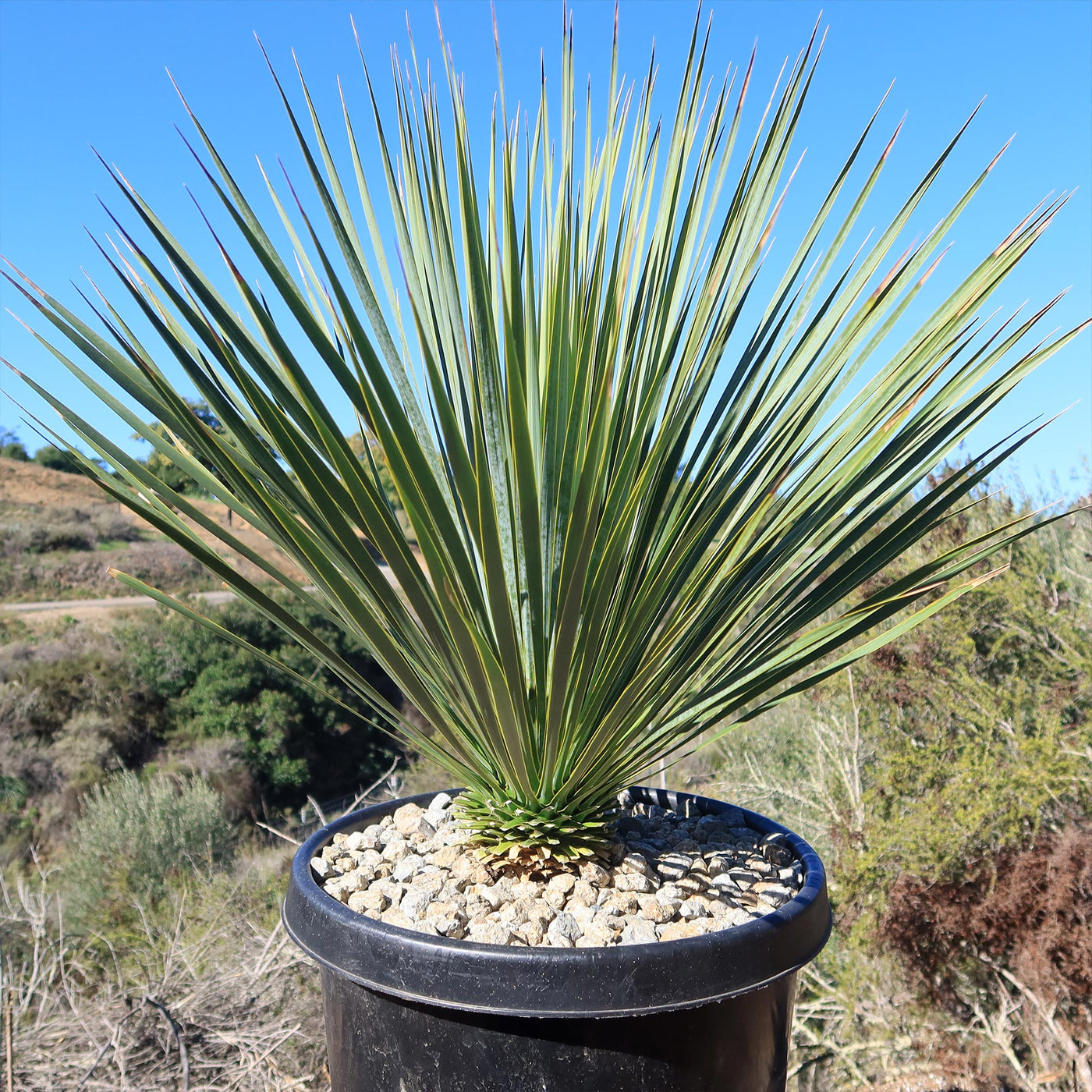
where can you buy yucca Beaked Yucca TreeAttention plant lovers: are you looking for a tree like plant that will make your garden stand out? Look no further than Yucca rostrata, also known as the beaked yucca tree. The Yucca rostrata has several other common names, such as Big Bend Yucca, Beaked Blue Yucca, Silver Yucca, Nordstrom's Yucca, Blue Yucca rostrata, and Adam's Yucca. Yucca rostrata is a slow growing evergreen, tree like succulent that belongs to the Agave family. Native to the
Attention plant lovers: are you looking for a tree-like plant that will make your garden stand out? Look no further than Yucca rostrata, also known as the beaked yucca tree. The Yucca rostrata has several other common names, such as Big Bend Yucca, Beaked Blue Yucca, Silver Yucca, Nordstrom's Yucca, Blue Yucca rostrata, and Adam's Yucca.
Yucca rostrata is a slow-growing evergreen, tree-like succulent that belongs to the Agave family. Native to the Chihuahuan Desert in northern Mexico and Southwestern Texas, this yucca species is known for its striking pom-pom-like appearance, with a single trunk that can reach heights of up to 15 feet and a crown of long, narrow, bluish-green leaves. The leaves are rigid, sword-shaped, and have sharp tips, hence the name "Beaked Yucca."
The mature size of Yucca rostrata can vary depending on growing conditions, but on average, the crown of leaves can spread about 10 feet in diameter. The beaked yucca is a stunning plant that is often referred to as a yucca tree due to its tall and tree-like appearance. However, despite its name, it's not actually a tree but a succulent. Succulents are plants that store water in their leaves, stems, or roots, allowing them to thrive in arid conditions. While some succulents can have a tree-like form, they are not classified as "true" trees in the traditional sense. The rosette of leaves is located at the top of the trunk, which is covered with the soft gray fibers of old leaves.
The flowers of Yucca rostrata bloom in the late spring, producing elegant tall flower stalks that can reach up to 10 feet in height. The flowers themselves are creamy white and bell-shaped, with a delicate and fragrant aroma that attracts pollinators like bees and butterflies. These clusters of white flowers of Yucca rostrata add a touch of beauty and grace to the already stunning presence of this desert plant.
Yucca rostrata is generally considered to be non-toxic to humans and pets. Its unique appearance and low maintenance requirements make it a popular choice for both landscape and container gardening.
Watering Needs
When it comes to Yucca plant care, it's important to strike the right balance. This tree-like Yucca plant is native to arid regions, so it has adapted to survive in dry conditions. As a result, it prefers infrequent deep watering rather than frequent shallow watering.
During the growing season, which is typically spring and summer, you should water your drought-tolerant Yucca rostrata once every two to three weeks. Make sure to thoroughly saturate the soil around the blue Yucca plant, allowing the water to reach the roots. This will support the plant's deep-root development and increase its resistance to drought.
In between waterings, it's crucial to let the soil dry out completely. Yucca rostrata does not like to sit in wet soil, as it can lead to root rot. So, before watering again, check the moisture level by sticking your finger about an inch into the soil. If it feels dry, it's time to water. If it's still moist, wait a few days before watering.
During the dormant period, which is typically fall and winter, Beaked Yucca requires even less water. Reduce the frequency of watering to once every four to six weeks, allowing the soil to dry out even more between waterings. This will mimic the plant's natural conditions during the colder months.
Remember, it's always better to underwater than to overwater Yucca rostrata. This beaked yucca blue plant is quite resilient and can tolerate drought conditions, but it does not fare well in soggy or waterlogged soil. So, keep an eye on the moisture levels and adjust your watering schedule accordingly, and your Yucca rostrata will thrive!
Light Requirements
When growing your Yucca rostrata indoors, it's essential to provide it with bright, indirect light (partial shade) for at least 4-6 hours daily. Place your Yucca rostrata near a window where it can receive plenty of natural light, but make sure to protect it from direct sunlight, as it can scorch the leaves. If you don't have a suitable window, you can also use artificial grow lights to provide the necessary light for your indoor Yucca rostrata.
If you are growing your beaked yucca plant outdoors, it will thrive in full sun, so it needs at least six hours of direct sunlight per day. Place it in a location where it can receive ample sunlight, such as a south-facing spot in your garden. This will ensure optimal growth and development of your Yucca rostrata.
It's worth noting that beaked Yucca rostrata is a tough Yucca plant and can tolerate some shade, especially during the hottest part of the day. However, for the best results and to maintain its compact shape and vibrant color, providing it with full sun is ideal.
Remember, whether you're growing Yucca rostrata indoors or outdoors, it's important to find the right balance of light. Too much direct sunlight can cause leaf burn, while insufficient light can result in leggy growth and a lack of vigor. By providing your Yucca rostrata with the appropriate light conditions, you'll help it thrive and showcase its unique beauty!
Optimal Soil & Fertilizer Needs
The beaked Yucca rostrata favors very airy, sandy soil that drains well. Planting them in ordinary soil will result in compacted roots, stunted growth, and, most likely, root rot. To create the optimal soil mix, you can combine equal parts of sandy soil, perlite, and peat moss. This will help promote good drainage while retaining some moisture to keep the roots hydrated. Avoid using heavy clay soils or potting mixes that retain too much water, as they can lead to root rot.
Instead, make or buy a well-draining potting mix, or ideally, use our specialized succulent potting mixGo to https://planetdesert.com/collections/soil-top-dressing-and-amendments/products/soil-cactus-mix-blend-1-gal-4-qt-cacti-succulent-dirt-compost-growing-media that contains 5 natural substrates and mycorrhizae to promote the development of a strong root system that helps your Yucca plant to thrive.
When it comes to fertilizing Yucca rostrata, it doesn't require frequent or heavy feeding. In fact, too much fertilizer can be detrimental to its growth. A slow-release, balanced fertilizer with an NPK ratio of 5-10-5 can be applied once a year in the spring to provide a gentle boost of nutrients. Be sure to follow the instructions for the correct dosage.
Apply it sparingly around the base of your beaked Yucca plant and gently work it into the soil. Remember, less is more when it comes to fertilizing Yucca rostrata. Overfertilizing can lead to excessive growth and weak stems.
By providing Yucca rostrata with well-drained soil and a light touch of fertilizer, you'll help it thrive and maintain its natural beauty. Remember to monitor the moisture levels and adjust your watering and fertilizing accordingly.
Hardiness Zone & More
When it comes to growing Yucca rostrata indoors, it can adapt well to a wide range of temperatures. Ideally, indoor temperatures should be kept between 60-80°F during the day and slightly cooler at night. Yucca rostrata can tolerate higher temperatures, but it's important to avoid extreme fluctuations or prolonged exposure to temperatures below 50°F.
If you're planning to grow your beaked Yucca rostrata outdoors, it is generally hardy in USDA zones 5-10. Yucca rostrata is known for its remarkable ability to withstand cold temperatures. It is one of the hardiest yucca species and can tolerate temperatures as low as -10 degrees Fahrenheit.
However, it's worth noting that extremely cold temperatures, especially when combined with wet conditions, can be detrimental to Yucca rostrata's health. If you live in a colder climate, it's advisable to provide some protection, such as covering the plant or moving it to a sheltered location during harsh winter conditions.
In terms of humidity, Yucca rostrata is a desert plant and can tolerate low humidity levels. It prefers drier conditions, similar to its natural habitat. Indoor humidity levels between 30-50% are generally suitable for Yucca rostrata. If the air in your home is particularly dry, especially during winter months, you can increase humidity levels by using a humidifier or placing a tray of water near the Yucca plant.
Remember, providing Yucca rostrata with the appropriate temperature and humidity conditions, whether indoors or outdoors, will help ensure its overall health and vitality.
Propagating Yucca rostrata
Propagating Yucca rostrata can be done through both seeds and offsets. If you're starting from seeds, it's best to sow them in a well-draining soil mix and keep them slightly moist until germination occurs. This process can take a few weeks to a couple of months. Once the seedlings have grown a bit, you can transfer them to individual pots.
Additionally, you can propagate your Yucca rostrata through offsets. Yucca rostrata naturally produces offsets, which are small plantlets that grow from the base of the parent plant. To propagate using offsets, carefully separate them from the parent plant, making sure each offset has some roots attached. Plant the offsets in a well-draining soil mix and provide them with the same Yucca plant care as mature plants.
Remember to be patient when propagating Yucca rostrata, as it may take some time for the new plants to establish and grow.
The Bottom Line
Overall, the Yucca rostrata (Beaked Yucca) is a stunning and resilient Yucca plant that can bring a touch of desert beauty to any garden or landscape. With its tall, slender trunk and striking blue-green leaves, it adds a unique and striking focal point to any space. Not only is Yucca rostrata visually appealing, but it is also a low-maintenance, cold, hardy plant that can tolerate a wide range of conditions, including drought and poor soil. Its ability to thrive in harsh environments makes it a great choice for xeriscaping.
Whether you're a beginner or an experienced gardener, Yucca rostrata beaked yucca is a fantastic addition to any succulent plant collection. So, if you're looking for a succulent that combines beauty and resilience, Beaked Yucca rostrata is definitely worth considering.
Shipping Notes
- Free Standard Shipping on $100+ Orders to the USA.
- Except Preorder products are shipped in 48 hours.
- Delivery to the USA:
- Standard Shipping : 3-10 business days
- If time is of the essence, please consider selecting expedited delivery for faster service.
Exchange/Return Notes
- We offer a 30-day return/exchange service after receiving.
- Final sale items are not eligible for returns or exchanges.
- To process your return/exchange, please contact us at [email protected]
- Please click here for more details>>> Return & Exchange Policy