Pay in installments of $5.67 with
 ,
,
 and
and

Shipping Estimate
USA
- USA
- CAN
- USA
- CAN
Ships within 48 hours · Estimated delivery Sep 27 - Oct 2
 Promo Codes Available:
For Your Every Summer RSVP, with Code: SUMMER15
Description
anthurium besseae aff care Anthurium besseae aff × forgetii – Dark Velvet HybridAnthurium besseae aff. forgetii Anthurium besseae aff. forgetii is a compact velvet Anthurium hybrid with rounded, deep green leaves and a soft pale vein pattern. The foliage sits close to the pot, with new leaves gradually opening into a fuller heart like outline as they harden. The cross brings together a besseae affinity parent with Anthurium forgetii, a species known in cultivation for its rounded, near closed leaf base. Indoors, it forms soft
Anthurium besseae aff. × forgetii
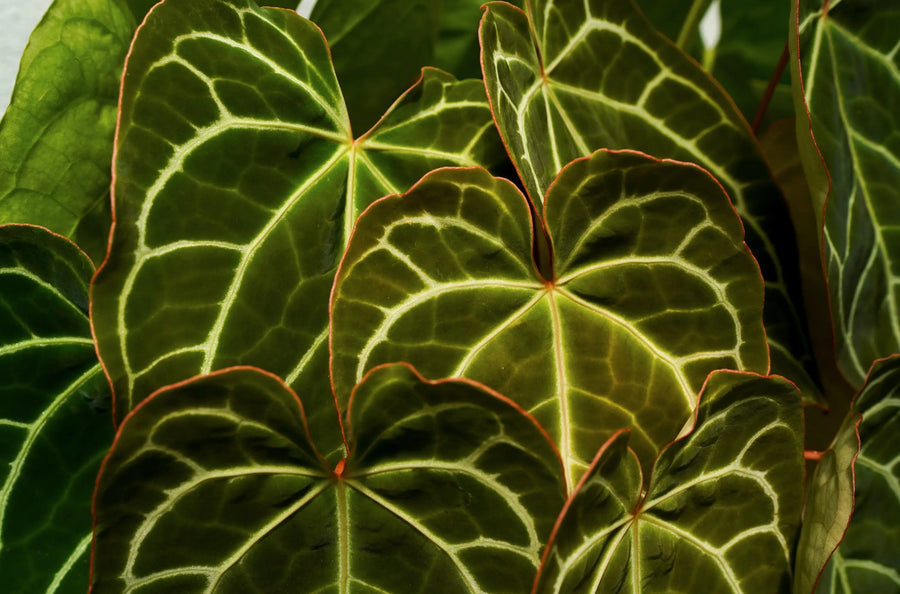
Anthurium besseae aff. × forgetii is a compact velvet Anthurium hybrid with rounded, deep green leaves and a soft pale vein pattern. The foliage sits close to the pot, with new leaves gradually opening into a fuller heart-like outline as they harden.
The cross brings together a besseae-affinity parent with Anthurium forgetii, a species known in cultivation for its rounded, near-closed leaf base. Indoors, it forms soft velvet blades around a neat central crown, with thick Anthurium roots that need moisture and air at the same time.
Rounded velvet traits
- Rounded velvet leaves: The blades are dark green with a soft, matte surface.
- Near-closed sinus shape: The forgetii influence can show in the rounded upper leaf outline, with little to no deep open notch at the base.
- Pale vein contrast: Fine lighter veins define the rounded blade and central vein pattern.
- Compact pot habit: The plant stays relatively close to its base, with leaves arranged around a tidy central crown.
- Thick Anthurium roots: The root system prefers an airy mix that holds light moisture while still draining freely.
- Soft new foliage: Expanding leaves are tender and benefit from stable humidity while they harden.
Compact growth and root behaviour
This hybrid grows as a compact, clumping Anthurium. New leaves rise from the central base, open softly and become firmer as the surface matures. A pot with good drainage and enough width around the crown gives the roots air and keeps the plant stable as the leaves broaden.
Anthurium besseae was described from Bolivia, while Anthurium forgetii was described from Colombia. Indoors, the soft leaves and thick roots respond best to warm conditions, filtered light, stable humidity and an open root zone.
Care for Anthurium besseae aff. × forgetii
- Light: Give bright filtered light. Direct midday sun can mark the velvet surface and dry the leaf edges.
- Humidity: Higher humidity helps the soft new leaves open cleanly, especially while the blade is still pale and flexible.
- Water: Keep the mix lightly and evenly moist, then let the upper layer begin to dry before watering again.
- Substrate: Use a chunky Anthurium mix with bark, airy mineral material and moisture-retentive fibre so the roots are not sealed into dense wet soil.
- Temperature: Keep it warm and stable, ideally above 18 °C, and protect the pot from cold windowsills or cold wet substrate.
- Placement: Leave space around the crown so new leaves do not press against shelves, glass or neighbouring plants while they expand.
- Feeding: Use a diluted fertiliser during active growth. Flush the pot occasionally if mineral salts build up in the substrate.
Issues to watch on Anthurium besseae aff. × forgetii
- Crispy leaf edges: Dry air, missed watering or a compacted mix can brown the margins, especially on younger velvet leaves.
- Stuck new leaves: Low humidity can make the soft blade catch as it emerges, leaving creases or uneven expansion.
- Yellowing lower leaves: Check whether the root zone is staying wet for too long, particularly in a heavy potting mix.
- Root rot: Soft roots, sour substrate smell or a wobbling crown usually point to dense wet conditions around the base.
- Pests: Thrips and spider mites can mark velvet foliage early. Inspect the undersides of leaves and the newest growth regularly.
Safety for Anthurium besseae aff. × forgetii
Anthurium belongs to the Araceae family and contains calcium oxalate crystals. Keep it away from pets and children that chew plants, and wash your hands after handling damaged leaves, roots or sap.
Name origin and parent species
The genus name Anthurium comes from Greek roots linked to “flower” and “tail”, referring to the spadix typical of the family. Anthurium forgetii N.E.Br. was published in Gardeners’ Chronicle in 1906 and was named after the collector Monsieur Forget. Anthurium besseae Croat was published in Novon in 2005; “aff.” marks a plant allied to Anthurium besseae.
Shipping Notes
- Free Standard Shipping on $100+ Orders to the USA.
- Except Preorder products are shipped in 48 hours.
- Delivery to the USA:
- Standard Shipping : 3-10 business days
- If time is of the essence, please consider selecting expedited delivery for faster service.
Exchange/Return Notes
- We offer a 30-day return/exchange service after receiving.
- Final sale items are not eligible for returns or exchanges.
- To process your return/exchange, please contact us at [email protected]
- Please click here for more details>>> Return & Exchange Policy