SKU: 26416414502
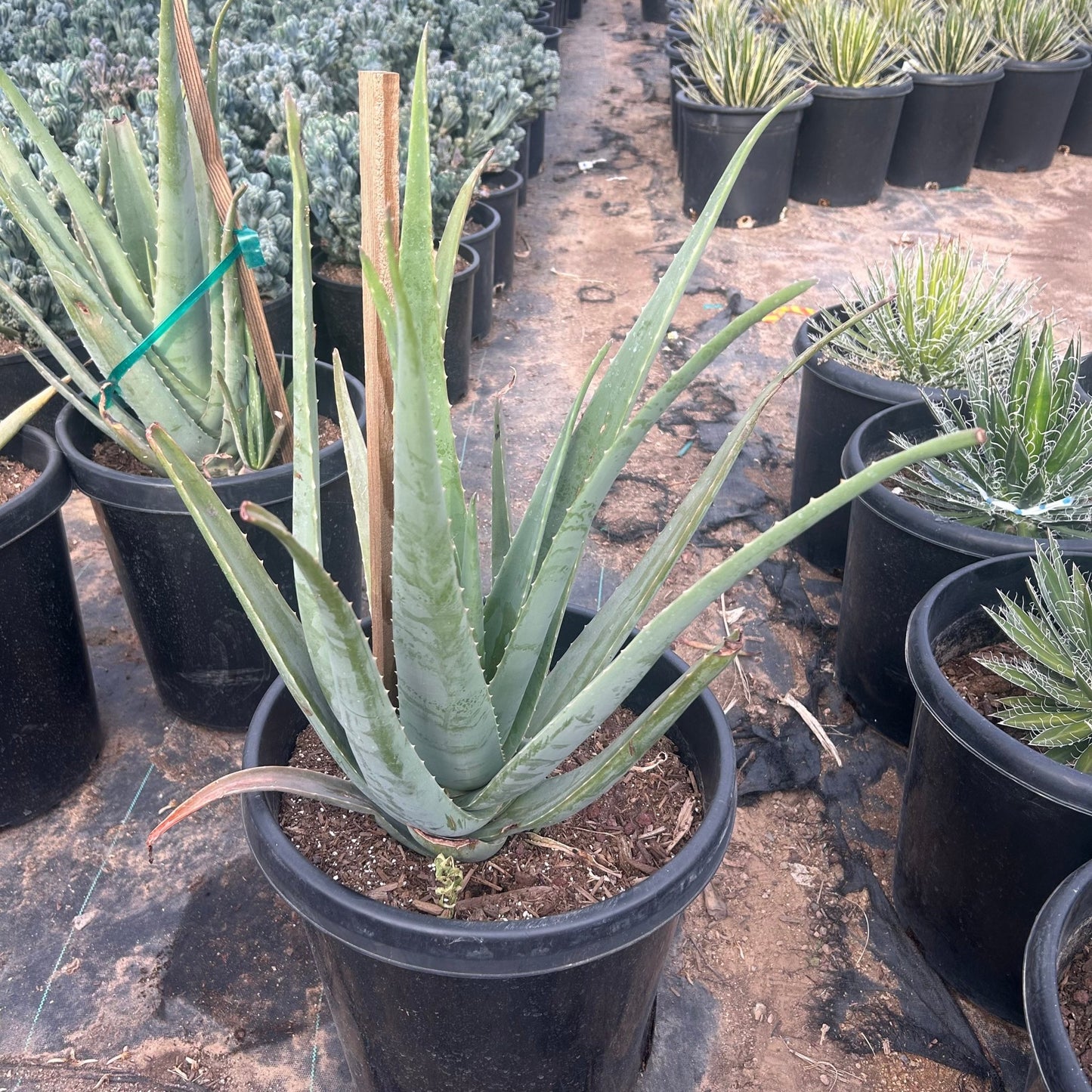
medicinal aloe vera plant

medicinal aloe vera plant Buy Aloe Vera Yellow Phoenix, AZ | Aloe barbadensis

Sale price$23.52 Regular price$26.13
Save 10%

Pay in installments of $6.53 with ShopPay, AfterPay and Klarna

Shipping Estimate
USA
  • USA
  • CAN

Ships within 48 hours · Estimated delivery Aug 3 - Aug 8

Promo Codes Available:

For Your Every Summer RSVP, with Code: SUMMER15

Description

medicinal aloe vera plant Buy Aloe Vera Yellow Phoenix, AZ | Aloe barbadensisPhoenix's Classic Medicinal Aloe With Sunny Yellow Blooms Aloe vera (Aloe barbadensis) yellow flowering variety is the iconic medicinal aloe that thrives effortlessly across the Phoenix Valley. This fast growing succulent forms large rosettes of thick, gel filled leaves used for centuries to soothe burns and nourish skin, while producing cheerful yellow flower spikes that brighten the winter and spring landscape. Whether you're starting a medicinal

Phoenix's Classic Medicinal Aloe With Sunny Yellow Blooms

Aloe vera (Aloe barbadensis) — yellow flowering variety — is the iconic medicinal aloe that thrives effortlessly across the Phoenix Valley. This fast-growing succulent forms large rosettes of thick, gel-filled leaves used for centuries to soothe burns and nourish skin, while producing cheerful yellow flower spikes that brighten the winter and spring landscape. Whether you're starting a medicinal herb garden in Scottsdale, filling a sunny border in Tempe, or creating a drought-tolerant mass planting in Gilbert — yellow Aloe Vera is one of the easiest, most rewarding desert plants you can grow.

Aloe Vera (Yellow) Plant Details

Attribute Detail
Scientific Name Aloe barbadensis (Aloe vera)
Common Names Aloe Vera, Medicinal Aloe, Yellow Aloe Vera
Mature Height 1–2 feet
Mature Width 2–3 feet
Growth Rate Fast — fills in quickly in Phoenix's warm climate
Sun Full sun to partial shade. Handles reflected heat.
Water Low once established. Highly drought-tolerant.
USDA Zones 9–11 (Phoenix is Zone 9b–10a)
Soil Well-draining. Adapts to Arizona caliche soils.
Foliage Evergreen — thick, gel-filled leaves year-round
Bloom Color Yellow flower spikes, winter to spring
Special Feature Medicinal gel — soothing for burns and skin care

Aloe Vera (Yellow) Uses in Phoenix Landscapes

Medicinal & Herb Gardens

Yellow Aloe Vera is the must-have plant for any medicinal garden in the Phoenix area. Keep it near your kitchen or patio door for instant access to fresh soothing gel whenever you need it for sunburn, minor burns, or skin irritation. It pairs beautifully with rosemary, lavender, and other useful desert herbs.

Mass Plantings & Ground Cover

With its fast growth and prolific pup production, yellow Aloe Vera makes a fantastic living ground cover for sunny slopes, median strips, and large landscape beds. Space plants 2–3 feet apart and they'll fill in within a season. When the yellow flower spikes emerge in winter, the effect across a mass planting is spectacular — neighborhoods in Chandler, Mesa, and Peoria use this technique to great effect.

Pool-Friendly & Foundation Plantings

Aloe Vera's clean rosette form and lack of sharp spines make it ideal around pools, patios, and along foundation walls. It tolerates splash-out chlorine, won't drop messy leaves, and stays evergreen year-round. The sunny yellow blooms add warmth to any outdoor living space.

Container Gardens

Yellow Aloe Vera thrives in containers on patios, balconies, and porches throughout the Valley. Use a well-draining cactus mix in a pot with drainage holes. Containers make it easy to share pups with friends and neighbors — this is one of the most generous plants in the desert.

Best Time to Plant Aloe Vera in Phoenix

Fall (October–November) is the ideal window — warm soil encourages rapid root growth while cooler air reduces transplant stress, giving the plant 6–8 months of establishment before summer. Spring (February–April) is the second-best option. Aloe Vera is tough enough to plant almost year-round in Phoenix, but avoid the peak summer months (June–August) if possible.

How to Plant Aloe Vera

  1. Dig wide, not deep — 2–3x the root ball width, same depth as the container.
  2. Check for caliche — break through any hardpan layer for good drainage.
  3. Backfill with native soil — Aloe Vera is not fussy; a light 20% perlite blend improves drainage.
  4. Spacing — 2–3 feet apart for mass plantings; 3 feet for individual specimens.
  5. Water basin — build a 3–4 inch ring to direct water to roots during establishment.
  6. Mulch — 2–3 inches of gravel or decomposed granite around the base.

Watering Aloe Vera in Phoenix

First Year Watering Schedule

Weeks 1–2: Every 2–3 days, deep and slow. Month 1–2: Every 3–4 days. Month 3–6: Every 7–10 days (every 5–7 days in peak summer). After Year 1: Every 10–14 days in summer; every 3–4 weeks in winter. Aloe Vera stores water in its thick leaves — overwatering is the most common mistake.

Drip Irrigation

Place one 1-GPH emitter 8–12 inches from the base. Run for 20–30 minutes per session. Established plants are remarkably drought-tolerant and may only need supplemental water every 2–3 weeks in summer.

How fast does yellow Aloe Vera grow in Phoenix?
Very fast. A 1-gallon plant can reach its full 2–3 foot spread within 1–2 years in the ground, and it produces abundant pups (offsets) that can be divided and replanted.

What's the difference between yellow and orange Aloe Vera?
The yellow and orange varieties are the same species (Aloe barbadensis) with different flower colors. Growth habit, size, medicinal properties, and care are identical — choose whichever bloom color you prefer.

Is the gel in yellow Aloe Vera the same as regular Aloe Vera?
Yes. The thick, clear gel inside the leaves has the same soothing, moisturizing properties regardless of flower color. Simply slice a mature outer leaf and apply the gel to minor burns, sunburn, or irritated skin.

Does Aloe Vera spread on its own?
Yes — Aloe Vera produces abundant offsets (pups) around the base of the mother plant. These can be left to form a colony or divided and replanted elsewhere. It's one of the easiest plants to propagate and share.

You May Also Like

Aloe vera - orange — The orange-flowering version of the same classic medicinal aloe.

Aloe Hybrid — A variegated hybrid aloe with colorful spotted rosettes and vibrant blooms.

Aloe humilis — A compact clustering aloe perfect for rock gardens and small spaces.

Aloe Banseii — A tree-forming aloe that adds dramatic height to succulent gardens.

How Many Aloe Vera Do I Need?

Yellow Aloe Vera is a fast, clumping rosette 2 to 3 feet wide that pups freely, so it reads as a living groundcover when planted in drifts. Use roughly 30-inch spacing (center to center) for solid coverage. Plant the table counts below, then let the pups knit the gaps closed within a season.

Area to cover Plants needed (30 in spacing)
25 sq ft 4 plants
50 sq ft 8 plants
100 sq ft 16 plants
200 sq ft 32 plants

For a single accent or container specimen, one plant is plenty: it will form its own colony over time.

Aloe Vera (Yellow) Season-by-Season in Phoenix

  • Spring (Feb to Apr): Tail end of the yellow bloom spikes, with a strong flush of new leaves and pups as soil warms. Excellent second planting window.
  • Summer (May to Sep): Takes full Valley heat and reflected heat in stride. Growth slows at the hottest peak. Monsoon humidity is fine as long as the soil drains: avoid standing water.
  • Fall (Oct to Nov): Prime planting season. Roots establish fast in warm soil ahead of the cool months.
  • Winter (Dec to Jan): Cheerful yellow flower spikes rise above the rosettes. Aloe Vera is lightly frost-tender: leaf tips can scorch below about 28 to 30°F. In a hard Valley frost, cover the plants overnight or site them under eaves or a canopy.

At a Glance

✔ Hummingbird-Friendly   ✔ Pollinator-Friendly   ✔ Heat-Loving (Reflected-Heat Tolerant)   ✔ Drought-Tolerant   ✔ Pool-Friendly (Low-Litter)   ✔ Spineless   ✔ Evergreen   ✔ Low-Maintenance   ✔ Deer & Rabbit-Resistant

Plant It With

  • Aloe vera - orange: The orange-blooming twin, for a two-tone medicinal aloe drift.
  • Aloe Hybrid: Spotted, colorful rosettes that add pattern next to the clean green leaves.
  • Aloe humilis: A compact clumping aloe that fills the front edge of the bed.
  • Aloe Banseii: A taller tree-forming aloe for height behind the mass planting.

Is Aloe Vera (Yellow) Right for Your Yard?

Yes if you have full sun to light shade, fast-draining or amended caliche soil, and want an easy, useful, spineless succulent that is safe beside pools, walkways, and play areas. It shrugs off heat and drought and shares pups generously. Not the best fit if your spot stays wet or poorly drained, or if it sits in an unprotected frost pocket where temperatures regularly drop below the upper 20s without any cover.

Shipping Notes
  • Free Standard Shipping on $100+ Orders to the USA.
  • Except Preorder products are shipped in 48 hours.
  • Delivery to the USA:
  1. Standard Shipping : 3-10 business days
  • If time is of the essence, please consider selecting expedited delivery for faster service.
Exchange/Return Notes
  • We offer a 30-day return/exchange service after receiving.
  • Final sale items are not eligible for returns or exchanges.
  • To process your return/exchange, please contact us at [email protected]
  • Please click here for more details>>> Return & Exchange Policy
SKU: 26416414502

Discover Niche Categories That Outsell medicinal aloe vera plant

Top-Converting Item to Boost Your Average Order

4.7 ★★★★★
Based on 8 reviews
Sort
Highest Rating
Newest First
Oldest First
Product Reviews
P
Parks N' Tech
Louisville, US
★★★★★ 5
Escaping the Cartridge Trap: How This Refillable Powerhouse Completely Supercharged My Workflow!
For as long as I have been setting up home offices, the traditional ink cartridge has been my absolute greatest nemesis. There is nothing quite as frustrating as firing up a crucial document only to be met with that dreaded, blinking low-ink warning right when you are on a tight deadline. That is exactly why bringing the white Epson EcoTank ET-2903 Wireless All-in-One Color Supertank Printer into my workspace has been an absolute breath of fresh air. Finished in a clean, minimalist white, this machine completely bypasses the antiquated, expensive cartridge ecosystem. It looks incredibly sleek and modern sitting on my desk, blending seamlessly into my setup without projecting the bulky, industrial vibe of older, traditional machines. Right out of the gate, it feels like a highly engineered, premium piece of technology designed specifically to make daily document management drastically easier and far more efficient. ​The sheer brilliance of this printer lies in its wildly innovative cartridge-free supertank architecture. Instead of swapping out tiny, expensive plastic squares every few weeks, this machine utilizes massive, front-facing ink reservoirs. Epson incredibly includes up to three years of ink right in the box, which equates to roughly eighty individual standard cartridges. Loading the ink is where the engineering truly shines; the proprietary EcoFit 522 ink bottles are uniquely keyed to their specific color slots, making it physically impossible to mix up the cyan, magenta, yellow, or black. The bottles automatically stop dispensing the exact moment the tank is full, ensuring a completely foolproof, zero-spill experience. Not only does this system save a phenomenal amount of money over the lifespan of the printer, but it also dramatically reduces the massive amount of plastic waste normally destined for landfills. Plus, being able to physically see exactly how much ink I have left at a mere glance provides unmatched peace of mind. ​When it comes to putting ink on paper, this machine is an absolute powerhouse that consistently delivers remarkably crisp, professional-grade results. It reliably pushes out sharp, highly legible black text documents at a brisk 11 pages per minute, making quick work of dense contracts, shipping labels, and lengthy reports. The color performance is equally stunning, operating at 6 pages per minute to produce vibrant, perfectly saturated graphics and incredibly high-quality photo prints. The color accuracy is truly exceptional, giving life to presentations and flyers with punchy, true-to-life tones that never look washed out. Coupled with a highly convenient 100-sheet rear paper capacity, the entire printing process is incredibly smooth and uninterrupted. I am never bogged down constantly reloading the tray, allowing me to effortlessly maintain my momentum during demanding, high-volume workdays. ​Beyond its spectacular printing capabilities, the built-in flatbed scanner and copier transform this unit into a comprehensive command center for all of my document needs. The scanner captures physical media with spectacular clarity and high-resolution detail, making the process of digitizing old tax records or preserving physical photographs incredibly easy and accurate. Navigating through all of these robust features is remarkably intuitive, thanks to the dedicated 1.44-inch color display located right on the front panel. The screen is bright, responsive, and paired with a highly logical button layout that allows me to initiate copies, execute scans, or perform quick maintenance tasks without ever having to boot up my laptop or dive into convoluted software menus. ​The wireless connectivity is the final piece of the puzzle that makes this printer an absolute joy to operate on a daily basis. Equipped with high-speed Wi-Fi 4, it establishes a rock-solid connection to my home network that never drops or wavers. The smart mobile printing functionality is incredibly seamless; I can easily select a photo or document on my smartphone while lounging in the living room and have it instantly printing in the office down the hall. It completely untethers me from the desk, offering a level of modern convenience that I simply refuse to live without. The Epson EcoTank ET-2903 is a phenomenally capable, remarkably efficient, and incredibly fun machine to use. It entirely eliminates the stress and extortionate costs of traditional printing, delivering a flawless user experience that I cannot recommend highly enough for anyone looking to seriously upgrade their productivity game.
WAS THIS REVIEW HELPFUL?YesReportShare
Reviewed in the United States on June 3, 2026
M
Mylittlechacha
Houston, US
★★★★★ 5
Epson is Epic!
This review is for the Epson EcoTank ET-2903 All-in-One Color Supertanker Printer. I am having a difficult time finding enough superlative words to describe how awesome this printer is. Let me begin by saying this printer blows any competition out of the water. I have personally owned several, highly touted, printers in the past four years and either they have underperformed, had complications or had major connectivity issues. They were a source of constant frustration. Then, I was able to procure an Epson EcoTank printer in the office where I work and have loved it. So, when I saw this Epson ET-2903 EcoTank, I did not hesitate to order it. Out of the box, you receive an all in one printer, a very precise set of instructions, and 4 bottles of high quality ink in Black, Cyan, Magenta, and Yellow. The printer is designed to work with the Epson Smart Panel app which guides you effortlessly through the installation and printer initialization process. Epson made this process very easy to set up, even for someone not very tech savvy. With the app, you can use your computer, laptop, tablet or mobile phone to print wirelessly to your printer. The difference with this EcoTank printer versus ink cartridge/toner printers is that each color ink has a separate refillable tank well that uses fluid ink. My office Epson EcoTank ink lasts and lasts and lasts and is very economical. I expect this ET-2903 will ink will last as well. I printed out my initial test page and all is working perfectly. I then printed out a color wheel to test the colors. It printed vibrant, beautiful colors in only seconds with the capability of printing 11 pages per minute. The printer is equipped with a scanning bed to easily scan and print any documents or photos. You can also scan an import any document/picture directly to your mobile phone, tablet or computer. One of the things I have learned about printers with ink tanks is that because they use liquid ink, they work a little differently from standard ink cartridge printers. Each color tank has tubes that run from the tanks to the printhead, providing excellent quality prints each time. However, an issue with this type of printer can be that they can occasionally get clogged if they sit idle for long periods. To prevent this, under the maintenance option on the control panel, I run a nozzle check periodically that takes only seconds to run. If it appears that there is a clog, the maintenance menu has a printhead self-clean option for easy cleaning. I was impressed with how lightweight the printer is and the dimensions are perfect for smaller areas. I measured the printer to be approximately 14.2” Length x 12.5” Deep x 6.4” High and can easily sit atop a desk, printer cart or shelf. Epson got this printer right and I can honestly say if you are looking for an economical, easy to use and reliable printer, you can buy this printer with confidence. With one click on my phone, I said goodbye to clunky disposable ink cartridges that are environmentally unfriendly, and hello to refillable tanks when I placed my order. I am thrilled with this printer and wholeheartedly recommend it.
WAS THIS REVIEW HELPFUL?YesReportShare
Reviewed in the United States on June 12, 2026
A
Amazon Customer
Boise, US
★★★★★ 5
Well Designed, Prints Clearly and Accurately, Software is a Bit of a Pain To Set Up
I've never used a printer in my entire life that didn't use finicky ink cartridges that are almost more expensive than the printer itself and need to be constantly replaced; this is a breath of fresh air, despite the dangers of spilling ink and making a mess. I found filling this with ink to be really easy, since you only have to pout the ink bottle in the correct port and leave it to fill itself, which takes about 10-15 seconds. the included ink bottles really only give you enough for a complete fill: You fill it, the printer set up charges the printer with ink, and the remaining ink in the bottles can refill about to the "max" line. Still, I really like this method. The top of the printer pops open like the hood of a car, to access the filling ports. It then has to be lowered down in two stages, presumably to prevent dropping the lid on fingers, though it doesn't seem heavy enough to cause major damage to adult fingers, and I have the printer elevated away from little fingers. This thing has the tiniest little LCD screen! It's a bit tricky on the Epson website to determine which software you need specifically. Obviously, my goal is to have a wireless printer for the entire home network. Some of the software seems specifically web-based, so you could theoretically print from work to a home printer, etc., though I balked at setting up or using an email address to send print jobs to. The wireless was annoyingly tricky to set up. I am still not sure if you're supposed to connect a computer and the printer to the wifi separately, or the printer first and then the computer would automatically recognize it, or what. I did successfully connect the printer to the wifi, but couldn't install some of the Epson software - it kept failing - but a quick test did allow me to print wirelessly, so I decided to just call it good and be done. Everything I have printed has been very clear and crisp. It could be a little darker and have more contrast, but that may be how I printed, or printing from pdf. It printed without jamming or sticking, and everything came through quickly and accurately, without leaks or streaks on my paper. I haven't tried the photocopier function though, since I mainly need it for printing and not scanning.
WAS THIS REVIEW HELPFUL?YesReportShare
Reviewed in the United States on June 13, 2026
D
Dionne
Draper, US
★★★★★ 3
No automatic double sided. Bulky external paper tray
Set up was easy. I didn’t like the exterior paper storage. The whole printer was slick and stealthy until it got to that obnoxious tray. Set up was easy. Printer does not have automatic duplex capabilities you have to manually flip the paper to do double sided. I also didn’t think the printing quality was great.
WAS THIS REVIEW HELPFUL?YesReportShare
Reviewed in the United States on June 10, 2026
R
ReViewER
Natrona Heights, US
★★★★★ 5
Sorry, Brother. Epson smashed you.
I have been a long time Epson user. I have owned their printers, all-in-ones, movie projectors, and even a receipt scanner. In all cases, I have always found them to be the best performance per dollar of any of the big guys. There kind of like Panasonic in cameras where people may talk about some other big names, but what you get per dollar is always good from them. Somewhere along the way, I got disillusioned with companies charging me $60 per pack of ink. I'd get really mad when I couldn't print black text because red or something was out. For a few years, I gave up and just went black and white laser printer. The toner was dirt cheap, and my printing cost dropped to virtually nothing. But, my ability to pront pictures was gone. No more color at all. I'd have to go to a print business if I needed color copies. Well, this finally changed that. The EcoTank is a great design. The "Eco" stands for the economic cheap ink it takes, and the "Tank" refers to the big holding tanks for the ink and give long ink life. Epson probably makes the best ink, but many manufacturers sell inks for this printer. There's none of the stupid compatability issues with cartridges. It's 2026, so of course it all connects wirelessly over WiFi. It's wonderful. The only issue is that you might have to do a little more maintenance to keep it reliable. If you let old ink carts sit too long, you could just replace them. Here that isn't an option. I've seen Youtube recommendations that say you should probably print a color page every week or two, so factor that in to keep it running well. I love it. Five stars.
WAS THIS REVIEW HELPFUL?YesReportShare
Reviewed in the United States on June 8, 2026

recommand products