SKU: 34859872779
house plants with milky sap

house plants with milky sap Shop 'African Milk Tree - Euphorbia Trigona Rubra' Care and Info

Sale price$20.16 Regular price$22.40
Save 10%

Pay in installments of $5.60 with ShopPay, AfterPay and Klarna

Shipping Estimate
USA
  • USA
  • CAN

Ships within 48 hours · Estimated delivery Aug 31 - Sep 5

Promo Codes Available:

For Your Every Summer RSVP, with Code: SUMMER15

Description

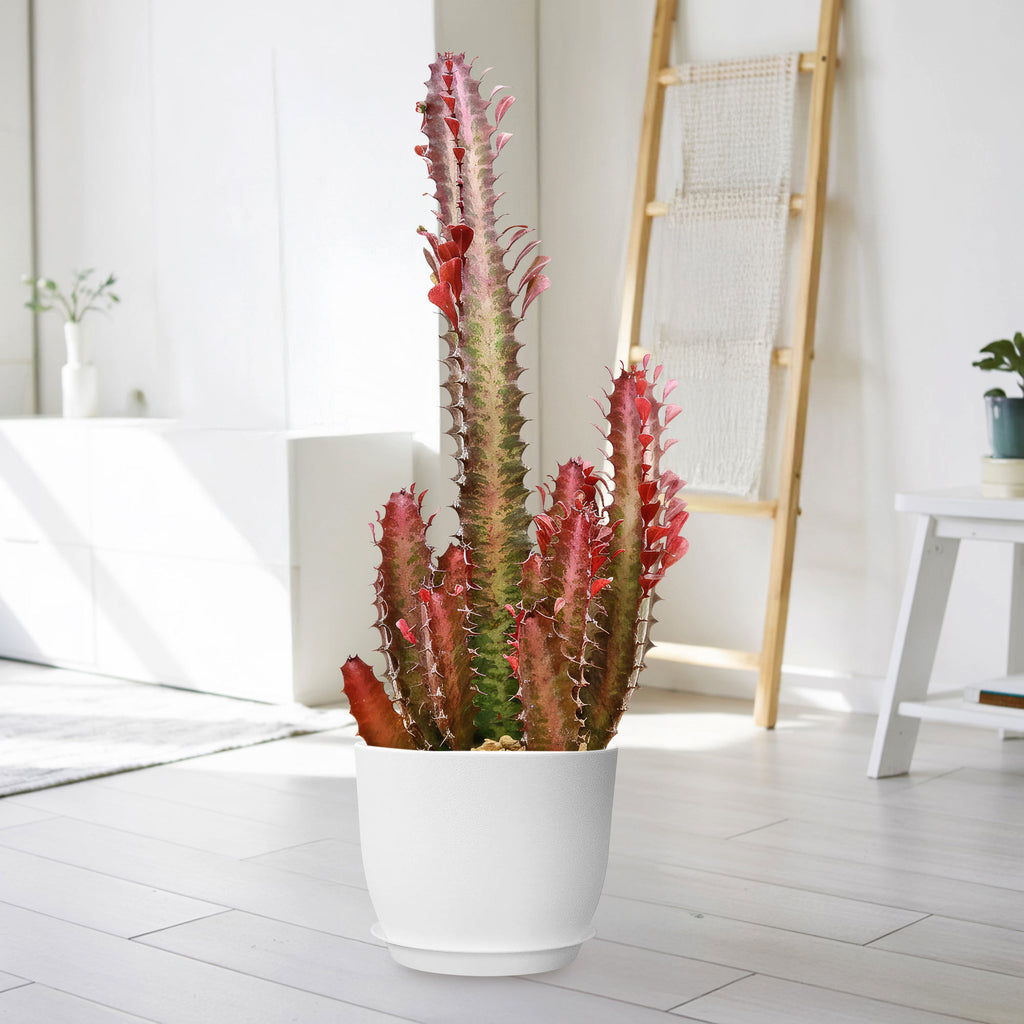
house plants with milky sap Shop 'African Milk Tree - Euphorbia Trigona Rubra' Care and InfoIntroducing the stunning African milk tree, known as Euphorbia trigona 'Rubra', the perfect addition to any collection of Euphorbias. The African milk tree is named after its white, milky sap, which is of African origin and is referred to as a "milk tree." The African milk tree has many other common names, such as the Royal Red, the Abyssinian Euphorbia, and the High Chaparral. Though this euphorbia plant also goes by the names "candelabra cactus,"

Introducing the stunning African milk tree, known as Euphorbia trigona 'Rubra', the perfect addition to any collection of EuphorbiasThe African milk tree is named after its white, milky sap, which is of African origin and is referred to as a "milk tree."

The African milk tree has many other common names, such as the Royal Red, the Abyssinian Euphorbia, and the High Chaparral. Though this euphorbia plant also goes by the names "candelabra cactus," "cathedral cactus," "friendship cactus," and "good luck cactus." This red Euphorbia milk tree is actually a succulent plant, despite looking a lot like a cactus.

The Rubra or Royal Red variety is well known for its vibrant Euphorbia cactus color, which develops late in the growing season.

African milk bush has a long lifespan and grows quickly, gaining 1 to 2 feet per year and reaching a height of 9 feet in just 3-5 years. When grown indoors, however, this African milk tree will only reach approximately half of its maximum height.

The African milk tree has branches that resemble three-winged angles and are covered in leaves and short, prickly spines. Euphorbia rubra has a vibrant purple-red color on its stem and leaves, while Euphorbia trigona has a bronzish hue. Its red teardrop-shaped leaves last for one or two seasons and can be propagated for a more impressive hedge or houseplant collection.

The flowers of the African Milk Tree are typically green or yellow in color and are surrounded by colorful bracts. It's actually quite rare for it to produce flowers indoors. In its natural habitat, however, this Euphorbia trigona rubra can produce small, inconspicuous flowers during the spring and summer months. 

When and How to Water Your African Milk Tree

The African milk tree is a drought-tolerant succulent that stores water in its fleshy stems, making it well adapted to dry environments. In the spring and summer, during the active growing season, Euphorbia trigona 'Rubra' should be watered every 10 to 14 days, Go to soil-cactus-mix-blend-1-gal-4-qt-cacti-succulent-dirt-compost-growing-media Green African Milk Tree or whenever the top 1–2 inches of soil feels completely dry. Water thoroughly until it drains from the bottom, but always allow the soil to dry out before watering again.

In the fall and winter months, when the plant enters dormancy, watering should be reduced to once every 3 to 4 weeks, or even less if the indoor environment is cool and the soil remains slightly moist. Overwatering during dormancy is a common mistake and can easily lead to root rot.

Overwatering can lead to root rot, which can kill your red African milk tree. It is important to allow the soil to dry out between waterings to prevent this.

Light Requirements - Where to Place Your Euphorbia trigona

If growing indoors as a houseplant, the African Milk Tree thrives in bright, indirect light for at least 4-6 hours a day. Avoid placing it in direct sunlight, as this can scorch its leaves. If you notice the stems stretching or the leaves losing their vibrant color, it might be an indication that your African milk tree is not receiving enough bright light. In such cases, you can supplement its light requirements with the help of artificial grow lights.

When growing outdoors, your Euphorbia trigona rubra thrives in full sun to partial shade. The African milk tree can tolerate some direct sunlight, but too much can cause the leaves to burn.

In general, it should be placed in a location that receives bright but filtered light, such as near a window with a sheer curtain.

Remember, if you live in a region with a mild climate, you can consider placing your African milk tree plant in a partially shaded area outdoors.

However, if you reside in a hot and arid region, it's best to provide some shade during the hottest parts of the day to prevent sunburn. 

Additionally, if they don't receive enough light, their stems may grow leggy and become paler, and their spines will shorten. So, make your milk plant happy and give it plenty of bright sunlight. If your Euphorbia trigona rubra is not receiving enough light, the leaves may become pale or yellow, while too much light can cause the leaves to turn brown or black.

Optimal Soil & Fertilizer Needs

The African milk plant favors very airy, sandy soil that drains well within a soil pH of 5.5 to 6.5. Planting them in ordinary soil will result in compacted roots, stunted growth, and, most likely, root rot. Instead, make or buy a well-draining soil, or ideally, use our that contains over 5 natural substrates and mycorrhizae to promote the development of new growth and a strong root system that helps your healthy plant thrive. 

The Euphorbia tree prefers fertilizer with lower doses of NPK once a year in spring, with a maximum ratio of 5-10-5 that is higher in phosphorus than nitrogen. This will help promote healthy growth without causing excessive leafy growth.

Indoor Growing Temperature & Humidity 

If you are growing your Euphorbia trigona rubra indoors, they prefer constant temperatures above 70°F, and can tolerate triple digits in the summer, so don't worry if your cactus gets too hot. In the United States, that usually means they're indoor plants or grown in a greenhouse in areas with colder climates, at least for part of the year.

These plants prefer low to moderate humidity, similar to their native arid environment. Avoid placing them in overly humid rooms like bathrooms, and ensure there is good air circulation to prevent moisture buildup around the roots.

Hardiness Zones & More

In the United States, this African milk plant is mostly an indoor plant, but if you live in southern Florida or Hawaii, then you can cultivate it outdoors in USDA zones 9-11. 

Remember, these perennial succulents cannot handle frost or cold temperatures, but African milk trees are not truly hardy plants, and prolonged exposure will almost certainly cause some damage. So, make sure they don't get below 45°F in their environment. 

Remember, this Euphorbia spurge doesn't require additional humidity, so growing it in a humid location could stress it out and lead to fungus growth or pest infestation.

Wildlife - Euphorbia trigona Flowers Attract the Following Friendly Pollinators

Euphorbia trigona flowers are known to attract a variety of friendly pollinators, including bees, butterflies, and hummingbirds. These pollinators are drawn to the bright colors and sweet nectar of the flowers, making them essential for the plant's reproduction and overall ecosystem health.

Butterflies
Bees
Hummingbirds
Lady Bugs
Multi Pollinators
Other Birds

According to ASPCA, the sap of the African milk tree is mildly toxic to both pets and humans and can cause blisters, severe eye irritation, and convulsions if swallowed. So, always keep Euphorbia trigona rubra away from pets and children.

How to Propagate Your African Milk Tree

The African Milk Tree can be propagated by stem cuttings is a rewarding experience, just as it is for the . Take a healthy stem, callous it, and plant it in a well-draining soil mix. Keep the soil moist and in a warm, bright location away from direct sunlight. With proper care, the cutting will develop roots and grow into a new plant.

Key Takeaways

  1. Euphorbia trigona 'Rubra' is highly drought-tolerant, thriving in dry conditions and requiring very little water once established.
  2. This plant is extremely popular among succulent enthusiasts and collectors for its vivid burgundy stems and striking vertical form.
  3. Euphorbia trigona 'Rubra' grows rapidly, especially during warm months with plenty of indirect sunlight.
  4. The plant has an upright, columnar growth habit, often branching as it matures to form a dramatic, tree-like silhouette.
  5. Euphorbia trigona 'Rubra' is well-suited for both indoor and outdoor settings, provided it is protected from frost and receives adequate light.

The Bottom Line

Overall, the African Milk Tree (Euphorbia trigona rubra) is a stunning and captivating succulent that will surely steal the show in any plant collection. With its vibrant red stems and unique branching pattern, it adds a touch of exotic beauty to any space. When it comes to African milk tree care, it prefers bright, indirect light and well-draining soil, and it can tolerate a wide range of temperatures. Just be cautious of its milky sap, as it can be irritating to the skin and eyes.

Don't miss out on this opportunity to add something truly exceptional to your garden. Order your very own Euphorbia trigona 'Rubra'—the African milk tree—today!

Shipping Notes
  • Free Standard Shipping on $100+ Orders to the USA.
  • Except Preorder products are shipped in 48 hours.
  • Delivery to the USA:
  1. Standard Shipping : 3-10 business days
  • If time is of the essence, please consider selecting expedited delivery for faster service.
Exchange/Return Notes
  • We offer a 30-day return/exchange service after receiving.
  • Final sale items are not eligible for returns or exchanges.
  • To process your return/exchange, please contact us at [email protected]
  • Please click here for more details>>> Return & Exchange Policy
SKU: 34859872779

Discover Niche Categories That Outsell house plants with milky sap

Top-Converting Item to Boost Your Average Order

4.6 ★★★★★
Based on 11 reviews
Sort
Highest Rating
Newest First
Oldest First
Product Reviews
D
Verified Purchase
DeeDee Bromlow
Lowell, US
★★★★★ 5
It's just a Proteus Core, but wireless. Wait... it's a PROTEUS CORE, but WIRELESS!!!
Color: Black, Style: Wireless, Pattern Name: Mouse
I've been using a Logitech G502 Proteus Core for a couple of years, and I've been wanting a wireless mouse for ages however, I had been hesitant to switch to anything else because I loved that G502 Proteus Core. Then, this mouse came out. I knew it was time to upgrade. I get a mouse that looks, feels and performs identically to my Proteus Core. No, scratch that, BETTER than my Proteus Core. Except now no more wire wrangling. No more wire catching on the edge of a table or needing to tape it down. Except the sensor is faster and better than my G502PC, and the wireless mouse is somehow LIGHTER than the wired version. What kind of space age magic is this!? When I got it at first, I was actually a little disappointed. I had been excited for this new, fancy mouse that was going to step my game up. But then I got it and it just felt exactly like my old one. It felt like nothing has changed. The wait to use it came to a somewhat anticlimactic end. But then I thought about it and realized..... IT FEELS EXACTLY LIKE MY OLD ONE. I got literally exactly what I loved before, but this time with RGB lighting and no cord! What had I expected? I got literally exactly what I wanted, and it felt like home. And the battery life, of my goodness, the battery life. I've been using this mouse since mid Early/mid-May. I probably use my mouse for about 1 to 4 hours a day, sometimes every other day depending on schedule. I charged this mouse to 100% on my first day of ownership. I haven't charged it since, and my battery currently reads 64%. Incredible. Over a month of regular and consistent use, with lighting on (at about 60-75% brightness, purple) and I haven't even gotten it to half charge. That tells me I've probably got another month or so of battery life to go! I have been BEYOND satisfied with this mouse. I only had one minor hiccup. Initially I put the wireless receiver in the rear of the tower, straight into the motherboard's primary USB 3 port. Unfortunately, I noticed that I would get occasional stuttering and hitching with the mouse cursor. After a bit I noticed that it only happened when my cell phone was on my computer desk in front of my mousepad. I relocated the receiver to the USB3 slot on my Corsair K60 keyboard, problem solved. I haven't had one stutter or hitch since. I think my cell phone's WiFi signal was causing some form of interference. I could reproduce the problem with my cell phone location every time, so I'm confident in what the issue was. BEYOND satisfied with this product. If you have ever used any of the Logitech G502 line - or mice of a similar shape - this product is an absolute NO BRAINER purchase.
WAS THIS REVIEW HELPFUL?YesReportShare
Reviewed in the United States on June 13, 2020
R
Verified Purchase
Ryan
Houston, US
★★★★★ 4
It's a good product but not quite a grand slam..
Color: Black, Style: Wireless, Pattern Name: Mouse
I've tried 15+ different mice in the last few years. It would be a bigger number if I wanted to collect them, but I mainly just try to buy the best small to medium-ish ultralight mice in search of my endgame. Won't buy a mouse without seeing reviews first anymore. However, I did main the old wired G502 for a long time before I became a snob. I still like the G502 shape, scroll wheel, and button layout very much despite the fact that it's not going to help me get high scores in aim trainers. The disadvantages caused by the weight and shape are somewhat, but not totally, made up for by the added functionality of the extra buttons, which are also fantastic for productivity. This is an overall solid product with only a few minor flaws that kept me from giving it a perfect score. The good: 1. Weight is noticeably reduced compared to the wired version. 2. The button layout every G502 fan fawns over is now on a wireless mouse. And it's genuinely a great button layout. 3. It's wireless, obviously. 4. Top-tier sensor. 5. Excellent battery life. 6. Infinite scroll wheel go brrrrr The bad: 1. Standard black teflon mouse feet. Not the worst I've seen, but Logitech does have a reputation for putting sh*tty feet on great mice. They at least improved this on the Superlight, but even those were still too thin. These aren't bad, but they could be better. 2. Click feel is substantially worse compared to the old G502. Switches are clearly not the same. Honestly would've been tempted to give this mouse 5 stars if it weren't for the clicks. They aren't heavy and ultra tactile like they were before. They're light and standard-feeling now, which isn't a deal-breaker by any stretch, but it's disappointing. 3. Price. You have to get this thing for less than $100 or it simply isn't worth it. It's a step up from the wired G502 but not to the point of it being worth 3 times as much. Even at a $95 sale price, that's still pushing it. Summary: you're sacrificing click feel and money to improve weight, obtain a nicer scroll wheel, and rid yourself of the atrocity that is the original G502 cable. You're also getting great battery life and excellent, low-latency wireless tech. It's a good mouse, but it's hard to say it's worth triple the amount of its predecessor, especially if you can replace mouse cables. Do not pay more than $100 for this mouse.
WAS THIS REVIEW HELPFUL?YesReportShare
Reviewed in the United States on July 13, 2021
J
Verified Purchase
JD.BuildsPC's
Bozeman, US
★★★★★ 5
The best mouse is the best mouse
Color: Black, Style: Wireless, Pattern Name: Mouse
I've used the wired in the past and it was my favorite mouse and after using an ASUS wireless mouse for the last 2 years I decided to go back to the Logi G502 only the wireless version this time. Connectivity is great. Disappointed that it doesn't use USB-C to charge the mouse itself, but whatever. This thing is so great and more comfortable than the last mouse I was using. That's a win All I'm saying is it's great to have this mouse again because it's hard to argue that this is the best mouse for gaming. I can't comment on battery life as I just received it but from the rest of the reviews, its has great battery life. But upon immediate use, I just can't recommend this mouse enough!!!
WAS THIS REVIEW HELPFUL?YesReportShare
Reviewed in the United States on March 22, 2026
N
Verified Purchase
Noah Meeks
San Leandro, US
★★★★★ 5
Simply a good mouse.
Color: Black, Style: Wireless, Pattern Name: Mouse
Simply a great mouse, Love the layout of the buttons, it feels very natural is use.
WAS THIS REVIEW HELPFUL?YesReportShare
Reviewed in the United States on June 1, 2026
R
Verified Purchase
RocketMan1969
Cuba, US
★★★★★ 5
A Truly Ergonomic Mouse
Number of Items: 1
Other not completely flat mice claim to be "ergonomic", but the only way to completely remove stress from your forearm when using a mouse is with a "vertical" mouse. My 2020 K75575WW Kensington ergonomic vertical mouse developed a problem with the left button "stuttering" so that it sent multiple button clicks when pressed just once. I liked the Kensington quite a bit. But it always just a little bit on the "not quite as solid as I would like" side, and failing after just 2.5 years confirmed this. So I wanted a more solidly build mouse. A search for "ergonomic mouse review" showed that the Logitech MX Master 3S was clearly the best ergonomic mouse available. At $100 it was several times more expensive as others including the latest Kensington vertical mouse. But sometimes furgal doesn't mean the least expensive. Sometimes it can mean the most expensive if that comes with better performance, features and lifespan. So I ordered it. And while it is indeed an incredible mouse, the angle is only about 20 degrees. The result is that while there is some reduction in forearm stress compared to a flat mouse, it wasn't enough for me. By the end of my very long days driving my mouse almost as much as I drive my keyboard, I could feel the tension building up in my forearm. So after a week I returned it and bought this Logitech MX Vertical. It is slightly less expensive than the MX Master 3S, but still much more expensive relative to other options. And while it is lighter and a little less substantial feeling in my hand than the MX Master 3S, it still feels very firm and solid. Most importantly keeps my hand in the neutral position with my fingers at about 70 degrees. A great feature of the MX Vertical shares with the MX Master 3S is the thumb rest. The Kensington didn't have this and so my thumb rested on the desktop. If it was a bit warm and my hands would sweat my thumb wouldn't slide smoothly and I would have to lift my thumb off the desk when I went to move the mouse. Not a horrible thing, but if you spend 8+ hours mousing around it gets tiresome. The button clicks are crisp. Best of all when the button bottoms out it feels like it is pressing against the case. It doesn't feel like travel is being limited by the switch itself bottoming out like the Kensington felt like it did. My hope is that this will keep the switch from wearing out so fast as happened with the Kensington. One slight negative of the MX Vertical is that I don't feel like I am quite as accurate in being able to move the cursor to a specific spot on the screen without some amount of conscious effort. Instead it doesn't go exactly in the direction I intended and overshoots where wanted it to stop. As such it might not make the best mouse for video games. [UPDATE: There is a bit of a learning curve in moving the mouse accurately. In the last couple weeks my need to make a more conscious effort to move the mouse to a specific spot on the screen is going down. Still think it is likely to not be as accurate as a flater mouse]
WAS THIS REVIEW HELPFUL?YesReportShare
Reviewed in the United States on February 13, 2023

recommand products