Pay in installments of $6.34 with
 ,
,
 and
and

Shipping Estimate
USA
- USA
- CAN
- USA
- CAN
Ships within 48 hours · Estimated delivery Sep 27 - Oct 2
 Promo Codes Available:
For Your Every Summer RSVP, with Code: SUMMER15
Description
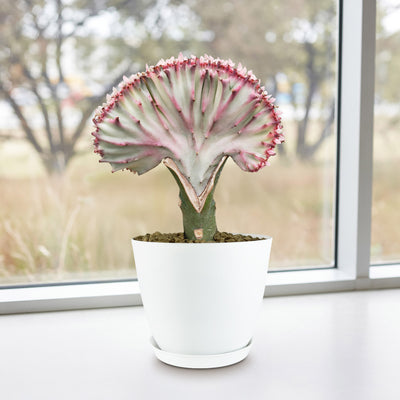
mermaid tail succulent near me Mermaid Tail CactusThe Mermaid Tail Cactus, known as Euphorbia lactea Cristata Grafted, is a rare, eye catching succulent prized for its wave like crested form that resembles a mermaid's tail rising from the sea. This sculptural plant is widely adored for its surreal, fan shaped growth and bold ridges, making it a standout in succulent arrangements and a favorite among collectors. Its dramatic silhouette and ease of care have made it a must have in modern indoor gardens
The Mermaid Tail Cactus, known as Euphorbia lactea Cristata Grafted, is a rare, eye-catching succulent prized for its wave-like crested form that resembles a mermaid's tail rising from the sea. This sculptural plant is widely adored for its surreal, fan-shaped growth and bold ridges, making it a standout in succulent arrangements and a favorite among collectors. Its dramatic silhouette and ease of care have made it a must-have in modern indoor gardens and novelty plant displays.
It is a grafting combination of the Euphorbia lactea, a columnar cactus-like succulent, and the Euphorbia cristata, which has a crested growth form. This combination creates a visually stunning and captivating plant that is highly sought after by succulent enthusiasts.
Native to tropical regions of India and Sri Lanka, the species Euphorbia lactea naturally grows as a tall, branching succulent with angular, spiny stems.
The crested mutation, however, develops when the plant’s growing tip fans out into a ruffled crest, giving it its mermaid tail-like appearance.
Since this form is not self-supporting in most cases, grafting is necessary to ensure the plant remains healthy and upright.
The distinctive feature of the Mermaid Tail Cactus is its undulating, ridged crest, often colored in varying shades of blue-green, gray, or silvery green, and sometimes outlined with soft pink or purple tones. The edges may appear wavy or jagged, resembling ocean coral or the gentle curve of a mermaid’s tail fin. Its waxy surface and abstract shape make it feel both whimsical and futuristic.
The mature Mermaid Tail Cacti typically reach 14 inches tall and wide, depending on the vigor of the rootstock and environmental conditions. Their compact size and upright form make them ideal for containers, windowsills, or decorative pots where they can be admired as a living sculpture. They grow slowly and retain their form well, requiring very little maintenance to stay attractive.
The blooms of Mermaid tail cactus are usually short-lived and yellow-green in color, but are rare in cultivation, especially for young or newly grafted plants. Most growers value the plant more for its shape and color than for its flowering potential.
The regular has a crested growth form naturally; the grafted version is created through the process of grafting, where the crest is grafted onto the stem of the Euphorbia lactea. This grafting process results in a more pronounced and defined crested growth pattern.
When and How to Water Your Mermaid Tail Cactus
Mermaid Tail Cactus is drought-tolerant and requires infrequent watering. It's best to water thoroughly when the soil is completely dry, allowing excess water to drain away to prevent root rot. Overwatering is a common issue with succulents, so it's better to err on the side of underwatering. Your Mermaid tail cactus should be watered every 10–14 days during the growing season, and every 4–5 weeks during dormancy.
From March to September, during the growing season, water your Mermaid Tail Cactus once every 10 to 14 days, depending on temperature and light exposure. The grafted crest benefits from deep, infrequent watering, just enough to soak the soil, then allow it to dry completely. Consistent overwatering can lead to root or graft rot, so err on the side of underwatering.
From October to February, during the dormant season, reduce watering to once every 4 to 5 weeks. Since growth slows in cooler months, the plant uses minimal moisture. Only water when the soil is completely dry and the stem begins to show slight wrinkling.
Light Requirements - Where to Place Your Mermaid Tail Cactus
When grown indoors, place your Mermaid Tail Cactus near a south- or west-facing window where it can get 6 to 8 hours of bright, indirect sunlight. If light is too low,
it may become pale or leggy. Supplemental grow lights can be used in low-light homes.
When grown outdoors, it can tolerate partial to full sun but should be gradually acclimated to avoid sun scorch, especially in very hot climates.
Place it where it receives at least 6 hours of light per day for best shape and color. Morning sun with afternoon shade is ideal in regions with harsh sunlight.
Optimal Soil & Fertilizer Needs
The mermaid cactus prefers sandy, well-drained soil and should be fertilized once a year in spring. Planet Desert's specialized cactus potting soil: Soil cactus mix blend 1 gal 4 qt cacti succulent dirt compost growing media includes an organic substrate with mycorrhizae to help with the growth of a healthy root system to help your succulents thrive.
When it comes to fertilizing your Euphorbia lactea grafted, use a minimal amount of NPK fertilizer for about (5-10-5) once a year in spring to support healthy crest development. In the dormant season, avoid fertilizing altogether as the plant is not actively using nutrients.
Hardiness Zones & More
In the United States, your Mermaid tail cactus is mostly an indoor plant, but if you live in southern Florida or Hawaii, then you can cultivate it outdoors in USDA zones 10-11.
In terms of humidity, the Euphorbia lactea grafted plant is adaptable and can tolerate a range of humidity levels.
However, it generally prefers a drier environment with lower humidity. It's important to provide good air circulation around the plant to prevent any issues with excess moisture or humidity-related diseases.
How to Grow Your Mermaid Cactus Best Indoors
Mermaid cacti thrive best indoors in a warm environment with temperatures ranging between 70-80°F during the day and slightly cooler temperatures at night. They also prefer high humidity levels, so consider placing a humidifier near the plant or misting it regularly to create a more tropical atmosphere. Additionally, ensure the cactus receives plenty of bright, indirect sunlight to promote healthy growth.
Wildlife - Mermaid Tail Cactus Attracts the Following Friendly Pollinators
The Mermaid Tail Cactus attracts a variety of pollinators such as bees, butterflies, and hummingbirds with its vibrant blooms. These friendly visitors help to ensure the continued health and reproduction of the cactus through pollination.
According to ASPCA, the Mermaid Tail Cactus is mildly toxic to humans and pets if ingested. The plant's sap, which is milky and white, can cause skin and eye irritation in humans and is mildly toxic to pets, potentially leading to mouth and stomach irritation and vomiting.
How to Propagate Your Mermaid Tail Cactus
The propagation of your Euphorbia lactea Cristata Grafted is done by cutting from the crest and grafting it onto a compatible rootstock such as Euphorbia neriifolia or Euphorbia canariensis. Use a sterilized knife to remove a healthy portion of the crest, let it callous over for several days, and then graft it onto the new rootstock using strong ties or grafting wax to secure it until fusion occurs. This method requires precision and care, making it best for experienced growers.
Key Takeaways
- The Mermaid Tail Cactus gets its name from its sculpted, crested form that resembles the flowing tail of a mermaid or ocean coral.
- It is not a true cactus but a grafted succulent, combining the fan-shaped crest of Euphorbia lactea with the rootstock of another Euphorbia species for support and longevity.
- Its unusual, wavy texture and colorful margins—often tinged with pink or lavender—make it look like a living piece of art.
- This Mermaid cactus plant is drought-tolerant and thrives on neglect, needing very little water and doing well in bright indoor spots.
The Bottom Line
Overall, the Mermaid Tail Cactus (Euphorbia lactea Cristata Grafted) is a fascinating, wave-like succulent that brings structure, uniqueness, and minimal maintenance to any indoor or outdoor space. Its crested form is sculptural and artistic, making it a favorite among collectors and modern gardeners. With proper light, sparse watering, and protection from cold and excess moisture, this plant thrives with very little effort and adds a surreal, underwater-like element to succulent displays.
Shipping Notes
- Free Standard Shipping on $100+ Orders to the USA.
- Except Preorder products are shipped in 48 hours.
- Delivery to the USA:
- Standard Shipping : 3-10 business days
- If time is of the essence, please consider selecting expedited delivery for faster service.
Exchange/Return Notes
- We offer a 30-day return/exchange service after receiving.
- Final sale items are not eligible for returns or exchanges.
- To process your return/exchange, please contact us at [email protected]
- Please click here for more details>>> Return & Exchange Policy