Pay in installments of $7.19 with
 ,
,
 and
and

Shipping Estimate
USA
- USA
- CAN
- USA
- CAN
Ships within 48 hours · Estimated delivery Oct 3 - Oct 8
 Promo Codes Available:
For Your Every Summer RSVP, with Code: SUMMER15
Description
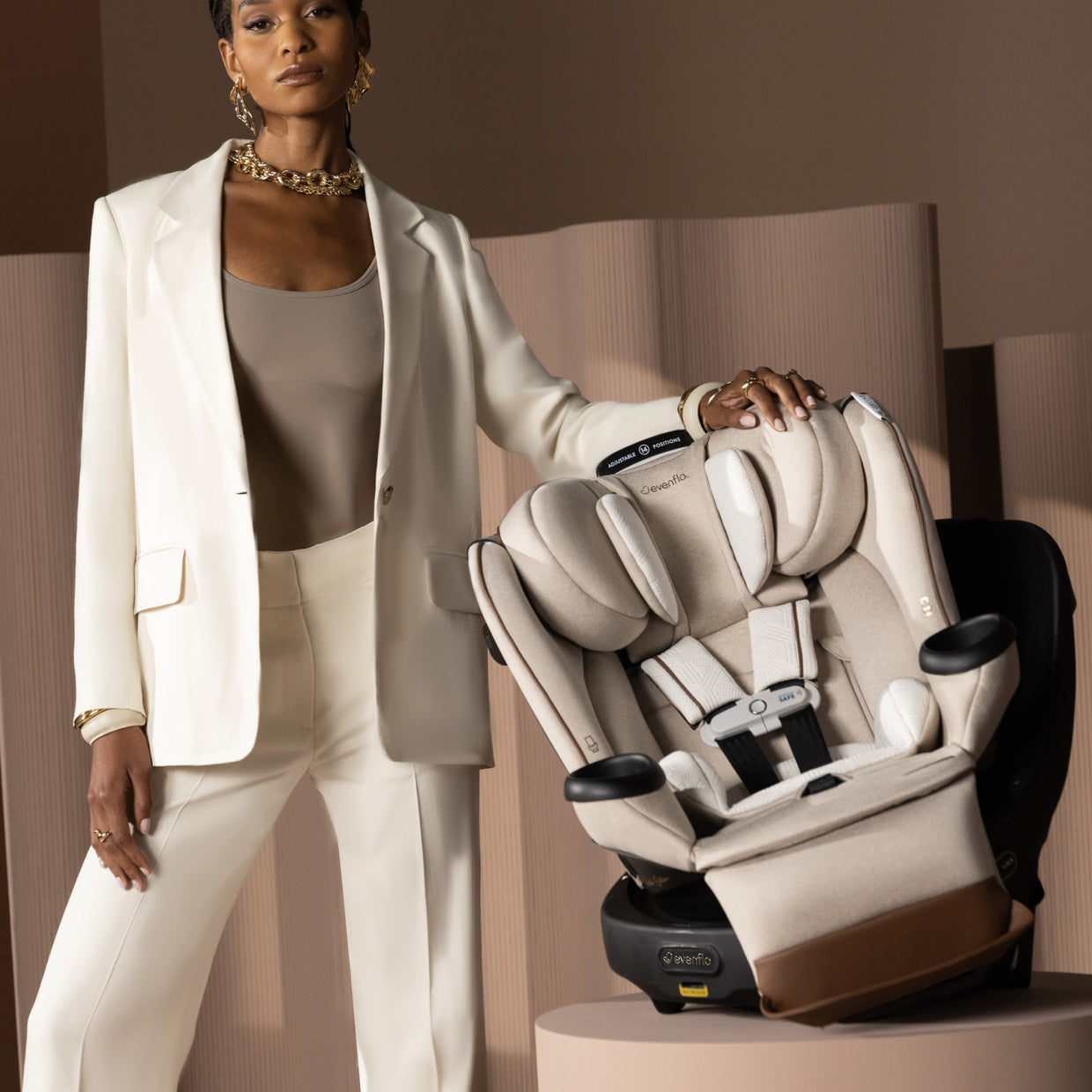
evenflo gold revolve extend Evenflo 360° Rotational All-in-One Car SeatHeres a turning point in car seat innovation designed to make a world of difference: The Evenflo Gold Revolve360 Extend Rotational All In One Car Seat with Green & Gentle Fabric. A spin off of the Revolve360, Americas bestselling rotating car seat, the Revolve360 Extend offers one hand, 360 rotation that makes it easy to get your child in and out of the car. Now it also allows you to make a positive impact on the planet. This seat features our soft
Here’s a turning point in car seat innovation designed to make a world of difference: The Evenflo® Gold Revolve360™ Extend Rotational All-In-One Car Seat with Green & Gentle™ Fabric. A spin-off of the Revolve360, America’s bestselling rotating car seat, the Revolve360 Extend offers one-hand, 360° rotation that makes it easy to get your child in and out of the car. Now it also allows you to make a positive impact on the planet. This seat features our soft Green & Gentle Fabric, free of added chemicals and flame retardants, and manufactured using 26 recycled plastic bottles! There’s plenty more to love beyond sustainability for kids. This 360° rotating car seat also offers the extended security of rear-facing all the way up to 50 lb. Child safety experts say the longer your child remains rear-facing, the better, and the Revolve360 Extend is here to help with peace of mind all the way around. You’re looking for a safe car seat — and the smart car seat choice is a connected car seat. The Evenflo Gold Revolve360 Extend will help put your mind at ease when it comes to child car seat safety, featuring SensorSafe™ to connect you to your little one from the backseat. While your eyes are focused on the road, integrated SensorSafe technology alerts you in real-time to four potentially unsafe conditions from your child’s car seat via your phone: unexpected chest clip unbuckling, temperature too hot or too cold in the car, child unattended in the car, and child seated too long. Install the seat just once for rear-facing and forward-facing modes of use — no need to remove the seat in order to make the switch. Sure360™ Safety Installation System with LockStrong™ and Tether360™, plus a handy bead-level indicator for leveling in seconds, make your one-time installation safe, secure and simple. The best swivel car seat is one that lasts! The Revolve360 Extend is the only car seat you’ll ever need, growing with your child with 3 modes that adapt to every stage: rear-facing (4 to 50 lb), forward-facing (30 to 65 lb) and booster (40 to 120 lb). This innovative car seat also comes with a zip-on, ergonomic leg rest to add comfort for growing legs. On-the-go recline means you can adjust the car seat to the perfect angle without having to uninstall or bother your child. This is the crème de la crème of swivel car seats. Offering good looks and ease at every turn, the Evenflo Gold Revolve360 Extend with Green & Gentle Fabric cradles your child in Gold-standard comfort, premium finishes and our eco-conscious fabric. Consider a more eco-friendly car seat and join the sustainability revolution. Go Green — and Gentle! At Evenflo, we go above and beyond government standards to create car seats that are safe. The Evenflo Gold Revolve360 Extend with Green & Gentle Fabric meets or exceeds all applicable federal safety standards. It is structural integrity tested at energy levels approximately 2x the federal crash test standard, and it is side-impact tested, rollover tested and temperature tested.If you need help installing your car seat, our ParentLink® customer service experts offer help online in real time. Get live video support with a certified car seat safety technician to assist with proper vehicle installation, so you can drive with confidence.
It's been 100 years and Evenflo continues to push the boundaries in baby and children’s gear design and innovation. We meet the needs of new generations of parents by focusing on what they really care about: leading-edge safety, smart design and technology, and convenient features that help them enjoy the journey of parenthood.
Shipping Notes
- Free Standard Shipping on $100+ Orders to the USA.
- Except Preorder products are shipped in 48 hours.
- Delivery to the USA:
- Standard Shipping : 3-10 business days
- If time is of the essence, please consider selecting expedited delivery for faster service.
Exchange/Return Notes
- We offer a 30-day return/exchange service after receiving.
- Final sale items are not eligible for returns or exchanges.
- To process your return/exchange, please contact us at [email protected]
- Please click here for more details>>> Return & Exchange Policy
4.6 ★★★★★
Based on 17 reviews
Sort
Product Reviews
★★★★★ 1
Don't Waste Your Money
Bought this 2 year protection plan and come to find out it doesn't even cover simple stuff like our mattress losing it's shape and stability. A mattress should last longer than 1 1/2 years before it starts caving in and the foam and springs start to give. So disappointed. Asurion Protection is a waste of money.
WAS THIS REVIEW HELPFUL?YesReportShare
Reviewed in the United States on June 7, 2026
★★★★★ 5
They got your back
Hey its worth every penny to get a warranty from this company ya never know what tomorrow brings so yeah
WAS THIS REVIEW HELPFUL?YesReportShare
Reviewed in the United States on May 11, 2026
★★★★★ 5
Very Pleaded!
They covered my purchase as advertised.
WAS THIS REVIEW HELPFUL?YesReportShare
Reviewed in the United States on May 17, 2026
★★★★★ 5
love my new chairs
best darn chairs for big people (450lbs)..iv ever purchased.the fabric is way thicker then the cheaper chairs thats out there.....only thing i have a slight concern about is the connectors ((made of plastic)) which hold the frameing in place....that could lead to a problem....thats what usually fails on most chairs iv purchased in the past...so i bought a 2 year protection plan just for that reason.but if i was to give it a rateing i would give it a 9 out of 10...one more thing if your a tall person its alot easerier to get up out of the chair because it sits higher then cheaper versions.
WAS THIS REVIEW HELPFUL?YesReportShare
Reviewed in the United States on March 12, 2026
★★★★★ 4
Get rid of the automation telephone go to a human being
I wish they would make it just a little bit easier to retrieve your gift card than having to search for it After trying to speak to a human Which was unsuccessful I managed to navigate my way through their AI and get them I managed to navigate my way through their AI and get them to retransmit my gift card. All besides that things work out good got my refund Thank you
WAS THIS REVIEW HELPFUL?YesReportShare
Reviewed in the United States on November 11, 2025