SKU: 40724200144
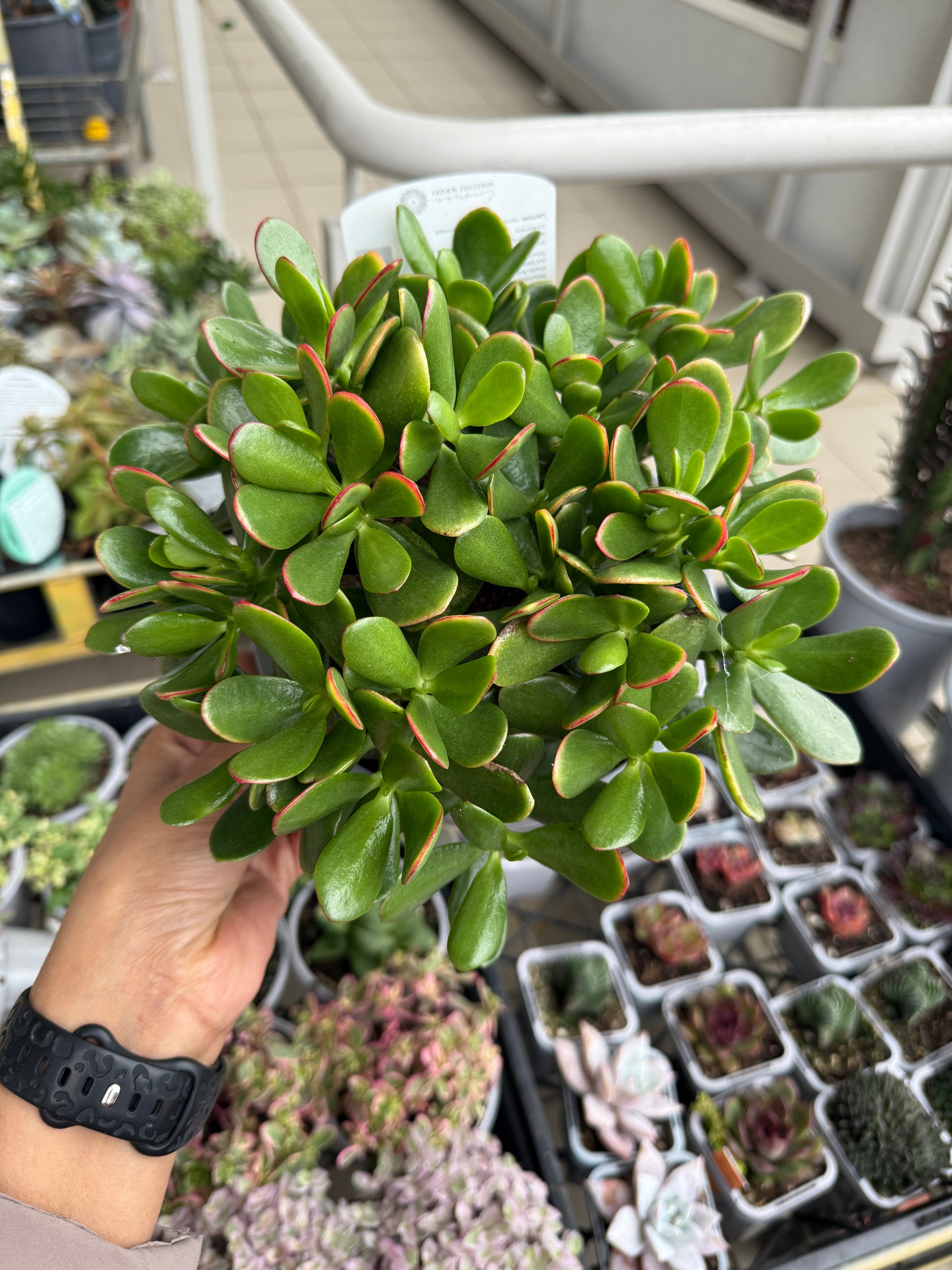
money plant crassula ovata

money plant crassula ovata Jade Plant (Crassula ovata) Care Guide

Sale price$24.59 Regular price$27.32
Save 10%

Pay in installments of $6.83 with ShopPay, AfterPay and Klarna

Shipping Estimate
USA
  • USA
  • CAN

Ships within 48 hours · Estimated delivery Oct 1 - Oct 6

Promo Codes Available:

For Your Every Summer RSVP, with Code: SUMMER15

Description

money plant crassula ovata Jade Plant (Crassula ovata) Care GuideCommon Name: Jade Plant, Money Plant, Lucky PlantOrigin: Native to South Africa and Mozambique Description: The Jade Plant is a classic succulent houseplant known for its thick, glossy, oval shaped leaves and strong, woody stems that give it a tree like appearance as it matures. Often considered a symbol of luck, prosperity, and friendship, it's a favourite in homes, offices, and gifts for new beginnings. Jade Plants are slow growers but incredibly

Common Name: Jade Plant, Money Plant, Lucky Plant
Origin: Native to South Africa and Mozambique

Description:

The Jade Plant is a classic succulent houseplant known for its thick, glossy, oval-shaped leaves and strong, woody stems that give it a tree-like appearance as it matures. Often considered a symbol of luck, prosperity, and friendship, it's a favourite in homes, offices, and gifts for new beginnings.

Jade Plants are slow growers but incredibly hardy, making them a perfect choice for beginners and seasoned plant parents alike. With the right care, they can live for decades — even becoming heirloom plants passed down through generations!

🌱 Care Tips:

Light:
Loves bright light! Place your Jade Plant near a sunny window — it thrives with at least 4–6 hours of direct or filtered sunlight daily. Outdoors, morning sun and afternoon shade work well.

Water:
Let the soil dry out completely between waterings. Water thoroughly, but make sure any excess drains out. Overwatering is the most common mistake — when in doubt, wait a few more days!

Humidity:
Jade Plants prefer dry air and are very tolerant of indoor conditions. No misting is needed.

Temperature:
Happy in average indoor temperatures between 18°C to 26°C (65°F to 80°F). Protect from frost and extreme heat.

Soil:
Use a well-draining succulent or cactus potting mix. A mix with sand or perlite is ideal to prevent root rot.

Fertiliser:
Feed once a month during the growing season (spring and summer) with a diluted succulent or general-purpose liquid fertiliser. No need to feed in winter.

Pet Friendly:
❌ No. Jade Plants are toxic if ingested by pets, so it's best to keep them out of reach of curious cats or dogs.

Shipping Notes
  • Free Standard Shipping on $100+ Orders to the USA.
  • Except Preorder products are shipped in 48 hours.
  • Delivery to the USA:
  1. Standard Shipping : 3-10 business days
  • If time is of the essence, please consider selecting expedited delivery for faster service.
Exchange/Return Notes
  • We offer a 30-day return/exchange service after receiving.
  • Final sale items are not eligible for returns or exchanges.
  • To process your return/exchange, please contact us at [email protected]
  • Please click here for more details>>> Return & Exchange Policy
SKU: 40724200144

Discover Niche Categories That Outsell money plant crassula ovata

Top-Converting Item to Boost Your Average Order

4.1 ★★★★★
Based on 25 reviews
Sort
Highest Rating
Newest First
Oldest First
Product Reviews
F
Verified Purchase
Fannie
West Palm Beach, US
★★★★★ 5
It works!!!
Had a customer service question and it was answered in less than 24 hrs. It works just like the instruction says!
WAS THIS REVIEW HELPFUL?YesReportShare
Reviewed in the United States on May 19, 2026
C
Verified Purchase
Chayda Black
Houston, US
★★★★★ 5
Perfect product for the error message you get on your EPSON printer
Top tier product. This pad replacement came with the instructions on how to fix my Epson printed that I've converted into sublimation. I never knew it had a drip container and I literally thought I was going to have to spend a lot of money trying to fix it. I looked up some videos and saw i needed a replacement kit. THis is it is I have an epson 4800 the video walk through with the paper was EASY, to put it in was even easier. Highly recommend.
WAS THIS REVIEW HELPFUL?YesReportShare
Reviewed in the United States on February 13, 2026
J
Verified Purchase
John Schisel
Grantham, US
★★★★★ 5
Great product
Works well
WAS THIS REVIEW HELPFUL?YesReportShare
Reviewed in the United States on May 6, 2026
C
Verified Purchase
Connor Ellis
Carnegie, US
★★★★★ 5
Perfect
Software is a bit clunky to use but worked perfectly (not to mention a huge cost savings!)
WAS THIS REVIEW HELPFUL?YesReportShare
Reviewed in the United States on April 3, 2026
K
Verified Purchase
Katelyn
Alexandria, US
★★★★★ 4
They do have a key to resolve it. Make sure you can connect your computer to your printer.
The customer service is great. They answer your email within 2 hours. The product itself is great too! Comes with two ink pads, gloves, etc. just like what they are advertised. They have instructions and if you have any questions, you CAN contact them. Sadly, my computer couldn’t connect to the printer so I couldn’t use the key they gave me to resolve the problem. I got the printer second hand, wanted to fix the issue, but in order to fix it, we need a cable to connect the computer and the printer. It’s weird that we found two different software (same purpose), but one can connect, the other one (the one on the instructions with this product) can’t. I confirmed with them that we do need a cable. I asked my printer seller about the cable and googled about it, both said the printer doesn’t come with a cable. But when I emailed them (this product) about my issues, they said it should come with a cable to connect. So I don’t know the answer about the cable but what I know is that I either but a cable myself or buy a separate key on their website and hopefully it works. If you don’t know your key, you can email them and ask about it. They then will send you another instructions (another method I assume). It’s a really long key, so if you can connect your computer to the printer, I’m sure you can use the key that comes with the product. It’s just a little bit of a slow process, but at least you know now and you can easily fix it in the future. :) In case you want to know my printer model, it’s ET-4800. These are just my opinions, I hope you can fix yours without any issues! :)
WAS THIS REVIEW HELPFUL?YesReportShare
Reviewed in the United States on November 10, 2025

recommand products