Pay in installments of $7.33 with
 ,
,
 and
and

Shipping Estimate
USA
- USA
- CAN
- USA
- CAN
Ships within 48 hours · Estimated delivery Oct 17 - Oct 22
 Promo Codes Available:
For Your Every Summer RSVP, with Code: SUMMER15
Description
sansevieria trifasciata moonshine rare snake plant Shop 'Moonshine Snake Plant - Sansevieria moonshine' Care and InfoIntroducing, the moonshine snake plant, known as Sansevieria Moonshine, a popular houseplant that belongs to the Sansevieria genus. Native to West Africa, it is a variety of the Sansevieria trifasciata. It has several other common names such as the Sansevieria trifasciata Moonshine, Silver Snake Plant, Silver Sansevieria, Sansevieria moonglow, or Dracaena moonshine, highlighting its attractive silver coloration. The Moonshine Snake Plant is a popular
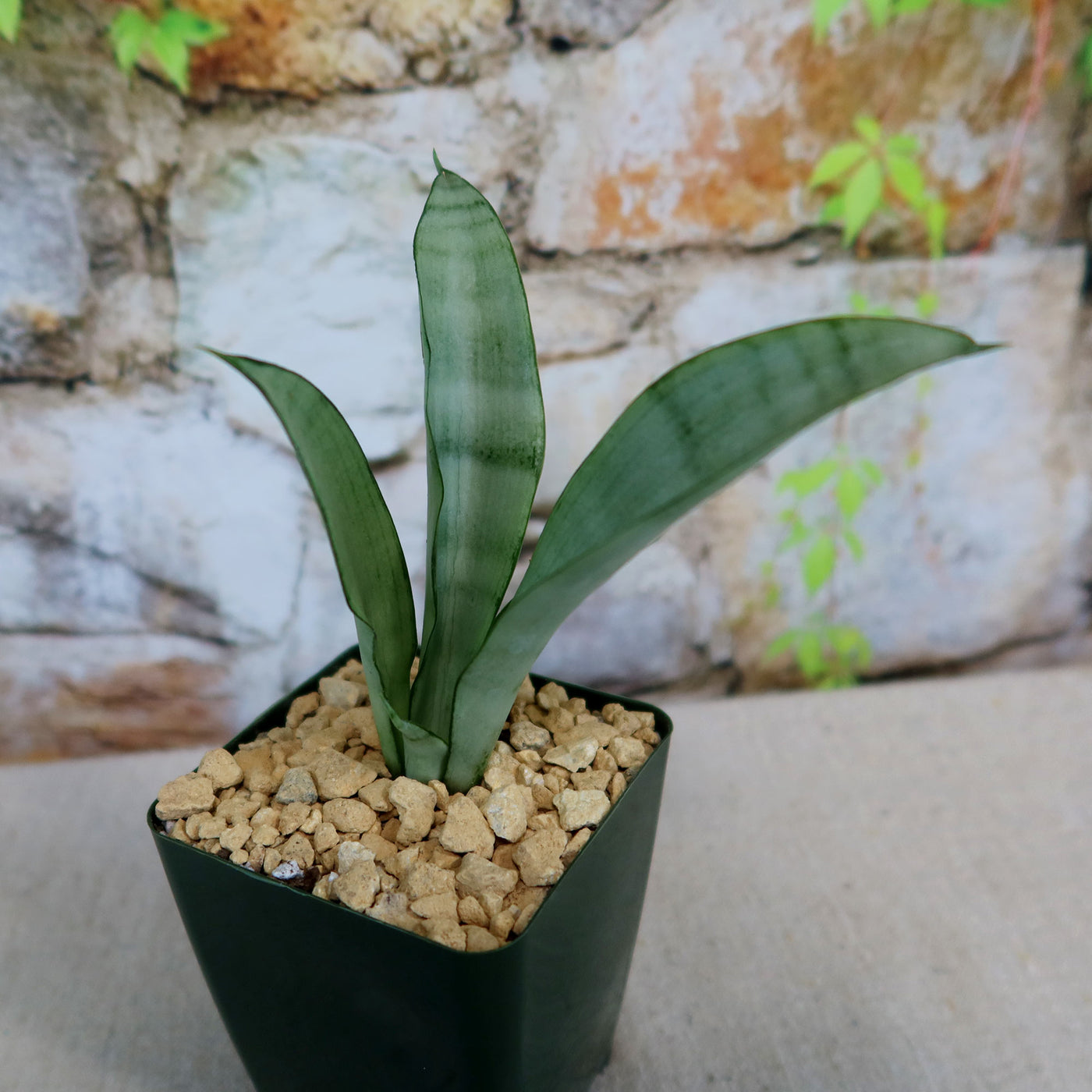
Introducing, the moonshine snake plant, known as Sansevieria Moonshine, a popular houseplant that belongs to the Sansevieria genus. Native to West Africa, it is a variety of the Sansevieria trifasciata. It has several other common names such as the Sansevieria trifasciata Moonshine, Silver Snake Plant, Silver Sansevieria, Sansevieria moonglow, or Dracaena moonshine, highlighting its attractive silver coloration. The Moonshine Snake Plant is a popular choice for indoor plant enthusiasts, with its silvery-green leaves that have a moonlight glow.
This moonshine snake plant features long, upright leaves that grow in a rosette pattern. The leaves are thick with a smooth texture of a beautiful silvery-green hue and bold green edges. They have a unique cylindrical shape, narrowing towards the tips, which adds to their visual appeal. The Moonshine Snake Plant can grow up to 4 feet tall in its natural habitat and 2 feet tall indoors, making it suitable for both small and large spaces.
Sansevieria Moonshine blooms in spring and summer, with fragrant green and white flowers on tall spikes. These sweet-smelling flowers will last 2 to 3 weeks. While the blooms are not the main attraction of these indoor plants, they can add a touch of elegance to their overall appearance.
Propagating Snake Plant moonshine is relatively easy. It can be propagated through leaf cuttings or by dividing the plant's rhizomes. Leaf cuttings can be placed in water or directly in well-draining soil until they develop roots. Dividing the plant involves separating the offshoots or rhizomes and planting them in separate pots to get new plants.
Moonshine Snake plants, known for their hardiness, low maintenance, and style, are commonly found in offices, lobbies, stores, and homes. The most common types of snake plants include Sansevieria trifasciata (Mother in law’s tongue plant), Sansevieria trifasciata 'Laurentii' (Variegated snake plant), and Sansevieria zeylanica (Zeylanica snake plant), which is gaining popularity in various settings.
Watering Needs
Like other tropical plants, this drought-tolerant Sansevieria Moonshine prefers moderate watering. Allow the soil line to completely dry out between waterings. Overwatering can lead to root rot, so it's best to err on the side of underwatering rather than overwatering. Before watering, check the moisture level of the soil by sticking your finger about an inch deep into the soil. If it feels dry at that depth, it's time to water. If it's still slightly moist, wait a bit longer.
In the spring and summer months, during the growing season, water your Sansevieria Moonshine every 2-3 weeks. While in the fall and winter months, during the dormant period, reduce watering to once every 4-6 weeks.
When watering, make sure to thoroughly saturate the soil in the pot, allowing water to seep out of the drainage holes. This ensures that the roots receive adequate moisture without sitting in stagnant water.
These moonshine snake plants are known for their ability to tolerate drought, so they can handle periods of dryness. Observing the moisture level of the soil and adjusting your watering accordingly will help keep your Sansevieria Moonshine happy and healthy.
Light Requirements
If you are growing your Sansevieria moonshine indoors, it prefers bright, indirect light for at least 4-6 hours a day. If you have a spot near a window with filtered or indirect sunlight, that would be ideal. However, this moonshine snake plant can also thrive in areas with medium light, making it a perfect choice for those with less sunny spaces in their homes.
If you decide to move your Sansevieria Moonshine outdoors, it's important to consider its light requirements. Your moonshine snake plant can tolerate full sunlight, but it's best to provide it with bright indirect light or partial shade. Too much direct sun can scorch the leaves, so finding a spot with filtered sunlight or placing it under a shade structure would be beneficial. If you live in a region with intense sunlight, it's a good idea to acclimate the plant gradually to prevent leaf burn.
Remember, finding the right balance of light is crucial for this beautiful plant. Too little light can result in leggy growth, while too much direct sunlight can cause leaf damage. Observing your snake plant's moonshine response to its current light conditions and adjusting accordingly will help ensure its health and growth.
Optimal Soil & Fertilizer Needs
The Sansevieria moonshine prefers very airy, porous, nutrient-rich soil with a pH of 6.5 - 7.5. Succulents require fast-draining soil that dries completely between waterings. Your soil must have a sandy texture and a low water-holding capacity, just like desert soil. Soggy wet soil can damage your moonshine snake plant and contribute to bacterial and fungal rot. In addition, because of a lack of oxygen, soggy soil substitutes air pockets with water, resulting in an anaerobic environment that can kill your snake plant.
As an alternative, you can create your own potting mix by combining equal portions of perlite, coarse sand, and good natural potting soil. Ideally, you want to use our specialized succulent potting mix that contains 5 natural substrates and organic mycorrhizae to promote the development of a strong root system that helps your succulent to thrive.
The Sansevieria Moonshine is a relatively low-maintenance plant when it comes to fertilizing. During the growing season in the spring, you can feed your Moonshine Snake Plant with a balanced (5-10-5), water-soluble NPK fertilizer once a year. However, be careful not to over-fertilize, as it can lead to salt buildup in the soil.
It's important to note that the Sansevieria Moonshine is a slow-growing snake plant, so it doesn't have high nutrient requirements. As long as you provide it with well-drained soil and occasional fertilization during the growing season, it should thrive.
Remember, it's always a good idea to observe your plant's response to the soil and fertilizer you provide. Adjusting the watering and fertilizing routine based on its growth and overall health will help ensure its well-being.
Hardiness Zones & More
When growing indoors, the Sansevieria Moonshine can tolerate a warm temperature between 60°F to 85°F. It's important to avoid exposing it to extreme temperature fluctuations, as this can stress the plant. Keep it in a spot where the temperature remains relatively stable throughout the day.
If you decide to move your Sansevieria Moonshine outdoors, it can thrive in USDA zones 10-11, where the average temperature stays above 50°F. If you live in a colder zone, it's important to protect the plant from freezing temperatures by keeping it indoors during the winter months. It can tolerate higher temperatures, but it's important to protect it from scorching direct sunlight, especially in hotter climates.
The Sansevieria Moonshine is a relatively low-humidity plant. It can tolerate a range of humidity levels, from dry to moderate. It's well-suited for indoor environments with average humidity levels. If you live in a particularly dry climate, you can increase humidity around the plant by placing a tray of water nearby or using a humidifier. This snake plant is one of the hardiest houseplants and is extremely adaptable.
Remember, providing the Sansevieria Moonshine with the appropriate temperature and humidity conditions will contribute to its overall health and growth. Whether you choose to keep it indoors or move it outdoors, maintaining a suitable environment will help ensure its well-being.
Final Thoughts
Overall, the Sansevieria Moonshine (Moonshine Snake Plant) is a low-maintenance snake plant for succulent plant lovers of all levels. With its striking silvery-green leaves, easy propagation methods, and ability to thrive in various indoor conditions, this moonshine snake plant adds a touch of elegance to any space. While it occasionally produces small, fragrant flowers, its main allure lies in its unique foliage. It thrives in bright, indirect light and only needs to be watered when the top inch of soil is dry. Additionally, it is important to avoid overwatering as this can lead to root rot. You can grow your plant indoors in warm temperatures between 60°F to 85°F, and outdoors in USDA zones 10-11. We think you will love this snake plant – order your very own Sansevieria moonshine snake plant for sale today and start enjoying its beauty in no time!
Shipping Notes
- Free Standard Shipping on $100+ Orders to the USA.
- Except Preorder products are shipped in 48 hours.
- Delivery to the USA:
- Standard Shipping : 3-10 business days
- If time is of the essence, please consider selecting expedited delivery for faster service.
Exchange/Return Notes
- We offer a 30-day return/exchange service after receiving.
- Final sale items are not eligible for returns or exchanges.
- To process your return/exchange, please contact us at [email protected]
- Please click here for more details>>> Return & Exchange Policy