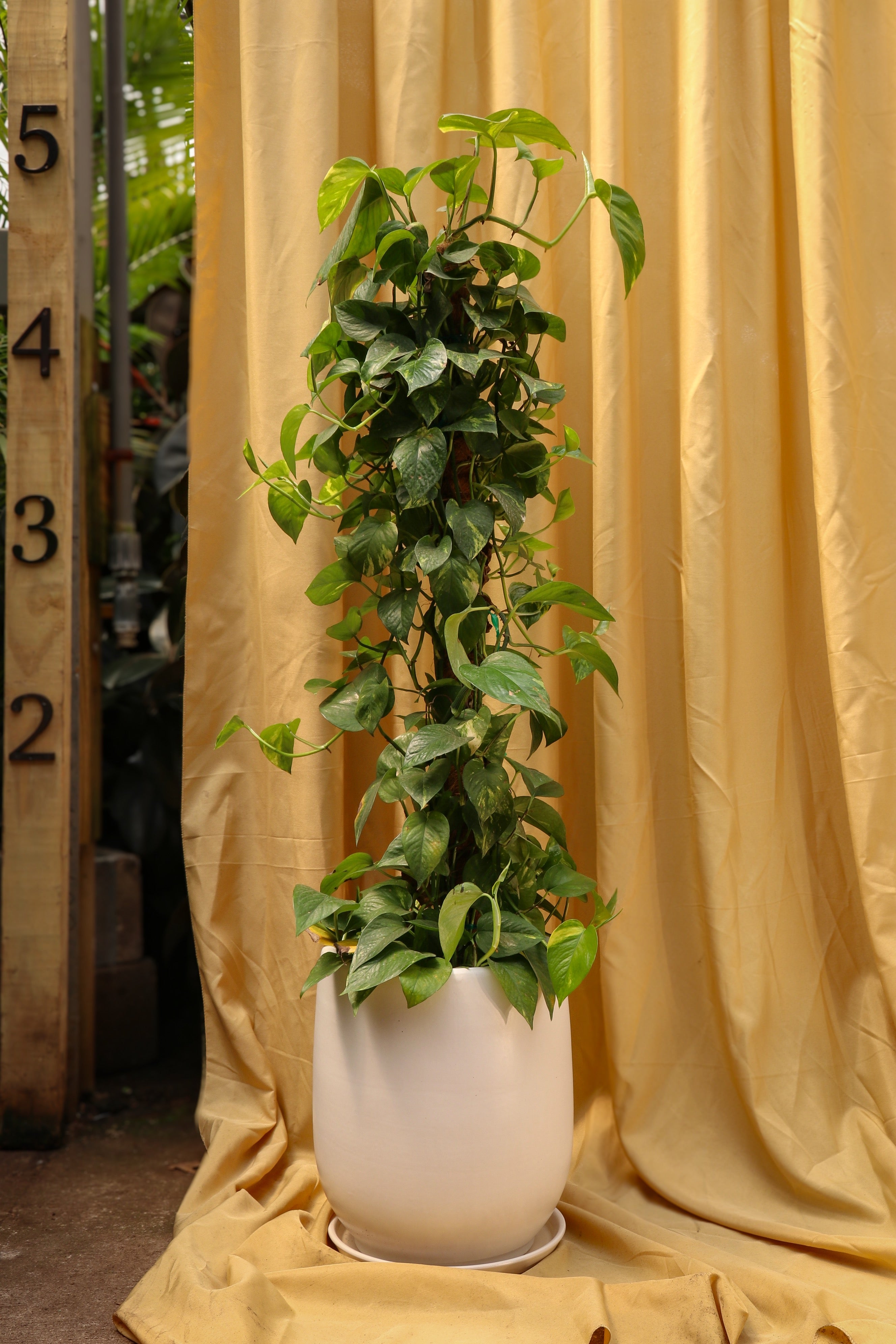
SKU: 46893021769
pothos on a pole

pothos on a pole 3-5 FT Pothos Pole

Sale price$23.38 Regular price$25.98
Save 10%

Pay in installments of $6.50 with ShopPay, AfterPay and Klarna

Shipping Estimate
USA
  • USA
  • CAN

Ships within 48 hours · Estimated delivery Aug 1 - Aug 6

Promo Codes Available:

For Your Every Summer RSVP, with Code: SUMMER15

Description

pothos on a pole 3-5 FT Pothos PoleDescription The Pothos growing on a pole is the overachiever who's decided sprawling around your coffee table isnt enough! This gorgeous Epipremnum aureum traded her casual trailing lifestyle for vertical stardom, climbing her pole as if shes chasing her dreams. With her heart shaped, glossy green leaves cascading down from above, this Pothos plant transforms any corner into a living sculpture that screams "I have my life together!" Even better? As

Description

The Pothos growing on a pole is the overachiever who's decided sprawling around your coffee table isn’t enough! This gorgeous Epipremnum aureum traded her casual trailing lifestyle for vertical stardom, climbing her pole as if she’s chasing her dreams.

With her heart-shaped, glossy green leaves cascading down from above, this Pothos plant transforms any corner into a living sculpture that screams "I have my life together!" Even better? As she climbs higher, her leaves grow bigger and more dramatic - because why settle for cute when you can have spectacular? Your Pothos on a pole brings jungle vibes without the humidity headaches, making her the perfect statement piece for plant lovers who want maximum impact with refreshingly minimal drama.


Care 

Can Pothos grow on a pole?

Absolutely! Pothos naturally climb in their native Southeast Asian habitats, using aerial roots to scale tree trunks and reach sunlight. A moss pole mimics this natural behavior perfectly, allowing your Pothos to express her true climbing personality.


How do you take care of a Pothos on a pole plant?

Taking care of a Pothos on a pole involves providing bright indirect light, watering when soil feels dry, and misting regularly. This climbing beauty thrives with monthly fertilizing during growing season and gentle guidance as she ascends her support.


Do Pothos like lots of sun?

Pothos prefer bright, indirect sunlight rather than intense direct rays that can scorch their beautiful leaves. Think of filtered light through a window or a well-lit room - she wants to see what's happening but doesn't need a spotlight.


What makes Pothos grow faster?

Bright indirect light, consistent watering, monthly feeding during spring and summer, and regular misting create optimal growing conditions. The climbing support actually encourages faster, more robust growth compared to trailing varieties, because she's living her best vertical life.


Where is the best place to put a Pothos on a pole indoors?

The best spot for your Pothos on a pole is near a window with filtered light, away from drafts and direct sun. She loves bright rooms where her dramatic height can be properly appreciated by everyone who walks by.

Consider placing her in a corner where she has room to grow tall without crowding other plants, or use her as a natural room divider that adds privacy while bringing life to your space.


Do Pothos like to be misted?

Pothos absolutely love being misted, especially when they’re growing on a moss pole! Misting keeps the pole moist, encouraging those aerial roots to attach and absorb additional moisture for healthier, lusher growth and more enthusiastic climbing behavior.

Regular misting also helps maintain the humidity levels that make your Pothos feel like she's back in her tropical homeland, resulting in more vibrant foliage and enthusiastic climbing behavior.


How to make my Pothos thrive?

Provide bright indirect light, water when the top inch of soil is dry, mist regularly, fertilize monthly during active growth periods, and prune leggy stems. Good drainage and protection from cold drafts complete the recipe for successful Pothos plant care.

Remember to rotate her occasionally so all sides get equal light exposure, and don't forget to guide new vines onto the pole as she grows - she needs a little direction to reach her full potential!


How often should you water a Pothos growing on a pole?

Water your Pothos growing on a pole when the top inch of soil feels dry, typically every one to two weeks depending on light and humidity. Between waterings, mist the pole to keep it moist for those aerial roots.


Pet-friendly?

The Pothos plant is not pet-friendly - it’s full of compounds that are toxic if animals eat them. These beautiful Epipremnum aureum plants can cause oral irritation, vomiting, and difficulty swallowing in curious pets who take a taste.


Is Pothos toxic to dogs?

Yes, Pothos is toxic to dogs and can cause drooling, vomiting, and digestive upset if your furry friend decides to nibble on those tempting leaves. Keep your climbing beauty safely positioned out of reach of curious canines.


Is Pothos toxic to cats?

Pothos is definitely toxic to cats, causing the same unpleasant symptoms as in dogs if ingested. Position your Pothos on a pole somewhere high enough that even the most determined feline acrobat can't reach those gorgeous but dangerous leaves.


Factoids

How do you train a Pothos plant to climb?

Training a Pothos plant to climb involves gently wrapping or tying the vines to your moss pole using soft ties or clips. As new growth appears, continue guiding those wandering vines onto the support structure for best results.

Mist the pole regularly to encourage aerial roots to naturally attach and grip the surface. Be patient - she'll get the hang of climbing and start doing most of the work herself once she realizes how much she loves the vertical lifestyle!


What is the lifespan of a Pothos plant?

With proper care, a Pothos plant typically lives five to ten years indoors, though some well-loved specimens continue thriving for decades. 


Do Pothos like coffee grounds?

Pothos can benefit from coffee grounds in moderation, as they provide nitrogen and improve soil structure nicely. However, use sparingly and only on well-established plants, since excessive coffee grounds can make soil too acidic and potentially harmful.


Is it better for Pothos to hang or climb?

While Pothos can both hang and climb beautifully, climbing actually encourages larger leaves and more vigorous growth. In nature, these plants are climbers, so a Pothos growing on a pole is living her most authentic life while delivering maximum visual impact.


Buy a Pothos 

Want to turn your home into a plant paradise with a Pothos growing on a pole? This stunning climbing beauty turns any space from "cool house" to "botanical paradise"!

Our live video shopping calls let you personally select the exact Pothos plant that makes your heart skip a beat. No plant roulette here - you'll meet your new green companion face-to-face (virtually) before she ships, ensuring your climbing queen arrives looking exactly as fabulous as when you first fell in love across the screen!

Shipping Notes
  • Free Standard Shipping on $100+ Orders to the USA.
  • Except Preorder products are shipped in 48 hours.
  • Delivery to the USA:
  1. Standard Shipping : 3-10 business days
  • If time is of the essence, please consider selecting expedited delivery for faster service.
Exchange/Return Notes
  • We offer a 30-day return/exchange service after receiving.
  • Final sale items are not eligible for returns or exchanges.
  • To process your return/exchange, please contact us at [email protected]
  • Please click here for more details>>> Return & Exchange Policy
SKU: 46893021769

Discover Niche Categories That Outsell pothos on a pole

Top-Converting Item to Boost Your Average Order

4.5 ★★★★★
Based on 28 reviews
Sort
Highest Rating
Newest First
Oldest First
Product Reviews
M
Verified Purchase
Magpie
Alexandria, US
★★★★★ 5
Great replacement screen for an old Chromebook
Size: 15.6" 1080P
Needed a new Screen for an older touch-screen Samsung Chromebook that bit the dust. Repairing it wasn't an option since it's no longer available. Enter this gem of a portable monitor. It works great. Not a replacement touch screen, but works fine with the chromebook touch pad or mouse and dongle. Easy to hook up, a bit testy on first several attempted to bluetooth connect, but works fine now. The speakers leave a bit to be desired, but I just use Bluetooth speakers anyway. Overall, very pleased with the screen clarity and responsiveness of this portable monitor. 15" screen. Great value! I'd buy it again.
WAS THIS REVIEW HELPFUL?YesReportShare
Reviewed in the United States on June 4, 2026
M
Verified Purchase
Michelle
Massapequa, US
★★★★★ 5
Exceptional - Better than one twice the price
Size: 15.6" 1080P
I bought a different external monitor a few years ago for twice the price and it was abominable compared to this monitor. This monitor is absolutely perfect. The speakers are definitely tinny like others mentioned, so don't expect to DJ a party with this thing, but for work it's perfect since that means voices are clearer anyways. The sound just isn't as full/rounded with proper bass, but it doesn't even matter because there's also a headphone jack on the monitor, too. USB-C is a total game changer for powering and passing full audio-visual in a single port. The included cables are also a big win since getting a spare data USB-C cable can get pricey and I know the one included is guaranteed to work with this monitor. It was literally plug-and-play with my 2023 16" Macbook Pro. I could go on and on about how every detail of this monitor is perfect, like how the stand is also a screen protector cover and how light and easy it is to carry and how the little grippy feet hold it in place confidently, but my point is THIS is FINALLY the external monitor I've been looking for!!!
WAS THIS REVIEW HELPFUL?YesReportShare
Reviewed in the United States on May 26, 2026
S
Verified Purchase
Sarah walker
Phoenix, US
★★★★★ 5
Great purchase and recommend!
Size: 15.6" 1080P, Size: 15.6" 1080P
What a great product! First I’ll start by saying it’s very lightweight which is what I needed to fit in my bag. I bought two of them because I need three screens and I couldn’t be happier. Set up, one cord!!! No power cord needed pulls power from the laptop so that’s a huge win in my book! I love the size I love the case is attached. Definitely recommend
WAS THIS REVIEW HELPFUL?YesReportShare
Reviewed in the United States on June 9, 2026
A
Verified Purchase
Amazon Customer
Battle Creek, US
★★★★★ 4
Works as advertised, but included USB-C cable was defective.
Size: 15.6" 1080P
This monitor performs great! Picture quality, brightness, all work as expected. When powered by a phone, you may have to limit the brightness below 80% if you don't attach extra power. The good news is, I can attach a power bank for the extra power, and any extra power not needed by the monitor will pass through and charge my phone. I've tested this with my laptop, phone, and tablet, and it works great in all cases. One extra plus that I didn't expect, because it was not listed in the product description and also not mentioned in any reviews that I saw, is that this monitor has VESA compatible holes for a VESA mount hidden behind the magnetic cover on the back. Beautiful. If I ever decide to mount it to an arm I can do it. All the advertised functionality works as expected with ONE exception. The USB-C cable that came with this monitor was faulty. It had a short across a couple of wires which could have caused damage to my phone had my phone not recognized it and alerted me of foreign object or water in the port. That water and foreign object warning basically means something is causing wires to be connected that shouldn't be and assumes you have a good cable. In my case, it was the cable itself that was faulty, and I used a tester to make sure. While the description says "do not use other USB-C to USB-C cables", that is just to cover themselves, because many people will use a USB-C cable meant only for charging, or one that is not display compatible. I have cables of varying lengths that are Thunderbolt USB-C which all handle between 100-240W power, data up to 100Gbps, and displays up to 8K. I just used one of my cables and everything works just fine. If you're having trouble with your monitor, or intermittent connections with the monitor (I did before I got the warning) then you may have a bad cable. Get a quality cable and make sure it's rated for display port, high data throughput (ideally minimum 40Gbps), and decent power capacity. Some will work for data but not power. Some work with power but not data. Some work with power and data, but only one at a time. You have to flip the connector to go between modes. I don't know why they make those, and those that manufacture such garbage should be locked up, but that's another story for another day. Bottom line is this. It's a quality monitor. If it ever starts having issues, I'll update the review. The cables I'm not so sure of. The HDMI cable is sufficient enough for FHD display, but I wouldn't recommend swapping it over to a higher res monitor, as it probably can't handle it. The USB-C cable has quality control issues, as they sourced out inexpensive cables for this monitor to keep the costs down. No big deal for me, as I have an abundance of good cables, but keep that in mind that you may need to consider the cost of quality cables for this monitor. I'm glad I bought it. It's going to make me much more productive. While I was disappointed in the USB-C cable, it's not a deal breaker as I already had plenty. Minus one star for the bad cable.
WAS THIS REVIEW HELPFUL?YesReportShare
Reviewed in the United States on December 2, 2024
R
Verified Purchase
Rick Hinton
Omaha, US
★★★★★ 5
Versatile, Great size, great value and bright. A little heavy, but well worth the cost.
Size: 15.6" 1080P
I own two of these monitors, I have been very happy with them. I carry them in my backpack/laptop case with all of my needed accessories, and it just simply works. I work from home and I was looking for something that I could take with me when I travel. My typical home setup involves a 43" LG monitor in the center, and then four additional 1080P monitors. When I am on the road, I need something smaller to have more "real estate" to work with. I usually use a hotel 4k TV or 4k tv at the air BNB we stay at so that I don't have to the 43" LG, but sometimes I just use these two portable screens. I have held meetings from a roadside park from the back of my Suburban with these while we were camping, from Panera while mixing audio, from a waiting room at an office while waiting on someone to complete their day, etc. All in all, the two that I have allow me to streamline my workflow when travelling. I have multiple windows up during the workday; I gather information from those screens and consolidate/copy/paste/ reference the data on my main laptop screen in the front and center. These monitors simply allow me to replicate what I have at home, but on a smaller and (somewhat) lighter scale. The good: I am not a gamer, so I cannot comment on how these would work in a gaming setup, I work on documents and reporting. With that said, these have great color at a great size. I can fit my Macbook Pro, and up to four of these screens in my bag, plus all my accessories, including Jabra Engage 75 headset, Plantronics headset (backup) , Apple keyboard and mouse, StreamDeck, USB-C Hub, and when needed, a universal Docking station that uses DisplayLink technology (Dell UD22) to get the extra screens. Without that, the Mac won't support more than 3 or 4 displays (Check specs for your PC/Mac). I like that these are USB-C *AND* HDMI. I can use them on pretty much any modern PC. To use the HDMI, however, You do need to power the monitor over USB-C with the provided cable. That's not a product issue, it's simply because that's the way HDMI works, there is no power over the cable. VESA capable, which is a big plus, I have magnetic VESA arms and I leave the plates on these monitors so I can use them anywhere. The bad: The rotator dial on the side has a tendency to get smashed in, but I don't use audio on either of the screens. I have a Bluetooth noise cancelling over the hear headphone set for that. A more solid design would have been with tactile push buttons instead of the rotator dial. I only have this problem with one of the screens. When I put them the backpack, I now put them in with the rotator dial pointed up to ensure a drop of the bag doesn't chance damaging the equipment. The ugly: The weight of the screens and associated covers adds about 2.5 lbs each, which is a lot. I have ordered two more, so that will be 10 lbs in the laptop backpack. May need to switch to a roller bag to cart this entourage around. Once I get the other two, I will revise this review. Right now I don't know if I will have to use the UD22 to utilize all of these screens simultaneously.
WAS THIS REVIEW HELPFUL?YesReportShare
Reviewed in the United States on June 6, 2025

recommand products