Pay in installments of $5.62 with
 ,
,
 and
and

Shipping Estimate
USA
- USA
- CAN
- USA
- CAN
Ships within 48 hours · Estimated delivery Oct 19 - Oct 24
 Promo Codes Available:
For Your Every Summer RSVP, with Code: SUMMER15
Description
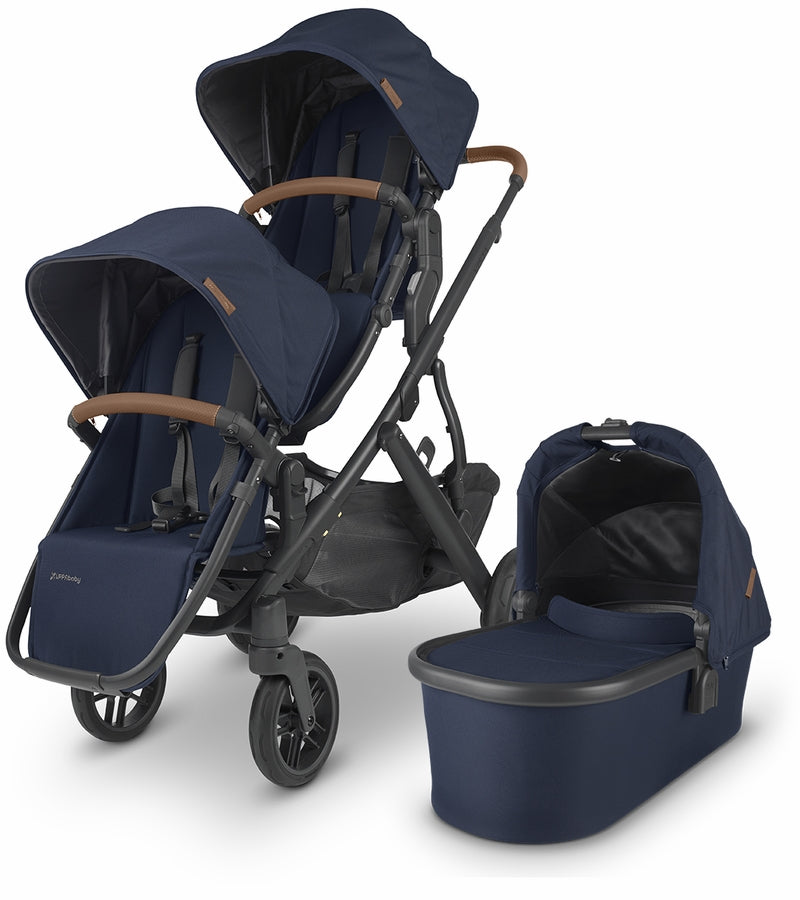
uppababy vista v2 twin stroller UPPAbaby VISTA V2 Double Stroller BundleFeatures of UPPAbaby Vista V2 Double Stroller The UPPAbaby Vista V2 Double Stroller is a favorite for a reason. Quick glance features: UPPAbabys bestselling stroller grows with your family! The UPPAbaby Vista V2 double stroller is the perfect choice for growing families and now you can get everything you need all in one convenient set. Whether youre expecting a second child, twins, or even a third child, the Vista V2 can configure to allow everyone to
Features of UPPAbaby Vista V2 Double Stroller
The UPPAbaby Vista V2 Double Stroller is a favorite for a reason. Quick glance features:
UPPAbaby’s bestselling stroller grows with your family!
The UPPAbaby Vista V2 double stroller is the perfect choice for growing families and now you can get everything you need all in one convenient set. Whether you’re expecting a second child, twins, or even a third child, the Vista V2 can configure to allow everyone to stroll in comfort.
Features of the UPPAbaby Vista V2 Double Stroller Set
The UPPAbaby Vista V2 Double Stroller Set comes with everything you need for an infant, but if you have an older child or are expecting twins, buying this convenient set adds an extra Rumbleseat, which makes strolling as a family a breeze. Features of the UPPAbaby Vista V2 Double Stroller Set include:
- Choose from multiple configurations
- Aluminum alloy stroller frame
- Easy to maneuver
- Machine washable seat fabrics, lay flat to dry
- Includes:
- UPPAbaby Vista V2 (check out the features here)
- Vista Upper Adapters
- UPPAbaby V2 Rumbleseat for the lower position (check out the features here). Note: purchase of the Rumbleseat includes the Lower Adapters.
_____________________________________________________________________________
Additional, but optional Vista V2 configuration options we recommend
- For use with newborn twins in bassinets, you'll need to add another UPPAbaby Bassinet, and both the Vista Upper Adapters and Vista Lower Adapters.
- For use with newborn twins in UPPAbaby Mesa car seats, you will need both the Vista Upper Adapters and Vista Lower Adapters.
_____________________________________________________________________________
How to use the UPPAbaby Vista V2 Double Stroller with two car seats
The UPPAbaby Vista V2 double stroller is compatible with a number of car seats that can be mounted together. These are the options:
-
UPPAbaby Mesa
To use the Vista V2 with two Mesa car seats, you need the Vista Upper Adapters and Vista Lower Adapters. -
Nuna Pipa / Maxi Cosi / Cybex / Clek
To use the Vista V2 as a double with two Nuna Pipa Infant Car Seats, Maxi Cosi Infant Car Seats, Cybex Car Seats, or Clek Car Seats you'll need UPPAbaby's Maxi Cosi / Nuna / Cybex Upper Adapter and UPPAbaby's Maxi Cosi / Nuna / Cybex Lower Adapter.
_____________________________________________________________________________
UPPABABY VISTA V2 DOUBLE STROLLER SPECIFICATIONS
|
Type Of Stroller: |
Premium single/double |
|
Maximum Carrying Load: |
50 lbs as a single |
|
Newborn Suitable: |
Yes, with included bassinet or optional SnugSeat |
|
Infant Seat Compatible: |
Yes, compatible with Uppababy Mesa (no adapter required), and certain Maxi Cosi, Nuna, Cybex, Clek and Chicco infant car seats (adapters required) |
|
Frame Material: |
Aluminum |
|
Stroller Weight: |
26.6 lbs with Toddler Seat attached |
|
Open Length: |
46" |
|
Open Width: |
25.7" |
|
Open Height (to top of handle): |
42.5" with handle fully extended |
|
Tire: |
8" front polyurethane, 11" rear AirGo no-flat |
|
Folded Size: |
33" x 25.7" x 19" (one seat attached with bumper bar) |
|
Brakes: |
One foot pedal controls both rear wheels |
|
Warranty: |
2 Year (3 years with Ub XTEND) |
FAQs about the UPPAbaby Vista V2 Double Stroller
Do you need the upper and lower bracket adapters for the Uppababy Vista V2 double stroller?
Yes, however please keep in mind that the purchase of a Rumbleseat includes lower adapters. If you are converting to a double with a Rumbleseat, you will need to purchase the Rumbleseat and upper adapters. For all other configurations, you will need to purchase both the upper adapters and lower adapters.
Can newborn infants use the Vista V2 stroller seat?
The Vista V2's stroller seats are recommended for 3-months and up. For newborns, you can add the Snugseat Infant Insert, use the Bassinet, or use an UPPAbaby Car Seat Adapter.
What is the weight limit for the UPPAbaby Vista V2 as a double?
The weight capacity for the main upper seat is 50 pounds, and the weight limit for the Rumbleseat is 35 pounds.
Can you fold the UPPAbaby Vista V2 double stroller with both seats attached?
It is possible to fold the UPPAbaby Vista V2 with both seats attached. However, the folded size will be bulky and difficult for most moms to lift into a car. It's more practical, if folding with both seats, for stowing in a closet or hallway.
Shipping Notes
- Free Standard Shipping on $100+ Orders to the USA.
- Except Preorder products are shipped in 48 hours.
- Delivery to the USA:
- Standard Shipping : 3-10 business days
- If time is of the essence, please consider selecting expedited delivery for faster service.
Exchange/Return Notes
- We offer a 30-day return/exchange service after receiving.
- Final sale items are not eligible for returns or exchanges.
- To process your return/exchange, please contact us at [email protected]
- Please click here for more details>>> Return & Exchange Policy