Pay in installments of $6.16 with
 ,
,
 and
and

Shipping Estimate
USA
- USA
- CAN
- USA
- CAN
Ships within 48 hours · Estimated delivery Sep 28 - Oct 3
 Promo Codes Available:
For Your Every Summer RSVP, with Code: SUMMER15
Description
is prickly pear cactus good for you Brittle Prickly Pear 'Opuntia fragilis'Are you on the hunt for a unique and eye catching plant to add to your collection? Look no further than the brittle prickly pear cactus or little prickly pear, also known as Opuntia fragilis or fragile cactus, a vibrant member of the Opuntia genus. This striking plant displays vibrant orange, red, or yellow green flowers that bloom from late spring to early summer, making it a true showstopper in any garden. There are few flowers on each brittle
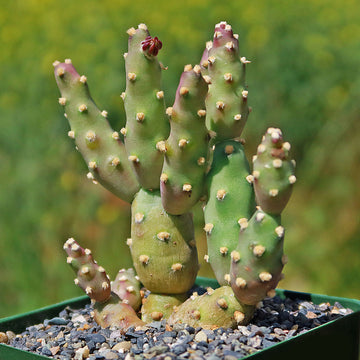
Are you on the hunt for a unique and eye-catching plant to add to your collection? Look no further than the brittle prickly pear cactus or little prickly pear, also known as Opuntia fragilis or fragile cactus, a vibrant member of the Opuntia genus. This striking plant displays vibrant orange, red, or yellow-green flowers that bloom from late spring to early summer, making it a true showstopper in any garden. There are few flowers on each brittle prickly pear, and many plants do not flower every year.
What makes this cactus truly unique is its loose connection of pads; they're easily detached by passing animals, which helps in propagation. And get this: new pads grow out of the top of the brittle prickly pear cactus, causing it to bend over like a little green waterfall!
Hailing from North America and reaching a height of 12 inches, it is noticeably thicker than other species (24 inches) at maturity. The prickly pear cactus, which is often cylindrical or potato-shaped with spines concentrated at the upper edge, is sure to make a statement wherever it's planted. However, it's important to note that this plant is mildly toxic for both humans and pets, so handle it with caution!
Plus, where new pads touch the soil, roots form and grow into new colonies! Talk about self-sufficiency! So, if you want a plant that can take care of itself while adding some cute desert vibes to your home, look no further than the Brittle Prickly Pear, 'Opuntia fragilis'.
Watering Needs
Many cacti, like Opuntia fragilis, thrive when cared for properly by using the "soak and dry" technique. This involves giving your plant a generous watering, followed by allowing it to completely dry out before watering again.
For potted and outdoor Opuntia, during the growing season, it's recommended to give them a deep-water soak once or twice a month when the soil is dry. Use a water meter or place your finger into the soil, and if it is dry an inch down, then you should water your plant. Make sure that you are also using porous sandy soil, and if it is in a pot, then make sure there is a drainage hole to avoid overwatering. In rainy seasons or cold weather, it's best to withhold watering your outdoor cacti.
Light Requirements
Opuntia fragilis prefers bright, direct sunlight and can tolerate full sun exposure for most of the day. When grown indoors or in low-light environments, the plant may not receive enough light to thrive and may become leggy or pale in color.
If you are growing Opuntia fragilis indoors, it is important to place it in a south-facing window or under grow lights to provide it with adequate light. If growing outdoors, it can be grown in a variety of locations, including rock gardens, xeriscapes, and containers, as long as it receives enough sunlight to support healthy growth.
Optimal Soil & Fertilizer Needs
Are you ready to take your Opuntia fragilis cacti plant game to the next level? When it comes to choosing the right soil and fertilizer for your adorable prickly pear cacti, you need to be extra cautious and use the right kind of soil. Moisture can be a real killer, leading to root and stem rot in no time. But fear not, my fellow green thumbs! Planet Desert has got your back with our specialized cactus potting mix that includes organic mycorrhizae, perfect for promoting healthy roots and happy plants.
When it comes to fertilizing your cactus plant, it only needs a small amount of fertilizer applied once a year in the spring. Cacti prefer fertilizer with lower doses of NPK, with a maximum ratio of 5-10-5 that is higher in phosphorus than nitrogen.
Hardiness Zones & More
Opuntia fragilis requires sunny, warm climates to thrive, but it can tolerate mild cold temperatures. Generally, these are hardy plants that can be grown in the garden in USDA zones 4–10, and it is a great houseplant for beginners as it will be fine if you forget to water it for a while.
These tropical cacti tend to live for many years and grow slowly. Plant them in the spring after the weather warms up.
Be sure to add Opuntia fragilis to your collection today and elevate the beauty of your home or garden with this stunning plant.
Shipping Notes
- Free Standard Shipping on $100+ Orders to the USA.
- Except Preorder products are shipped in 48 hours.
- Delivery to the USA:
- Standard Shipping : 3-10 business days
- If time is of the essence, please consider selecting expedited delivery for faster service.
Exchange/Return Notes
- We offer a 30-day return/exchange service after receiving.
- Final sale items are not eligible for returns or exchanges.
- To process your return/exchange, please contact us at [email protected]
- Please click here for more details>>> Return & Exchange Policy