SKU: 67129467657
xeno air plant

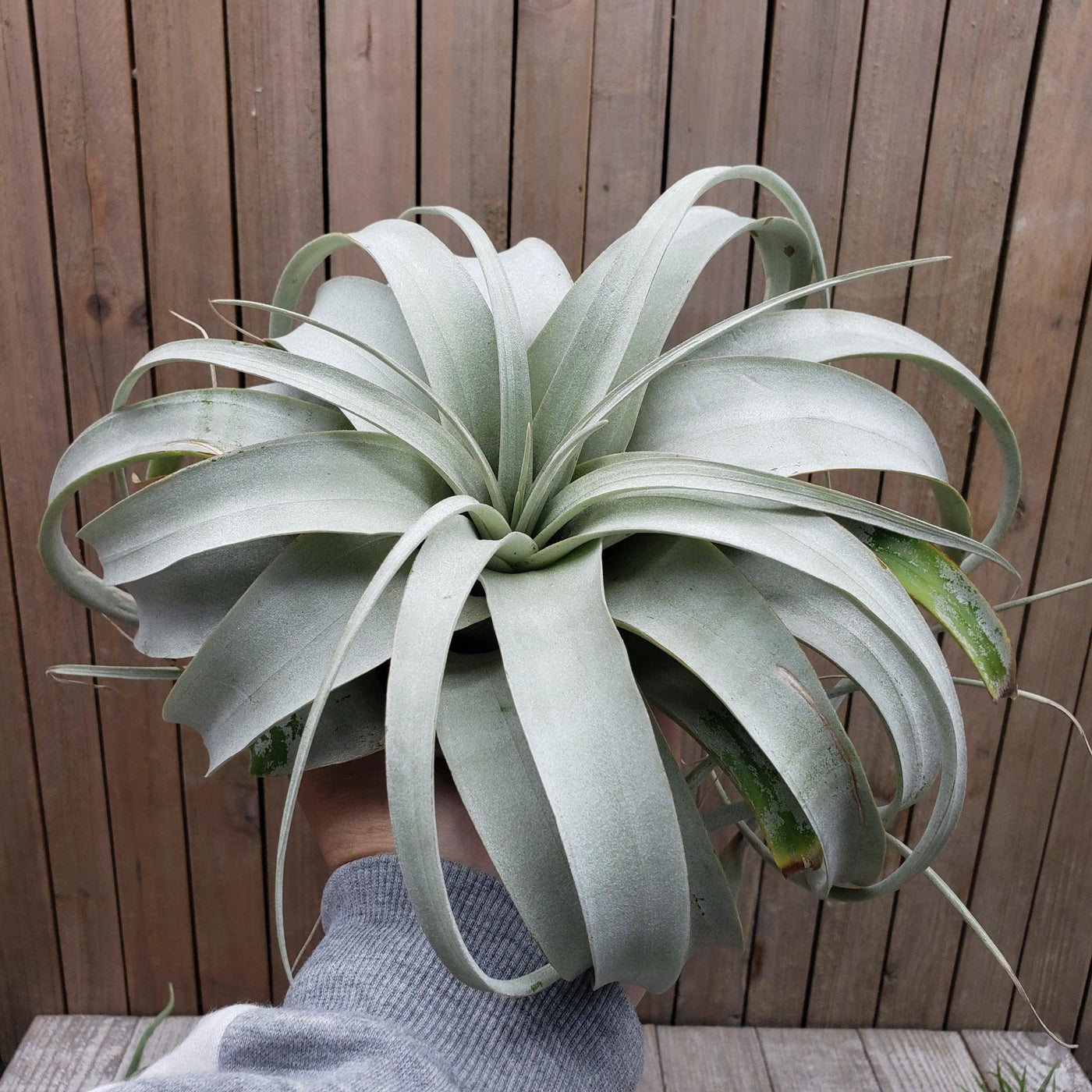
xeno air plant Get 'Tillandsia xerographica' For sale

Sale price$23.52 Regular price$26.13
Save 10%

Pay in installments of $6.53 with ShopPay, AfterPay and Klarna

Shipping Estimate
USA
  • USA
  • CAN

Ships within 48 hours · Estimated delivery Aug 7 - Aug 12

Promo Codes Available:

For Your Every Summer RSVP, with Code: SUMMER15

Description

xeno air plant Get 'Tillandsia xerographica' For saleWelcome to the world of the king of air plants Tillandsia xerographica, a stunning perennial, evergreen epiphyte that's bound to leave you in awe period. It reigns supreme over all other Tillandsias! Its name is derived from the Greek words "Xero" and "graphica; which both indicate "dry writing" or "dry painting." The "king or Queen" of air plants is another name for the Xerographica air plant. These slow growing Xerographica air plants are native to

Welcome to the world of the king of air plants - Tillandsia xerographica, a stunning perennial, evergreen epiphyte that's bound to leave you in awe period. It reigns supreme over all other Tillandsias! Its name is derived from the Greek words "Xero" and "graphica”; which both indicate "dry writing" or "dry painting." The "king or Queen" of air plants is another name for the Xerographica air plant. 

These slow-growing Xerographica air plants are native to Southern Mexico, El Salvador, and Guatemala, where you can find them hanging out in the topmost branches of subtropical forests. They cling to the trees and grow completely in the air, high in the forest canopy. Xeros stand out from other air plants in terms of aesthetic appeal. 

As they grow, their mossy green (silvery-gray leaves) flocked lovely thick leaves wrap and spiral around one another and are also covered in trichomes, which are small scales that help the xerographica air plant absorb moisture from the air. This produces a beautiful, nearly spherical air plant that will provide you with stunning living décor that is simple to maintain because of its sluggish growth habits. 

With its quite large growth of up to 3 feet in diameter with the leaves curving inward to form a tight rosette shape, as compared to other air plants, and low maintenance needs, this perennial evergreen large air plant is sure to impress and make it perfect for even the busiest gardener. 

Mature and large Tillandsia Xerographica blooms between spring and summer, and it takes years to flower. A single spiky inflorescence (floral bracts) bears bisexual red to purple Tillandsia Xerographica blooms. With a magnificent spike of long-lasting purple to crimson inflorescences, the tubular flowers, and stem can reach a height of one to three feet. Only under ideal conditions do plants bloom once during their lifespan. 

The typical Tillandsia Xerographica lifespan is about twenty years. Tillandsia Xerographica pups formed after the death of the flower at the base is the ideal way oftheir propagation from a mother plant. The Tillandsia Xerographica mini and adult plants are stunners in landscaping, balconies, and gardens. You can plant air plants in mounted displays and holders like terrariums and aeriums! 

Belonging to the esteemed Bromeliaceae family of plants (the beloved bromeliad family), Tillandsia xerographica exudes an irresistible charm fit for royalty in your stunning living decor! You can get this king of air plants for sale online at Planet Desert. In this product description, we'll take you through everything you need to know about caring for this xerographic air plant - from sun exposure to hardiness zones. So, let's dive in! 

Watering Needs 

When it comes to watering this king of the air plants Tillandsia xerographica, it's important to strike a balance. These air plants prefer to be underwatered rather than overwatered. A good rule of thumb is to mist, soak or rinse them once or twice a week, depending on the humidity of your environment. This stunning air plant gets its moisture from the morning dew instead of traditional roots. 

To water the Tillandsia xerographica, you can either mist it with water using a spray bottle or give it a thorough soak. When misting, make sure to evenly spray the leaves, allowing the water to gently coat them. If you choose to soak your air plant, you can submerge it in a deep bowl or basin of water for about 5 minutes, then let it drain by shaking excess water and dry completely before placing it back on its display. A few good shakes will drain the excess water and will help to protect it from rotting. 

Additionally, rinsing is indeed a great method for watering Tillandsia xerographica air plants. Giving them a gentle rinse under running water is an effective way to hydrate them. Just make sure to thoroughly wet the leaves, allowing the water to reach all parts of the plant. After rinsing with lukewarm water, hold your healthy plant upside down and let the excess water drain off and allow the plant to dry completely before placing it back in its display. This method helps mimic the natural rainfall that these plants would receive in their native habitats. 

Remember, it's important to avoid letting water sit in the center of the plant, as this can lead to rot. After watering, make sure to shake off any excess water and allow the plant to dry within a few hours. Providing proper air circulation is key to preventing any moisture buildup.

Light Requirements 

When it comes to light requirements, xerographica air plants are sun-loving epiphytes that prefer bright, indirect light for at least 4-6 hours daily. These plants thrive in a spot where they can receive ample amounts of filtered sunlight throughout the day. It's best to avoid placing them in direct sunlight for prolonged periods, as it can potentially scorch their delicate leaves. 

To provide the ideal lighting conditions, you can place your Tillandsia xerographica near a west-facing window with sheer curtains or window space in a location where it can receive bright light. This will help mimic the natural conditions these air plants would experience in their native habitats. 

Remember to observe your air plant closely and make adjustments to its placement if you notice any signs of stress, such as leaf discoloration or wilting of the green leaves. Finding the right balance of light is essential for the health and well-being of your Tillandsia xerographica air plant. 

Optimal Soil & Fertilizer Needs 

When it comes to soil, Tillandsia xerographica air plants don't require soil like other plants. They are epiphytic plants, which means they naturally grow on other surfaces and absorb nutrients and moisture from the air. Instead of soil, you can mount or place your Tillandsia xerographica on a piece of driftwood, bark, or other decorative surfaces. 

As for fertilizer, Tillandsia xerographica air plants have minimal nutritional needs. They can absorb nutrients directly from the air and rainfall. However, if you want to give them a little boost, you can use a specialized air plant bromeliad fertilizer or natural fertilizer with an equal mix of NPK. Apply the fertilizer sparingly, about once a year during the growing season. 

Remember, air plants are adapted to survive in nutrient-poor environments, so it's crucial not to over-fertilize them. Providing them with the right mounting surface and occasional light feeding will help keep your Tillandsia xerographica air plant healthy and thriving. They also are among theeasiest air plantsto grow in the home. 

Hardiness Zone & More

Tillandsia xerographica air plants are native to tropical regions and are typically found in USDA hardiness zones 10-11, which means they thrive in warm climates with minimum temperatures above 30°F.  

In terms of temperature, for Tillandsia xerographica air plants, the ideal temperature range is between 60°F and 80°F. They can tolerate slightly higher temperatures, but it's important to avoid exposing them to extreme heat or cooler temperatures. 

When it comes to humidity, these air plants prefer moderate to high humidity levels. They are adapted to tropical environments where humidity is naturally higher. To provide the optimal humidity for your Tillandsia xerographica, you can mist them with water a few times a week or place them in a humid location, such as a bathroom or near a humidifier. 

By providing the appropriate hardiness zone, temperature range, and humidity levels, you can create a favorable environment for your Tillandsia xerographica air plants to thrive and grow beautifully. 

Shipping Notes
  • Free Standard Shipping on $100+ Orders to the USA.
  • Except Preorder products are shipped in 48 hours.
  • Delivery to the USA:
  1. Standard Shipping : 3-10 business days
  • If time is of the essence, please consider selecting expedited delivery for faster service.
Exchange/Return Notes
  • We offer a 30-day return/exchange service after receiving.
  • Final sale items are not eligible for returns or exchanges.
  • To process your return/exchange, please contact us at [email protected]
  • Please click here for more details>>> Return & Exchange Policy
SKU: 67129467657

Discover Niche Categories That Outsell xeno air plant

Top-Converting Item to Boost Your Average Order

4.5 ★★★★★
Based on 12 reviews
Sort
Highest Rating
Newest First
Oldest First
Product Reviews
J
Verified Purchase
James
Birmingham, US
★★★★★ 5
Super easy to set up and start drawing
I was honestly shocked at how easy it was to connect it to my iPad. Opened the box and was expecting to see more inside of it, decided to see what happens when I put it up to my iPad and it connected instantly. Works great with my iPad m2 with touch sensitivity and spiral twist stuff in procreate. Really happy to not have to plug it in to charge. I’m planning to use this daily, so I needed to make sure it would actually feel good to hold in my hand and oh baby let me tell you, it does. It’s really smooth drawing wise, using it is intuitive. Fits on the iPad snug. I’d say give it a shot
WAS THIS REVIEW HELPFUL?YesReportShare
Reviewed in the United States on April 3, 2026
A
Verified Purchase
Alecia Hernandez
Cuba, US
★★★★★ 4
It works, but there’s some improvement needed.
The Apple Pencil Pro is easy to write with, not heavy like the other reviews made it seem, very nice and simple design, great battery life, great pressure sensitivity, and the squeeze feature and wireless charging is a nice touch. Theres one issue though, I’m an artist and student and I do a lot of work on my iPad. The pencil (or my iPad) glitches and randomly and switches me over to the eraser tool in the middle of me writing/drawing even when I turned the squeeze feature off.
WAS THIS REVIEW HELPFUL?YesReportShare
Reviewed in the United States on February 6, 2026
P
Verified Purchase
Patrick Cook
Fort Morgan, US
★★★★★ 5
Great laptop
Style: 256GB | Magic Keyboard, Color: Silver, Set: Without AppleCare+
The Neo has quickly become one of my favorite pieces of tech, and a big part of that comes down to two things Apple consistently gets right: MacOS and build quality. This is my first MacOS product and it is a joy to use. Everything feels smooth, intuitive, and thoughtfully designed. From the seamless integration with other Apple devices to the clean interface and reliable performance, it just works in a way that lets me focus on what I’m doing instead of fighting with the system. Then there’s the build quality, which is honestly second to none. The Neo feels incredibly solid the moment you pick it up. The aluminum chassis is sleek yet durable, with no flex or creaking, and the attention to detail is obvious in everything from the hinge to the keyboard. It has that premium feel that makes it clear you’re using a quality device. The trackpad is large and precise, easily the best I’ve used on any laptop, and the keyboard strikes a great balance between comfort and responsiveness. Overall, the Neo delivers a polished experience that’s hard to beat. Between the reliability and elegance of MacOS and the exceptional build quality, it’s a laptop that feels worth the investment.
WAS THIS REVIEW HELPFUL?YesReportShare
Reviewed in the United States on April 9, 2026
K
Verified Purchase
Keith Pearce
Lake Worth, US
★★★★★ 5
Impressive web PC, first time mac user, massive upgrade over a 4 year old Lenovo Yoga 13
Style: 256GB | Magic Keyboard, Color: Citrus, Set: Without AppleCare+
The neo is really impressive for $600. It has a nice screen, an incredibly rigid aluminum chassis, loads web pages and videos super fast, boots quick. Impressive Bluetooth and WiFi range and performance (Bluetooth is so much better then my old laptop), good speakers(for a laptop), good battery life, a decent keyboard, excellent trackpad, decent web cam, looks nice, low heat output and no vents to get blocked, compact and light. Highly recommended for anyone shopping for a compact web machine. The only negatives on the hardware are: lack of keyboard backlight, the interior edge of the chassis is sharp, not enough to cut you, but enough to be annoying when typing in some positions, not many ports just a normal USB C and a 2.0 speed USB C (both can be used for charging) and screen does not fold flat, so the laptop cannot be stood up against the wall. I was a bit unsure about the Neo because of it using a cellphone chip, but that was not a problem at all. The Neo is super snappy, as fast as my Workstation/Gaming PC when loading web pages and videos. Also I have not noticed any issues with the amount of RAM, 8GB seems sufficient for running a web browser, just as long as you do not go crazy on tabs in Chrome or if you use Firefox that actually manages tabs properly. As a web browser machine I doubt that this will have any performance issues. I am sure that you would hit limits of the mobile CPU if you do did something serious like video editing, but it is more then enough for more casual use. As someone who had never used a mac before I was a bit apprehensive about trying a different OS, but really it has been fine. I mostly just use my laptop to run a web browser, so I do not interact with the OS that much and MacOS is really pretty nice in many ways. The hardest thing to get used to will be the copy paste shortcuts using command instead of ctrl. Mostly MacOS functions about the same as windows, just better. You can just shut the lid on the Neo and it actually shuts off without hardly using any battery and instantly resumes when you open it again. When you do shut it down boot time is super fast. Mac's update system is pretty unobtrusive and just not stupid like windows update. Mac wants you to sign up to all of their AI and cloud stuff, but you do not have to. I did not even setup the app store. The only apps that I wanted were Firefox and a system wide EQ for my earbuds. I found eqMac on gethub, the free version works pretty well. Anyway don't let the different OS scare you away, MacOS is pretty decent and not really that much different then windows. I got used to it in 2 days of use. Also it should get 7 years of software support. Here is a comparison of the Neo with the 4 year old Lenovo Yoga 13 it is replacing. The Lenovo was $550 when new so a very similar price category from 4 years ago. Not sure if this will be useful to anyone so I am putting this at the end, but I figure that a lot of people will be in the same situation switching from a budget windows machine from a few years ago, Overall the Neo is better in almost every way, except for the screen not being able to fold around like the yoga and the lack of a backlit keyboard. The Neo is much faster, it way outperforms the AMD 4650u in my old lenovo when it comes to loading web pages and videos. My old laptop had started really chugging lately when loading YouTube and twitch videos. Not sure it there is something wrong my old laptop it or if web sites have just gotten that much harder to run. My old lenovo Yoga 13 has an absurd amount of flex in the plastic chassis, when you pick up one corner of the device the other edge sags visibly, the keyboard flexes noticeably when typing, the entire chassis will twist with very little effort. The chassis has also cracked in several places and I have been having to superglue it back together to keep the chassis from literally falling apart. The Neo on the other hand is completely rigid you can lift it anywhere, no flex in the keyboard, you would have to really try to do anything to this thing, it is amazing for a laptop of any price, much less a $600 one. Unless you really do something terrible to it I expect the Neo chassis to last well beond the lifetime of the hardware. The battery life on the neo is great, I would say it is about twice that of the lenovo, even though I just put a new battery in my lenovo 6 months ago. The Bluetooth range on the Neo is at least 2 times better, my earbuds would loose connection to the lenovo if I walked 20 feet away to go to the bathroom. I can walk anywhere in the house and stay connected to the Neo, range of about 40+ feet in the house and about 80+ feet outside. Not only the range is better but also Bluetooth connects faster and just works kind of flawlessly, while in windows I constantly had odd Bluetooth issues. This is with just some basic $30 Anker Bluetooth earbuds. WiFI range and throughput is also much better then my old laptop The yogo 13 had a good screen, so I do not find the screen of the Neo a huge upgrade, it is noticeably more vibrant and it is higher res, although I found 1980x1080 to be fine at this size. Also the Yoga 13 screen could fold all of the way back and around into any position you want and it was touchscreen, so some improvements and some downsides. Still the color on the Neo screen is very nice. The speakers in the Neo are many times better then the the Lenovo, my old Pixel phone even easily outdid the Lenovo, it had impressively bad speakers. The webcam on the Neo is also a big upgrade over the Lenovo, higher res and just better all around. The Neo has a macbook keyboard, so generally it is a very good laptop keyboard. It is not my favorite type of keyboard, but it works quite well and is fast to type. The trackpad is great, it is so much better then any windows computer trackpad that I have used, it functions a bit different so it takes a bit of getting used to, but it is just so much better then windows trackpads. As the Neo uses a cellphone chip it does not really need any cooling, so there are no vents and the chassis never gets hot or even warm. My old lenovo would get uncomfortably hot when charging and I had to be careful not to block the vents when using it on a bed or blanket, but that is not a problem with the Neo. There are no vents to block. Overall this thing is just impressive for $600 and I just do not see any windows laptop coming close to competing for a thin and light web machine. Sure if you want something that can game or do more intensive work stuff, but I just wanted something to run a web browser and this does that incredibly well while also being a beautifully well made device.
WAS THIS REVIEW HELPFUL?YesReportShare
Reviewed in the United States on March 29, 2026
T
Verified Purchase
Tallen Conway
Louisville, US
★★★★★ 5
Great Product
Style: 256GB | Magic Keyboard, Color: Indigo, Set: Without AppleCare+
I am blown away by the quality of this laptop. I paid much more for a MacBook in 2017 and this MacBook Neo is cheaper and much faster. The battery life is amazing and it performs well for what I use it for, which is mostly school work, streaming videos, creating presentations, and online tutoring. I also think the camera is very good for a laptop!
WAS THIS REVIEW HELPFUL?YesReportShare
Reviewed in the United States on May 17, 2026

recommand products