Pay in installments of $5.28 with
 ,
,
 and
and

Shipping Estimate
USA
- USA
- CAN
- USA
- CAN
Ships within 48 hours · Estimated delivery Aug 10 - Aug 15
 Promo Codes Available:
For Your Every Summer RSVP, with Code: SUMMER15
Description
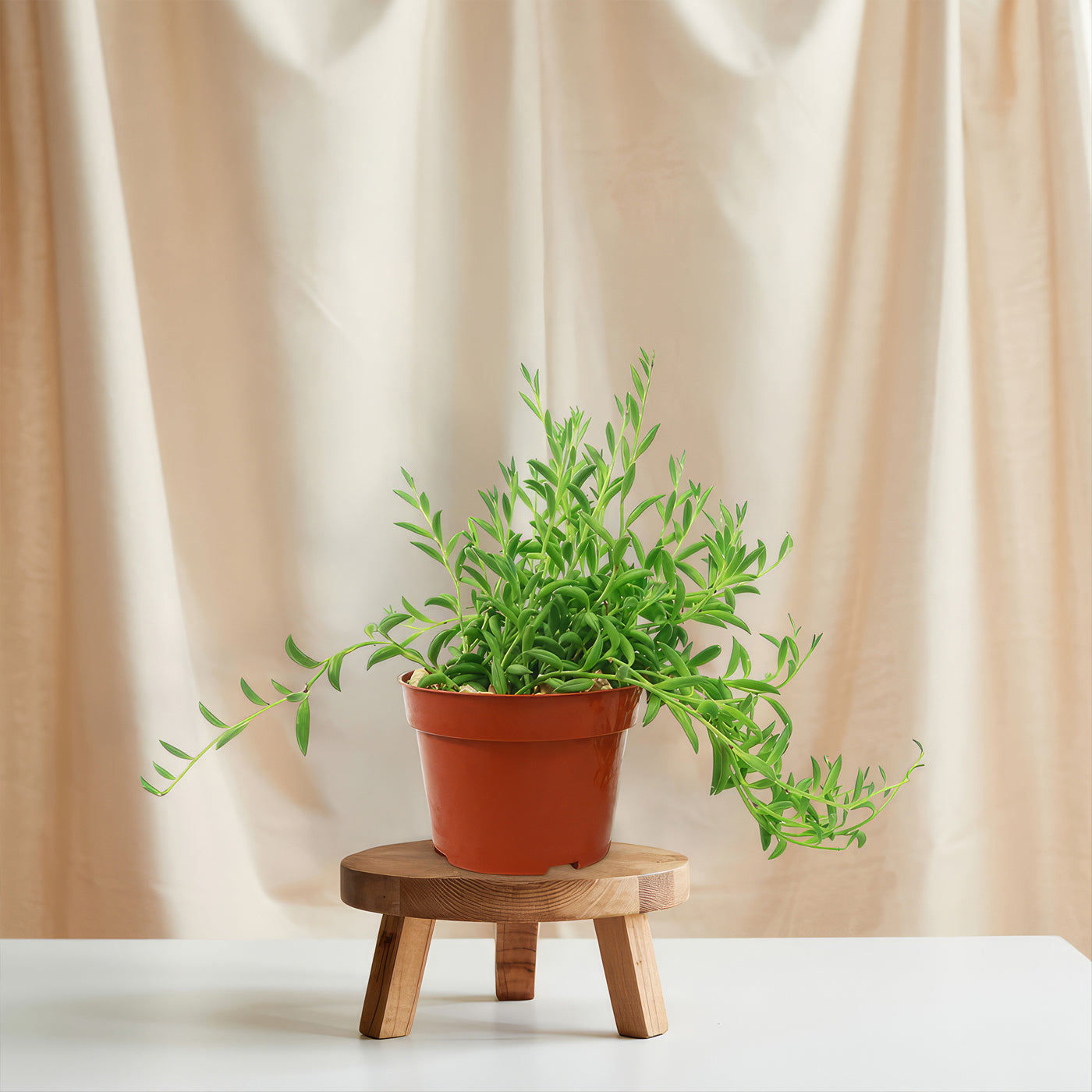
banana succulent plant care String of Bananas ‘Curio radicans’String of Bananas makes a great hanging plant, with its cascading vines and glossy, banana shaped leaves creating a flowing curtain of greenery. Native to South Africa, this fast growing succulent, formerly known as Senecio radicans and now classified as Curio radicans, adds texture and movement whether spilling from a hanging basket, trailing off a shelf, or softening the edge of a garden wall. The String of Bananas plant typically grows up to 3 feet
String of Bananas makes a great hanging plant, with its cascading vines and glossy, banana-shaped leaves creating a flowing curtain of greenery. Native to South Africa, this fast growing succulent, formerly known as Senecio radicans and now classified as Curio radicans, adds texture and movement whether spilling from a hanging basket, trailing off a shelf, or softening the edge of a garden wall.
The String of Bananas plant typically grows up to 3 feet long and 12 inches wide when grown in hanging containers, although the stems can extend longer in favorable outdoor conditions.
The vines are densely packed with glossy, green, banana-shaped leaves arranged in a semi-spiraled pattern.
These leaves are not only attractive but also serve a functional role by storing water during dry periods.
From late winter to early spring, the tiny, star-shaped white or pale pink flowers may release a light cinnamon or clove-like scent.
Flowering is more common outdoors or when grown in bright light and slightly cooler winter conditions.
Thanks to its durability and unique appearance, String of Bananas is popular in modern container arrangements, xeriscapes, vertical gardens, and minimalist interior designs. It’s worth noting that String of Bananas is often confused with “String of Fishhooks”, which is a slightly bluish-gray cultivar with thinner, longer leaves.
When and How to Water Your String of Bananas Plant
The drought-tolerant String of Bananas prefers to be watered every 7-10 days when the soil is completely dry in the spring and summer, and every 3-4 weeks or less in the fall and winter. Like most succulents, it stores water in its stems and leaves, making it more resilient to dry conditions than many houseplants. Overwatering is a common issue, so it’s always better to underwater than overdo it.
From spring to early fall, during the active growing season, water deeply but infrequently, typically every 7-10 days. Wait until the top 2-3 inches of soil are dry before watering again. Always ensure the pot has drainage holes to prevent root rot.
From late fall to winter, in the dormant season, you may only need to water once every 3–4 weeks. It’s best to err on the dry side when in doubt. In the winter, they are dormant, and if they receive too much water, they may quickly develop root rot.
Light Requirements – Where to Place Your Curio radicans
String of Bananas thrives in bright light, needing 4–6 hours of sunlight daily indoors and up to 6 hours of morning or filtered sun outdoors.
Whether grown indoors or outside, avoid placing your plant in full, deep shade; insufficient light causes stretched growth and a loss of the rich green color.
Rotate potted plants regularly to ensure even exposure and balanced trailing.
When grown indoors, place your String of Bananas near a south- or west-facing window where it can receive plenty of indirect light for at least 4-6 hours a day.
It can tolerate some direct sun, especially in the morning, but harsh midday rays through glass can scorch the leaves.
If your indoor space has lower light, consider supplementing with a grow light to prevent leggy or pale growth.
For outdoor growth, this Senecio plant flourishes in bright, filtered sunlight or partial shade, particularly in hot climates. Aim for about 4 to 6 hours of early morning sun, followed by indirect light or dappled shade in the afternoon. If you're in a coastal or mild zone, it can take more sun, but in desert or high-heat regions, afternoon shade is best to prevent sunburn.
Optimal Soil & Fertilizer Needs
Use a fast-draining cactus or succulent mix, and feed lightly once a year in the spring during the active season. The ideal soil for String of Bananas is a gritty, well-aerated mix that allows excess moisture to drain quickly. Planet Desert specializes in succulents and has specialized succulent potting soil, opens in a new tab that includes an organic substrate with mycorrhizae to help with the growth of a healthy root system, to help your succulents thrive. Remember, good drainage is essential to prevent root rot, especially in hanging containers or shallow pots.
In the spring, during the growing season, fertilize once a year with a diluted liquid NPK fertilizer or a balanced formula like 5-10-5 at half strength. This helps encourage vigorous trailing growth and overall plant health. Avoid over-fertilizing, as it can lead to weak stems and overly rapid growth that becomes leggy.
Do not fertilize during the fall and winter when the plant enters dormancy. Its nutrient needs decrease significantly, and any excess fertilizer may harm the roots or cause salt buildup in the soil.
Hardiness Zones & More
The String of Bananas thrives indoors in 60-80°F with low humidity and bright light, and outdoors in USDA Zones 9-11 with frost protection.
If you're growing it in a humid climate, ensure the plant is in a breezy spot with good airflow to prevent fungal issues.
Always bring it indoors before temperatures drop below freezing, as this succulent is not frost-hardy.
When growing indoors, this plant prefers bright indirect light with warm temperatures between 60°F and 80°F. It handles average home humidity well, but it’s important to maintain good air circulation, especially in high humidity or if placed in bathrooms.
In the United States, this is mostly an indoor plant, but if you live in southern Florida or Hawaii, then you can cultivate it outdoors in USDA zones 9-11. In these zones, it does best with partial sun to filtered light and should be protected from extreme midday heat or cold winds. In colder zones, it must be overwintered indoors.
Wildlife – String of Bananas Flowers Attract the Following Friendly Pollinators
The string of banana flowers is known to attract various friendly pollinators such as bees, butterflies, and hummingbirds due to their sweet nectar and vibrant colors. These pollinators play a crucial role in the ecosystem by helping to fertilize plants and promote biodiversity.
According to the ASPCA, Senecio radicans is mildly toxic to humans, cats, and dogs if ingested, so keep it out of reach of curious pets. However, it is safe to touch and handle, which makes it a popular choice for hanging baskets or indoor planters.
How to Propagate Your String of Bananas Plant
The string of banana Propagation is simple and highly successful with stem cuttings. Snip a healthy stem with several leaves and let it dry for a day to allow the cut end to callous. Then, place the cutting on top of moist succulent soil or insert it slightly into the mix. Roots typically develop within a few weeks. You can also root cuttings in water first, then transplant them once roots are visible. Keep the propagated plants in bright, indirect light while they establish.
Key Takeaways
- String of Bananas is a fast-growing, trailing succulent known for its cascading vines filled with banana-shaped leaves, making it a popular choice for creating lush, hanging displays.
- It thrives in hanging baskets, window boxes, or elevated containers, where its vines can spill down gracefully, adding vertical interest to any indoor or outdoor space.
- This plant is drought-tolerant once established, requiring minimal watering and thriving in well-draining soil, making it ideal for low-maintenance gardeners.
- It can grow up to 3 feet long, with vines that quickly fill in and trail beautifully, giving a full, dense appearance with proper light and care.
- String of Bananas can also be used as ground cover in warm climates, spreading along the soil surface while maintaining its signature quirky leaf shape.
The Bottom Line
Overall, the String of Bananas (Curio radicans) is a fast-growing, drought-tolerant succulent known for its cascading, banana-shaped leaves and ease of care. It thrives with bright light, minimal watering, and well-draining soil, making it a favorite for both beginner plant lovers and succulent collectors. Whether used indoors in hanging baskets or outdoors in rock gardens, it adds lush texture and movement to your design.
Shipping Notes
- Free Standard Shipping on $100+ Orders to the USA.
- Except Preorder products are shipped in 48 hours.
- Delivery to the USA:
- Standard Shipping : 3-10 business days
- If time is of the essence, please consider selecting expedited delivery for faster service.
Exchange/Return Notes
- We offer a 30-day return/exchange service after receiving.
- Final sale items are not eligible for returns or exchanges.
- To process your return/exchange, please contact us at [email protected]
- Please click here for more details>>> Return & Exchange Policy