SKU: 76064745564
real succulent plants for sale

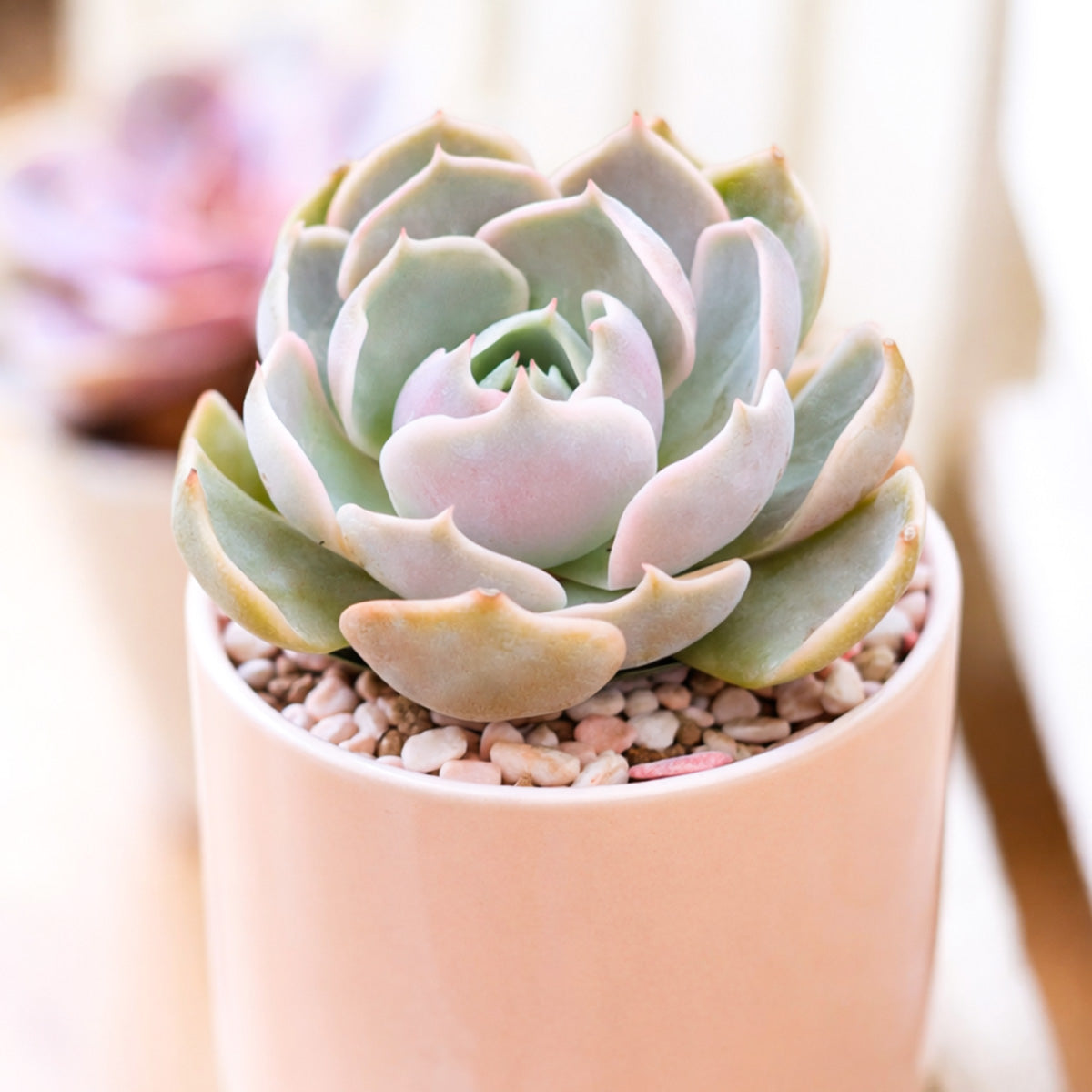
real succulent plants for sale Echeveria Lotus

Sale price$26.26 Regular price$29.18
Save 10%

Pay in installments of $7.29 with ShopPay, AfterPay and Klarna

Shipping Estimate
USA
  • USA
  • CAN

Ships within 48 hours · Estimated delivery Aug 5 - Aug 10

Promo Codes Available:

For Your Every Summer RSVP, with Code: SUMMER15

Description

real succulent plants for sale Echeveria LotusDescription Echeveria 'Lotus' Care Guide FAQ Common Issues Echeveria 'Lotus' is a stunning rosette succulent that belongs to the Crassulaceae family, prized for its lotus like formation and compact beauty. This drought tolerant succulent originates from the mountainous regions of Mexico, where it naturally grows in rocky, well draining conditions. This compact succulent forms perfect rosettes with thick, fleshy leaves that display gorgeous pink and

  •   Echeveria 'Lotus' is a stunning rosette succulent that belongs to the Crassulaceae family, prized for its lotus-like formation and compact beauty. This drought tolerant succulent originates from the mountainous regions of Mexico, where it naturally grows in rocky, well-draining conditions.

      This compact succulent forms perfect rosettes with thick, fleshy leaves that display gorgeous pink and green coloration, especially when grown in bright light. Echeveria 'Lotus' showcases pale green to blue-green leaves with delicate pink edges that intensify with sun exposure, creating a mesmerizing lotus flower appearance. The rosette succulent typically reaches 4-6 inches across, making it an ideal desk plant for small spaces.

      Echeveria 'Lotus' produces tall flower spikes with bell-shaped blooms in shades of coral, pink, or orange during spring and summer months. The indoor plant shows clear signs when thirsty through slight leaf wilting, making it incredibly beginner friendly for new succulent enthusiasts. This low maintenance beauty tolerates dry heated air exceptionally well, thriving in typical home environments.

      This echeveria succulent excels as both an indoor plant and outdoor specimen, easily moving outside for summer growth and staying outdoors through autumn. Echeveria 'Lotus' grows beautifully under office LEDs and survives 10-day trips alone, making it perfect for busy plant lovers. The plant is pet friendly and propagates readily from leaf cuttings or offsets, adding to its appeal among collectors seeking rare rosette succulents.

  •   Echeveria 'Lotus' thrives in bright indirect light to direct sun, adapting well to various lighting conditions indoors.

      Water Echeveria 'Lotus' deeply every 7-14 days during growing season, allowing soil to dry completely between waterings.

      Echeveria 'Lotus' requires well-draining cactus mix or regular potting soil amended with perlite and coarse sand.

      Echeveria 'Lotus' prefers temperatures between 65-80°F (18-27°C) and tolerates brief cold snaps to 25°F (-4°C).

      Echeveria 'Lotus' grows slowly to moderately and needs minimal fertilizer, requiring only diluted succulent fertilizer monthly during spring.

      Echeveria 'Lotus' thrives in USDA hardiness zones 9-11 and can tolerate brief frosts down to 25°F (-4°C). These zones encompass Florida, southern California, southern Texas, southern Arizona, Hawaii, southern Louisiana, coastal Georgia, coastal South Carolina, southern Nevada, and parts of coastal Oregon. The succulent also grows well in protected microclimates throughout Alabama, Mississippi, North Carolina's coast, and select areas of Tennessee and Arkansas where winter temperatures rarely drop below freezing.
  • Q: Is Echeveria 'Lotus' safe for pets and children?
    A: Yes, this plant is pet friendly and safe around cats, dogs, and children. Echeveria 'Lotus' contains no toxic compounds that would harm pets if accidentally nibbled.

    Q: How often should I water my Echeveria 'Lotus'?
    A: Water Echeveria 'Lotus' every 7-14 days during spring and summer, reducing to every 3-4 weeks in winter. Always wait until soil is completely dry between waterings.

    Q: Can Echeveria 'Lotus' grow in low light conditions?
    A: While Echeveria 'Lotus' prefers bright indirect to direct light, it can survive in lower light and grows successfully under office LED lighting. Colors will be less vibrant in low light conditions.

    Q: How do I propagate Echeveria 'Lotus'?
    A: Propagate Echeveria 'Lotus' by gently removing healthy leaves and letting them callus for 2-3 days before placing on well-draining soil. You can also separate offsets that form around the base of the mother plant.

    Q: Why are my Echeveria 'Lotus' leaves turning yellow?
    A: Yellow leaves on Echeveria 'Lotus' typically indicate overwatering or poor drainage. Reduce watering frequency and ensure your pot has drainage holes with well-draining succulent soil.

    Q: How big does Echeveria 'Lotus' get?
    A: Echeveria 'Lotus' reaches 4-6 inches across and 3-4 inches tall at maturity. This compact size makes it perfect for desks, windowsills, and small container gardens.

Shipping Notes
  • Free Standard Shipping on $100+ Orders to the USA.
  • Except Preorder products are shipped in 48 hours.
  • Delivery to the USA:
  1. Standard Shipping : 3-10 business days
  • If time is of the essence, please consider selecting expedited delivery for faster service.
Exchange/Return Notes
  • We offer a 30-day return/exchange service after receiving.
  • Final sale items are not eligible for returns or exchanges.
  • To process your return/exchange, please contact us at [email protected]
  • Please click here for more details>>> Return & Exchange Policy
SKU: 76064745564

Discover Niche Categories That Outsell real succulent plants for sale

Top-Converting Item to Boost Your Average Order

4.8 ★★★★★
Based on 8 reviews
Sort
Highest Rating
Newest First
Oldest First
Product Reviews
D
Verified Purchase
Dalia
Dallas, US
★★★★★ 5
Excellent Screen Protector!
Model: iPad 11th A16 2025/10th, Model: iPad 11th A16 2025/10th
This screen protector was easy to install and fits my iPad perfectly. The screen remains clear and responsive, and it provides great protection against scratches and fingerprints. Very happy with this purchase
WAS THIS REVIEW HELPFUL?YesReportShare
Reviewed in the United States on June 4, 2026
G
Verified Purchase
gaby rosabal
Battle Creek, US
★★★★★ 5
Great quality and protection.
Model: iPad 11th A16 2025/10th
I'm really happy with this screen protector. It fits the iPad perfectly and doesn't interfere with cases. It feels very sturdy and scratch-resistant, giving me peace of mind. Definitely worth it.
WAS THIS REVIEW HELPFUL?YesReportShare
Reviewed in the United States on May 31, 2026
L
Verified Purchase
Lori K
Bozeman, US
★★★★★ 5
Easy set up
Model: iPad Pro 12.9 2022/2021/2020/2018
Nice product. I cracked my screen in my iPad and wanted something to keep it from getting worse
WAS THIS REVIEW HELPFUL?YesReportShare
Reviewed in the United States on June 12, 2026
Z
Verified Purchase
Z-06
Boise, US
★★★★★ 5
4 years on - Still - A very good printer, if you can ignore its demands to update firmware
Style: WF-7840, Set: DUAL TRAY (500 sheets)/FAX/ADF/PRINT/COPY/SCAN
Summary: It is an excellent printer (4.6 out of 5) if you don't mind its constant requirements to update the firmware, which I have not since the day I bought it. I have had this printer for over a year. It has printed close to 5,000 pages of different sizes, papers, colors and document types. As someone said in the other posts (a big thank you), firmware update is only to drive users to get Epson's proprietary ink cartridges. When the printer harasses me to update the firmware, I just keep on ignoring it. Epson does a good job to harass you both on the printer and computer - just ignore it. Pros: 1. Only printer for <$500, which could print Ledger paper (11x17), which was a must for me. This thing prints beautiful and very crisp AutoCAD drawings. The lineweights and scales are phenomenal. 2. Excellent printing quality using stock and generic print cartridges. The printer can be really customized to get the right tones and textures for your print. Works very well with heavy stock papers and photo papers. I am yet to try any stickers, but I do not foresee any issues with it. 3. Good printing speed. It is not blazing like the commercial printers you find in the offices, but it is very fast for what it does. 4. Excellent connectivity. I had no issues with using either Ethernet or wireless. The printer can print on my Windows devices and Mac machine. I do not print from my phone, so cannot comment on that. 5. Heavy duty. The printer has printed approx. 5,000 pages so far without any troubles. I have not seen it overheat nor do any weird activities when it is printing. Indifferent: 1. Scanning. While scanning quality is very good, the direct scan option is cumbersome. You cannot use the scan button on the printer to scan into the computer disk. You have to go to the computer and activate the scan software to perform scanning. This can be an issue, if you have a setup where your office is on one floor and the printer is on another, like I have in my home. Cons: 1. Heavy. This thing is decently heavy and bulky. Don't try to keep on moving it or have it in your mobile office. Also, make sure to have a good sturdy and stable table. The printer twerks, jerks, sashays, parries. 2. Constant harassment to update the firmware. It can sometime be very annoying, but that's a small price to pay, if you get to ignore it. Look at the bigger picture. Price: When I bought it, the price was just below 3 bills, I understand it has gone up by half a bill (however, I am seeing the price going >$400 on some occasions). The new price of 3 and a half is not bad given the shape of the economy and supply chain issues. Also, the OEM cartridges (812) are cheaper at Staples than trying to Subscribe and Save here. Bottom-line: A very good printer, if you ignore and disprove its petulance to update itself. Update 3/23/2023 - I have had it now for over 2 years. The printer continues to print flawlessly and as of now has little under 10,000 pages printed of different sizes and paper weights. It still begs to update its firmware, which I have not done since its purchase. The only wishlist item I have for this printer is if it were to come with the Epson ink-tank. Update 3/28/2024 - Three years into it I have, still not updated it. The printer continues the work. I have now printed about 12,000 pages. In December, after I replaced all my cartridges, it started missing colors' tones, textures, and locations. Did full printer head alignment and cleaning twice (instructions are clear on the printer screen under Settings-> Maintenance menu). Printed test pages, and now it is working flawlessly. Update 3/20/2025 - Marks 4 years of running this printer. Definitely the least amount of pages printed annually - about 1,500. No firmware update performed and it still cries to update. Still running strong on both inks - generic and branded. There is a seller on eBay that offers XL cartridges for the colored ones too. Definitely worth giving a shot. If you are in a market for a prosumer printer consider this one in your list, if you can get it below $300.
WAS THIS REVIEW HELPFUL?YesReportShare
Reviewed in the United States on May 4, 2022
E
Verified Purchase
Ed Bello
Pawtucket, US
★★★★★ 5
Back with Epson after 5 year break of 2 Decades of Epson usage
Style: WF-7840, Set: DUAL TRAY (500 sheets)/FAX/ADF/PRINT/COPY/SCAN
Monster of a printer/scanner/all-in-one. Love it so far. No issues, I just need to get used to all the options. I have it for my home office and business. I veered away from Epson 5 years ago after 2 decades of Epson printers but I am happy I am back with Epson. Jet ink, one needs to print color every one or 2 weeks or the jets may clog on any ink jet printer. I have been there many times..... test print if needed.
WAS THIS REVIEW HELPFUL?YesReportShare
Reviewed in the United States on May 27, 2026

recommand products