Pay in installments of $6.49 with
 ,
,
 and
and

Shipping Estimate
USA
- USA
- CAN
- USA
- CAN
Ships within 48 hours · Estimated delivery Sep 29 - Oct 4
 Promo Codes Available:
For Your Every Summer RSVP, with Code: SUMMER15
Description
monstera thai constellation plant care Shop 'Thai Constellation Monstera' Care & Growing GuideThe Thai Constellation Monstera, is a popular, climbing plant prized for its beautiful, creamy white and green variegated large leaves. A naturally occurring mutation of Monstera deliciosa, which is known for its large, split leaves with dramatic fenestrations (holes) as it matures. What sets the Thai Constellation apart is its unique variegation, with splashes and flecks of white that resemble stars scattered across a dark green background, which is
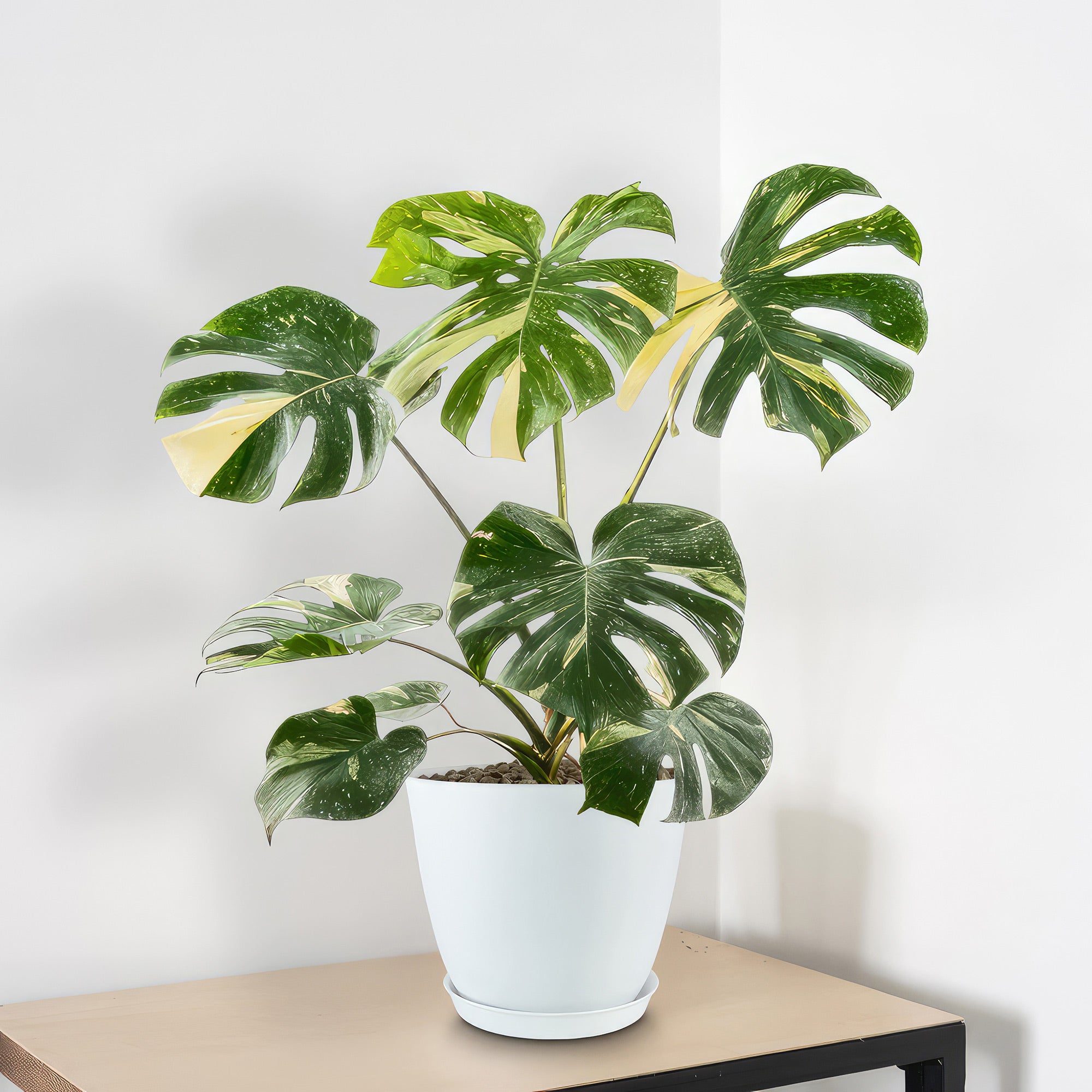
The Thai Constellation Monstera, is a popular, climbing plant prized for its beautiful, creamy white and green variegated large leaves. A naturally occurring mutation of Monstera deliciosa, which is known for its large, split leaves with dramatic fenestrations (holes) as it matures.
What sets the Thai Constellation apart is its unique variegation, with splashes and flecks of white that resemble stars scattered across a dark green background, which is why it’s named “Thai Constellation.” This Monstera has gained considerable popularity among plant collectors and interior design enthusiasts for its impressive leaf size, easy care requirements, and stunning visual appeal.
The Thai Constellation Monstera’s origins trace back to Southeast Asia, particularly Thailand, where it was selectively bred for its rare variegation. It grows as an epiphytic plant, meaning it can climb trees and other structures to reach sunlight in the forest canopy. Its natural habitat contributes to its preference for warm, humid conditions, where it thrives in indirect sunlight and well-drained soil.
The Thai Constellation Monstera is distinguished by its large, heart-shaped leaves that, with maturity, develop dramatic splits and holes. The small holes or transparent areas in a plant's leaves is thought to be an adaptation to the rainforest, allowing sunlight to filter through to lower plants.
The Thai Constellation’s leaves are marbled with white and creamy-yellow patterns, giving each leaf a unique appearance. Mature Thai Constellations can grow to impressive sizes, with leaves reaching up to 4 feet wide and the entire vine plant capable of reaching 16 feet in height when provided with ample support, such as a moss pole or trellis.
Thai Constellation flowers are creamy-white and typically bloom in mature plants during the warm growing season. These inflorescences feature a spathe that encloses a spadix, resembling the blooms of other aroids like the peace lily. While the flowers are beautiful, most growers focus on the plant’s unique foliage and often remove blooms to promote leaf growth.
In its natural habitat it produce gorgeous edible fruit that has a flavor reminiscent of pineapple, but flowering and fruiting are rare occurrences indoors, where light and humidity conditions usually aren’t sufficient for this process.
The Thai constellation Monstera cuttings once costing a few hundred dollars, has come down in price in recent years, making it more affordable and accessible. This monstera is surprisingly easy to grow at home and requires little care, even though it is rare.
Beyond its aesthetic appeal, the Monstera deliciosa Thai Constellation provides several benefits. Like many tropical plants, it can help purify indoor air by removing toxins and increasing humidity levels, which contributes to a healthier indoor environment. Additionally, its large leaves release moisture, making it a natural humidifier. It’s beautiful, variegated foliage brings an element of nature into living spaces, creating a calming and relaxing atmosphere, which has been shown to reduce stress and improve mood.
When and How to Water Your Thai Constellation Plant
Like other drought-tolerant plants, Thai Constellation Monstera prefers minimal watering once established. When it comes to watering needs, it's essential to strike a balance to ensure the plant remains healthy.
In the spring and summer, during the growing season, Monstera Thai Constellation is actively growing and will require more frequent watering typically once a week. Water the plant thoroughly when the top inch or two of the soil feels dry. Ensure that excess water can drain away to prevent waterlogging, as this can lead to root rot. Water the plant consistently but allows the soil to dry out slightly between waterings to mimic its natural habitat.
In the fall and winter, during the dormant season, its growth slows down, and watering needs decrease once every 2-3 weeks. During this time, reduce the frequency of watering but still monitor the soil's moisture levels. Water the Thai Constellation Monstera sparingly, allowing the soil to dry out more between waterings. It's crucial to adjust your watering routine based on the plant's growth cycle to prevent overwatering, which can be detrimental to its health.
By observing the plant's growth patterns, adjusting watering frequency accordingly, and ensuring proper drainage, you can help your plant thrive while respecting its drought-tolerant nature.
Light Requirements – Where to Place Your Thai Constellation Monstera
When grown indoors, place your Thai constellation near a window where it can receive filtered sunlight or indirect light for at least 4-6 hours a day. Avoid placing it in direct sunlight, as this can scorch the leaves. If the plant is not receiving enough light, its variegation may fade, so ensure it gets adequate light to maintain its vibrant appearance.
For outdoor cultivation, these Monstera Thai constellation plants thrive in bright, indirect light or dappled shade. They can benefit from morning sunlight or filtered light throughout the day.
Avoid exposing the plant to harsh afternoon sun, especially in hot climates, as this can damage the leaves. Providing the right balance of light outdoors will help the plant grow healthily and maintain its striking variegation.
Whether grown indoors or outdoors, Thai Constellation Monstera's light requirements play a crucial role in its overall health and appearance. By ensuring the plant receives the appropriate amount of light, you can help it thrive and showcase its beautiful, variegated leaves to their full potential.
Optimal Soil & Fertilizer Needs
Thai Constellation Monstera thrives in well-draining soil that retains some moisture but does not become waterlogged. A good potting mix for this plant is a combination of peat moss, perlite, and orchid bark to provide the right balance of aeration and moisture retention. Planet Desert specializes has Go to soil cactus mix blend 1 gal 4 qt cacti succulent dirt compost growing media that includes an organic substrate with mycorrhizae to help with the growth of a healthy root system to help your Monstera Thai constellation thrive. When repotting or planting your Thai Constellation plant, ensure the soil is well-draining to support its growth.
When it comes to fertilizer needs, Monstera Thai Constellation benefits from minimal feeding during the growing season to support its lush foliage. A balanced NPK fertilizer with an equal ratio of 5-10-5 can be applied once a year during the growing season in the spring. This helps provide essential nutrients for healthy growth and vibrant leaves. However, during the plant's dormant season, reduce or stop fertilizing to allow the plant to rest.
By ensuring the Thai monstera constellation roots have access to the right nutrients and soil conditions, you can help it thrive and maintain its stunning appearance. Remember to adjust your fertilization schedule based on the plant's growth cycle to support its overall health and well-being.
Hardiness Zones & More
When grown indoors, Thai Constellation Monstera prefers temperatures between 65-80°F with bright, indirect light. It thrives in a warm and humid environment, making it ideal for indoor spaces with consistent temperatures. To maintain the plant's health, avoid exposing it to sudden temperature fluctuations or drafts, as this can stress the plant and affect its growth. Keeping the indoor environment stable and comfortable will help your Monstera plant thrive.
For outdoor cultivation, your Thai Constellation plant is typically suited for USDA zones 10-12. These zones generally have milder winters and warmer temperatures, which are favorable for tropical plants like the Monstera Thai Constellation.
If you live in a region outside these zones, you can still grow the plant outdoors during the warmer months and bring it indoors during colder periods to protect it from frost and low temperatures.
By understanding the temperature and humidity preferences of Thai Constellation, you can create an environment that mimics its natural habitat and supports its growth. Remember to adjust care practices based on the season and environmental conditions to ensure the plant remains healthy and vibrant.
Wildlife – Monstera Thai Constellation Attracts the Following Friendly Pollinators
The Thai Constellation Monstera is known to attract pollinators such as bees, hummingbirds, butterflies, and other beneficial insects due to its unique and fragrant flowers. These pollinators play a vital role in the plant's reproductive process by transferring pollen from one flower to another, leading to fruit production in Monstera.
According to the ASPCA, Monstera plants are considered mildly toxic to humans and pets and can cause symptoms like oral irritation, drooling, vomiting, and difficulty swallowing if consumed. It is recommended to keep these plants out of reach of pets and children to prevent accidental ingestion and ensure their safety.
How to Propagate Your Thai Constellation Plant
To propagate your Thai Constellation plant, you can take stem cuttings from a healthy, mature plant. Make sure the cutting has at least one node, as this is where roots will develop. Place the cutting in water or a well-draining soil mix until roots form, then transplant into a pot with fresh soil. Keep the new plant in a warm, humid environment to encourage growth, and continue to care for it as you would an established plant. With proper Monstera Thai constellation care and patience, your propagated plant will grow into a beautiful and healthy plant, ready to adorn your space with its stunning variegated leaves.
Key Takeaways
- The Thai Constellation Monstera displays stunning, creamy-white marbling across its dark green large leaves, resembling a starry constellation, making each leaf truly unique.
- The Thai Constellation Monstera is an excellent climber, using aerial roots to attach itself to supports like moss poles or trellises, which encourages it to grow larger leaves with more pronounced fenestrations.
- Mature leaves develop splits and fenestrations, mimicking rainforest adaptations to let light filter through to lower plants and giving it an iconic “Swiss cheese” look.
- Bred in Thailand, this rare Monstera cultivar is surprisingly drought-tolerant for a tropical plant, able to withstand brief periods of dryness, though it thrives with consistent moisture.
- It absorbs toxins and increases humidity in indoor spaces, helping improve air quality naturally.
- While rare indoors, it can produce flowers and fruit with a pineapple-like flavor under ideal conditions, adding to its unique appeal
The Bottom Line
Overall, the Thai Constellation Monstera is a stunning tropical plant that brings a touch of celestial beauty to any indoor space with its unique, star-like variegated large leaves and impressive size. This rare cultivar adds both aesthetic appeal and functionality by helping to purify indoor air and increasing humidity. Although it’s a tropical plant, the Thai Constellation is relatively easy to care for, thriving best in bright, indirect light with moderate humidity and well-draining soil. While it’s drought-tolerant enough to withstand occasional dry periods, regular watering helps it reach its fullest potential. Given adequate support and the right indoor conditions, it makes a captivating, low-maintenance addition to any plant lover’s collection. Order your very own Monstera Thai constellation for sale today!
Shipping Notes
- Free Standard Shipping on $100+ Orders to the USA.
- Except Preorder products are shipped in 48 hours.
- Delivery to the USA:
- Standard Shipping : 3-10 business days
- If time is of the essence, please consider selecting expedited delivery for faster service.
Exchange/Return Notes
- We offer a 30-day return/exchange service after receiving.
- Final sale items are not eligible for returns or exchanges.
- To process your return/exchange, please contact us at [email protected]
- Please click here for more details>>> Return & Exchange Policy