SKU: 82419675838
chiseled stone succulent

chiseled stone succulent Lithops Mesembs & Mimicry Succulents 2.5" Lithops

Sale price$24.68 Regular price$27.42
Save 10%

Pay in installments of $6.86 with ShopPay, AfterPay and Klarna

Shipping Estimate
USA
  • USA
  • CAN

Ships within 48 hours · Estimated delivery Oct 9 - Oct 14

Promo Codes Available:

For Your Every Summer RSVP, with Code: SUMMER15

Description

chiseled stone succulent Lithops Mesembs & Mimicry Succulents 2.5" Lithops***PLEASE Read, Mesemb info below*** Lithops are AWESOME! Watering: Please Note: Lithops are NOT a type of "Water When Dry" plant. DO NOT WATER WHEN THEY ARE SPLITTING WITH NEW Lithops on their middle* ONLY water when the new leaves come and the old leaves have shriveled. This can be 2 times a year. A light misting once a month is OK in very hot summer months. NEVER water in the winter months as they go dormant. That's all they need!! They are

 ***PLEASE Read, Mesemb info below***

Lithops are AWESOME!

Watering: Please Note:  Lithops are NOT a type of "Water When Dry" plant. DO NOT WATER WHEN THEY ARE SPLITTING WITH NEW Lithops on their middle*

ONLY water when the new leaves come and the old leaves have shriveled. This can be 2 times a year.  A light misting once a month is OK in very hot summer months.  NEVER water in the winter months as they go dormant.   That's all they need!!    They are extremely prone to root rot!

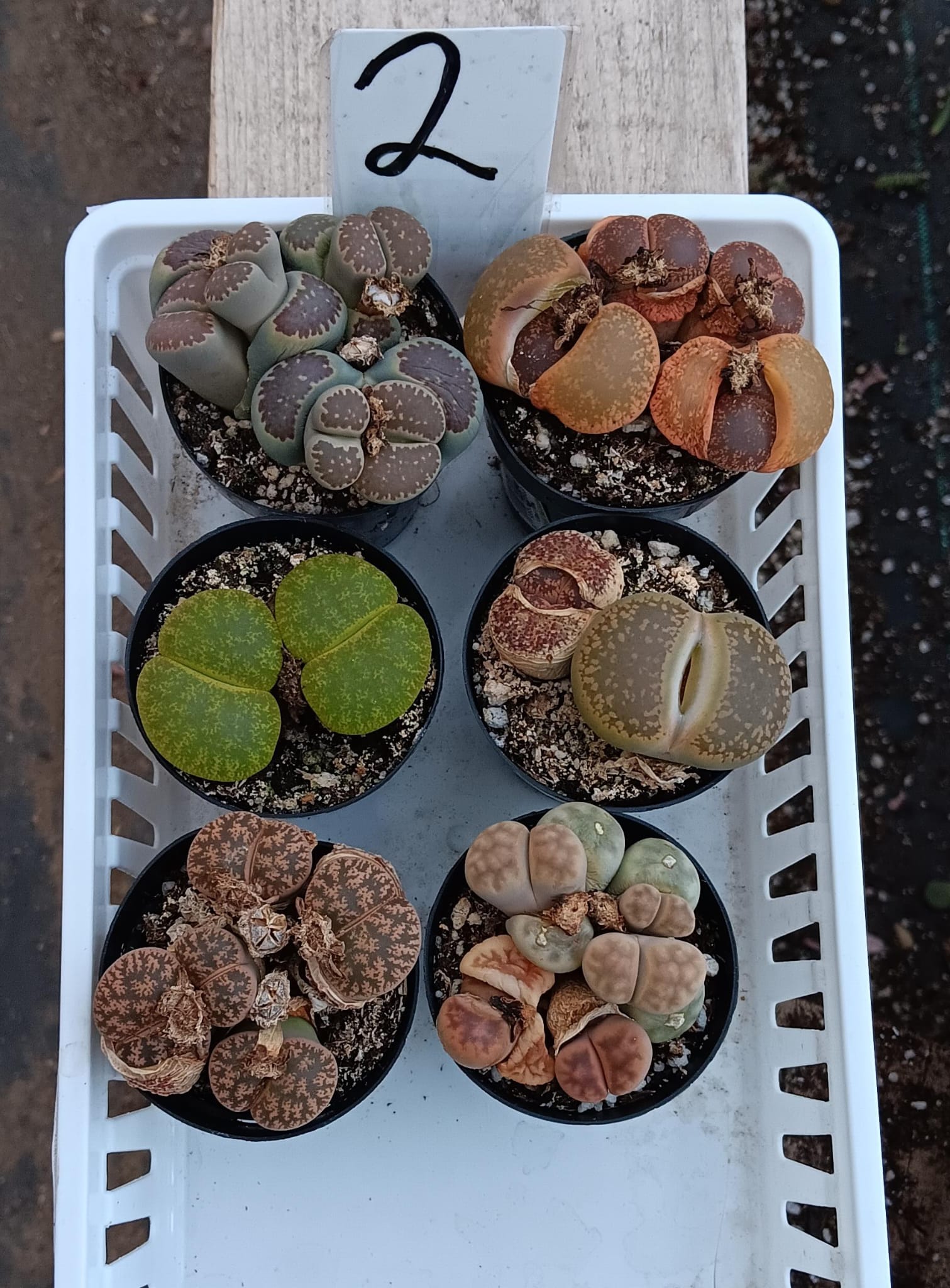
Lithops aka Living Stones, collection of individual lithops, they come in a 2.5″ plastic container usually containing 2-4 lithops in each container, but sometimes/rarely only 1 very larger and mature one, based on stock, size and other factors. Sometimes we also ship them in plastic square 2" containers, they will have multiples as well. Sizes and colors of lithops vary based on current stock and season!!!  Please note that 99% of lithops are browns and grays. Other colors are a rarity.  If you are looking for a large variety of colors, please email first as we cannot guarantee the colors we have in stock.

2", 2.5", 3.5" etc. refers to approx. container size.  Each quantity is for ONE container, unless it's an exact listing for multiple containers. 

***Depending on the Lithop growing season, sometimes lithops will begin to naturally split, crack etc.  Lithops can have scars on their sides and on top, this is natural and doesn't mean your lithop is dying.  Lithops split.  Any scarring is not permanent and will be shed when they split!  This is a natural process with Lithops.  They are also one of the most difficult succulents to grow!  Sometimes they just die. No reason, it just happens.  They are strange and so unique!  Have fun and enjoy them!

Sometimes soil gets displaced during shipping, sometimes a plant can come out of it's container, just gently place back in, it won't kill the plant, many mesembs are grown from seeds and are transplanted and moved multiple times during their lives! Don't water for 3 weeks after replanting/transplanting.

Fine gravel may or may not be included, it is extremely hard to keep contained, assume it's not, if it is and you can salvage it, have at it.

*"*We are now offering Exact" containers/sets of Lithops.  "Exact" means you are purchasing the lithops in that picture.*  And we'll be adding new ones every couple of days so keep checking back!

Great WEBSITE

http://www.lithops.info/

CARE SHEET

>Rock Cactus (Lithops) :

There are well over 300 types of Lithops. Each are named with the Cole system ( after the man who found the while exploring Africa). They range in texture, size, color,

Watering:
Tap water or distilled water is fine. Humidity is not required for this plant. Treat it as a cactus.. Be sure not to over water. It will take up all the water that is put in the pot. So if too much water is given..the plant will swell and split.  **I've been told by a grower of lithops a light mist in the winter every few weeks is ok....***

Light:
Lighting is just as easy. The Lithops can take full strength sun. No shade is required. However…if doing so be sure to water every week (instead of every other ). For indoors…A window sill with any direction light will do. Too much light is not a problem. Too little light is. You know when the plant is not getting enough light when it appears to be ‘reaching’ for it. Meaning it will lose its rock like appearance and grow taller. If this is noticed, simply find another place with more light.

Temperatures:
The Lithops will do fine in just about any temperature that it is given. Naturally found in the desert of South Africa and north, the plant will do fine with temps in the upper 90′s (Fahrenheit) to 100 degrees. On the other side of the scale…do not allow your Lithops to freeze. It will do fine in temperatures in the upper 40′s and greater. If it freezes it will die.

Fertilizer:
Fertilizer is a requirement that is of some debate with growers. To play it safe…a diluted amount of 20-20-20 plant food ( about 1/4 strength) will be fine about 1 a month. No more than that. After the plant flowers in late Fall/early Winter ( see special notes ) no fertilizer should be applied to the plant until after the new growth comes n.

Soil:
The soil mix for this plant will vary from person to person. The best mix would be 40% peat moss and 60% perlite to allow drainage. The pot needs to be able to allow excess water to drain ( for fear of plant swelling). So a loose soil will be best.

Growth:
The growth cycle of the Lithops is quite unique. There are basically 3 stages. The plant has no dormancy period ( that is noticeable ). In the Fall ( sometimes Winter ) the Lithops will shoot a flower up between the
leaves. It will look like a small daisy ( most colors are yellow and white). After the flower dies off ALL WATERING/FERTILIZING SHOULD BE STOPPED!!! It is at this point the plant will rest a short time. Then from the middle again two new leaves will start to form. They will take all the moisture
and nutrients from the old. This is why it is important not to water/fertilize ( it will disrupt the process ). The old leaves will shrivel and die and the new ones will come in and replace the old. After
that point…it is safe to resume watering/fertilizing.

Reproduction:
The Lithops will reproduce by runner ( a ‘root’ that will spread out ). A new plant will come up (usually by the parent.) The other way that they will reproduce is by seed.

Important Notes
1) Never over water your plant. It will swell and sometimes split. If this happens special chemicals will need to be applied so that bacteria does not enter the plant and cause it to die. 2) Do not allow your plant to freeze. The Lithops can take a wide spectrum of temperatures above 50 degrees. 3) Do not water or fertilize your plant when it is producing new leaves.This will disrupt the process which it needs to complete

Mesembs also known as Mimicry succulents are some of the most interesting and primitive looking succulents out there!  Naturally found in hot, dry desert type environments where water is an uncommon visitor.  This listing is for 5 different mesemb type plants, potted in their plastic round 2.5" containers.  They come labeled and ready for you to enjoy.  Pictured are some of the types we have, but there are also others not pictured.  Our stock varies weekly, monthly and seasonally, we'll always do our very best to ship out the nicest variety of mesemb mimicry succulents we have available!

***Some Mesembs can shed their skin, they can have nicks and marks and small scars, imperfections,  just like people. 

Really, really watch your watering w/ these guys, google info on each and learn what they like, they are not your common succulent that just needs water when dry, don't water when wet maintenance.  sometimes these guys need to be left dry for months!

***Baby Toes are very fragile.  Sometimes some of their many stems can get cracked and or damaged during shipping.  They are one of the most interesting succulents out there so when we have them available, we'll try and include them.  Damage will eventually be outgrown.  If this is an issue, please make a note during checkout not to include Baby Toes, but it will be your loss!   :)

Sometimes soil gets displaced during shipping, and sometimes a plant can come out of it's container, just gently place back in, it won't kill the plant, many mesembs are grown from seeds and are transplanted and moved multiple times during their lives!

Shipping Notes
  • Free Standard Shipping on $100+ Orders to the USA.
  • Except Preorder products are shipped in 48 hours.
  • Delivery to the USA:
  1. Standard Shipping : 3-10 business days
  • If time is of the essence, please consider selecting expedited delivery for faster service.
Exchange/Return Notes
  • We offer a 30-day return/exchange service after receiving.
  • Final sale items are not eligible for returns or exchanges.
  • To process your return/exchange, please contact us at [email protected]
  • Please click here for more details>>> Return & Exchange Policy
SKU: 82419675838

Discover Niche Categories That Outsell chiseled stone succulent

Top-Converting Item to Boost Your Average Order

4.8 ★★★★★
Based on 13 reviews
Sort
Highest Rating
Newest First
Oldest First
Product Reviews
A
Verified Purchase
Amazon Customer
Lake Worth, US
★★★★★ 1
Very glitchy mouse won't accept clicks, made me reinstall windows
Color: White
TLDR: Ask ChatGPT about this mouse and it'll tell you that other users have reported issues with this mouse not clicking properly. It will tell you that this is a known issue with this mouse. So I'm an IT expert (programmer, been using PC's since Windows 3.1). And I could not get this mouse to work right. The mouse doesn't work right when the computer goes to sleep, and then wakes from sleep. This problem occurs on Windows 11 pro. When the mouse is connected in Bluetooth mode: First problem is, the mouse will NOT reconnect to the PC when the PC wakes from sleep, unless you have "Show notifications to connect using Swift Pair" disabled in windows Bluetooth settings. But setting is on by default. Second problem is, even with this setting disabled, and even if the mouse successfully reconnects when the computer wakes up, the computer will NOT accept clicks when it wakes up. This mouse apparently drops a phantom click that it never releases. The only way I could find to get rid of that phantom click is by pressing CTRL+ALT+DEL every time the computer wakes. This resets the phantom click and the mouse would function normally. But it's super annoying to have to press CTRL+ALT+DEL every time the PC wakes, especially since this mouse is supposed to be a gift to my little girl, I don't want her to have to deal with it not working perfectly. Also the mouse would sometimes stop accepting clicks even in the middle of playing games, but this only happened rarely in Bluetooth mode. On the wireless USB mode: The mouse cursor is NOT visible when windows first boots. You can't use the mouse to get to the box to type your PIN number to unlock the computer. You must use the keyword to get into windows, and then the cursor appears. This problem doesn't happen when using the mouse in Bluetooth mode, only in the wireless USB mode. And then the phantom click issue is MUCH more frequent in the wireless USB mode, and doesn't require the computer to wake from sleep, but happens randomly even in the middle of playing games... suddenly you can't click anything. And when waking from sleep, or when the mouse "goes to sleep", when it wakes up there's issues with clicks... and sometimes the cursor isn't even visible. Connecting a second mouse: When the computer stops accepting clicks, then even the second mouse would not be able to click. All connected mouses would stop being able to click. But this problem of not being able to click, would ONLY occur if the Razor Orochi V2 mouse was connected to the computer either via Bluetooth or wireless USB. If I disconnected the Orochi V2 mouse, then the problem never happens. So it's definitely this mouses's fault. But initially I didn't realize this mouse was the culprit. Because it affected all connected mice. So I thought, at first, that it was a windows issue... maybe a bad driver I had installed in the past. So I ended up reinstalling windows, trying to fix any potential driver issues. It wasn't until after that, when I discovered that the problem was this mouse all along. I was super upset to have reinstalled windows, and lost all my software and settings, only to then discover that the problem was still there and it was this mouse all along. As for getting my money back, amazon did not offer me an option to return the mouse and get a replacement. It only lets me send it back for a full refund. No option for replacement. So I think I bought this mouse when it was on sale. So it seems like they are expecting me to send it back, and then repurchase it at the new higher price, if I want to try it again. It's possible mine was simply defective. I did every imaginable thing to try to get this mouse to work. The mouse I had was brand new from Razor, but it was running an old firmware. I did a firmware update to version 1.03.00 (it was running version 1.02.00 when it arrived). I can confirm that firmware update did NOT fix the problem with the phantom clicks. I also set all the related devices in my device manager to not go to sleep, including the USB slots. That did NOT fix the problem with the phantom clicks. I also, at the advice of chatGPT, did a bunch of registry edits, none of which fixed the problem. I also, at the advice of chatGPT, wrote my own c# application, which attempted in various ways to force the mouse to release the phantom click, at least when the computer would wake up. I was trying to mimic the behavior of pressing CTRL+ALT+DEL. After many hours of coding, I was unable to programmatically correct the problems with this mouse. I really wanted this mouse to work because it's wireless, and its small, so it fits my daughter's hand. I'm now having to return this mouse at my time and expense, no option for replacement, lost whatever discount I got from the previous sale, and I lost days of my life trying to fix this mouse, and I lost some of my software and settings from the reinstallation of windows, so I have work to do just to get my daughter's computer back to normal again. Terrible experience. Conclusion: Ask ChatGPT about this mouse and it'll tell you that other users have reported issues with this mouse not clicking properly. It will tell you that this is a known issue with this mouse.
WAS THIS REVIEW HELPFUL?YesReportShare
Reviewed in the United States on November 7, 2025
C
Verified Purchase
Chris Hardwick
Battle Creek, US
★★★★★ 5
Works flawlessly for drafting use...
Color: Black, Style: Wireless, Pattern Name: Mouse
This mouse has been a great upgrade for my setup. The wireless connection is fast and reliable, and I honestly can’t tell the difference from a wired mouse. The sensor is very responsive, and everything feels smooth and precise, especially combined with the Logitech G mouse pad. I actually use this all day at work for drafting, so precision and comfort really matter, and this mouse delivers on both. I’ve even purchased several more for my drafting team, and everyone has been really happy with it. I also like the customizable weight system—you can adjust it to feel just right in your hand. Overall it feels solid, well made, and comfortable for long hours of use.
WAS THIS REVIEW HELPFUL?YesReportShare
Reviewed in the United States on March 17, 2026
D
Verified Purchase
DANIEL A LIZARRAGA V
Dallas, US
★★★★★ 5
This is the last mouse you will ever buy
Color: Black, Style: Wireless, Pattern Name: Mouse
Just buy it. What can be said about this mouse that hasn't been said before? This is the perfect mouse, there is no contest. I know it is a bit on the pricier side, but if you need a mouse, just get the cheapest one you can get and start saving to get this one, IT'S THAT GOOD. The mouse glides over any decent mouse pad, you don't need to get a Logitech one. The shape is perfect for all kinds of grips and the weight system is great for customization. The led has different brightness levels, including turning it off completely to save more battery, and the keys are just silent and satisfying to press. Again, this is the best mouse ever, no other mouse will offer a better value for your money than this one. A bit steep, yes, but worth it.
WAS THIS REVIEW HELPFUL?YesReportShare
Reviewed in the United States on March 20, 2026
A
Verified Purchase
Aaron Grinnell
New York, US
★★★★★ 5
One of the best mice I've ever owned
Color: Black, Style: Wireless, Pattern Name: Mouse
I was a little skeptical about this mouse but after 3 weeks of use it's continued to be my favorite mouse. Not only does it. Have a good feel. It is very durable and customizing. The weight is fantastic. If you get the charging pad it just glides. But is definitely worth its money
WAS THIS REVIEW HELPFUL?YesReportShare
Reviewed in the United States on April 19, 2026
W
Verified Purchase
William Garber
San Leandro, US
★★★★★ 5
Impressive and Comfortable
Color: Black, Style: Wireless, Pattern Name: Mouse
Only after a couple play sessions in BF6 with this mouse, I can already feel how much more precise I can be with it. My first play session was a bit rough getting used to the feel of it. It’s quickly getting more natural. I switched from a ghost keyboards m1 mouse to this. The left and right mouse clicks feel a bit more stiff than my m1 mouse which I like. Easier to avoid accidental inputs. All the other buttons feel solid with clean clicks. The mouse wheel is a very different feel with more significant bumps while scrolling, but it adds a more tactile feel being easier to control. It also has a release that lets it just spin for probably more work type use rather than gaming. It’s easy to setup, basically plug and play but a bit confusing. It comes with of course, a charging cable but the Bluetooth usb comes in some sort of housing that plugs in by the charging cable. Not sure if that is better or worse than how I have it now which is the usb receiver plugged into the back of my pc. Works fine. Looking at the Logitech website shows up to 48 hours of battery life with default lighting, or up to 60 hours with no lighting. Fully charged it showed 26 hours (25 hours now at 96%). And turning off the lighting at 96% only goes up to 28 hours. Which is plenty as I usually plug my wireless device in to charge after use. My favorite part of this mouse is how comfortable it is. It’s a bit thicker filling in my smaller hands more compared to my m1 mouse. Another nice added comfort feature is the thumb ledge. It keeps my thumb off my mouse pad, and helps with control of the mouse in high stress fps situations. The weight also help in precise aiming. My m1 mouse was 65g , the g502 is 111g plus the 1 big weight and 2 smaller weights I added making it go up to maybe 119g. Highly recommend this mouse, and will try to update if it fails prematurely.
WAS THIS REVIEW HELPFUL?YesReportShare
Reviewed in the United States on November 22, 2025

recommand products