SKU: 8436755678
liquid fertilizer for aquarium plants

liquid fertilizer for aquarium plants Aquarium Co-Op Easy Green

Sale price$22.65 Regular price$25.17
Save 10%

Pay in installments of $6.29 with ShopPay, AfterPay and Klarna

Shipping Estimate
USA
  • USA
  • CAN

Ships within 48 hours · Estimated delivery Oct 17 - Oct 22

Promo Codes Available:

For Your Every Summer RSVP, with Code: SUMMER15

Description

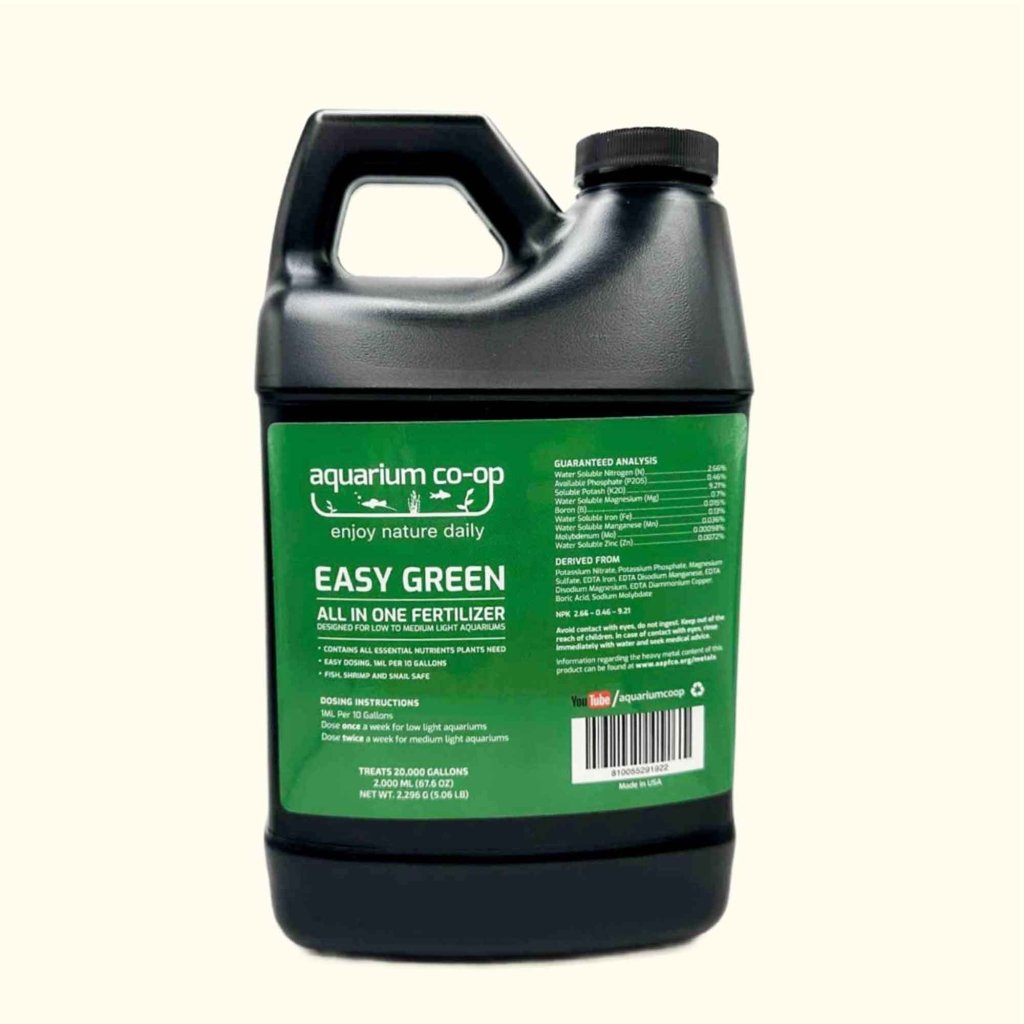
liquid fertilizer for aquarium plants Aquarium Co-Op Easy GreenBeginner friendly fertilizer for great plant growth Easy to use measuring cap for quick dosing Safe for fish, shrimp, and snails If you only get one fertilizer for your aquarium plants, then Easy Green is the one you want. As our #1 best selling product, this all in one liquid fertilizer contains all the essential nutrients your aquatic plants need to thrive so that you dont have to figure it out yourself. Check out the thousands of 5 star customer

  • Beginner-friendly fertilizer for great plant growth
  • Easy-to-use measuring cap for quick dosing
  • Safe for fish, shrimp, and snails

If you only get one fertilizer for your aquarium plants, then Easy Green is the one you want. As our #1 best-selling product, this all-in-one liquid fertilizer contains all the essential nutrients your aquatic plants need to thrive so that you don’t have to figure it out yourself. Check out the thousands of 5-star customer reviews below and see the incredible results that people have gotten because Easy Green is:

1.   Easy to use, without having to measure out a ton of different supplements
2.   Way more potent than the leading competitors 
3.   Reasonably priced, because a little goes a long way

1.  For the 500 ml (16.9 oz) bottle, use the measuring cap to dose (1 ml) per 10 gallons of water
—  Dose once a week for low light aquariums (10–20 PAR)
—  Dose twice a week for medium light aquariums (20–35 PAR)

2.  For the 120 ml (4 oz) bottle, dose 2 drops per gallon of water
—  Dose once a week for low light aquariums (10–20 PAR)
—  Dose twice a week for medium light aquariums (20–35 PAR)

We recommend having between 20–50 ppm of nitrate in your aquarium from dosing Easy Green for optimal plant growth.

Guaranteed Analysis:
—  Water Soluble Nitrogen (N) 2.66%
—  Available Phosphate (P2O5) 0.46%
—  Soluble Potash (K2O) 9.21%
—  Water Soluble Magnesium (Mg) 0.7%
—  Boron (B) 0.015%
—  Water Soluble Iron (Fe) 0.13%
—  Water Soluble Manganese (Mn) 0.036%
—  Molybdenum (Mo) 0.00098%
—  Water Soluble Zinc (Zn) 0.0072%
NPK 2.66 - 0.46 - 9.21

Measurable Nutrients: 1 mil of Easy Green in 10 gallons of water adds 3 ppm of nitrate, and 2 drops of Easy Green in 1 gallon of water also adds 3 ppm of nitrate. For more details, see the full article.

Notes:
—  Store the fertilizer upright and away from children. For optimal shelf life, store the fertilizer out of light.
—  Warning: fertilizer can be irritating if it gets into your eyes, nose, or mouth, and it can cause stomach upset if swallowed. If you get Easy Green on your skin, rinse it off. If you get it in your eyes or mouth, rinse thoroughly for 15 minutes. For USA customers, reference the poison.org website. For Canadian customers, reference dpic.org.

Shipping Notes
  • Free Standard Shipping on $100+ Orders to the USA.
  • Except Preorder products are shipped in 48 hours.
  • Delivery to the USA:
  1. Standard Shipping : 3-10 business days
  • If time is of the essence, please consider selecting expedited delivery for faster service.
Exchange/Return Notes
  • We offer a 30-day return/exchange service after receiving.
  • Final sale items are not eligible for returns or exchanges.
  • To process your return/exchange, please contact us at [email protected]
  • Please click here for more details>>> Return & Exchange Policy
SKU: 8436755678

Discover Niche Categories That Outsell liquid fertilizer for aquarium plants

Top-Converting Item to Boost Your Average Order

4.0 ★★★★★
Based on 13 reviews
Sort
Highest Rating
Newest First
Oldest First
Product Reviews
L
Verified Purchase
Laura Sinkler
Draper, US
★★★★★ 5
Monthly reload for Subscribe & Save Orders
Reload type: One Time Reload
Not a glamorous review, but a genuinely useful tip for Subscribe & Save users. I reload about $100 to my gift card balance once a month, a week or two before my S&S order processes. Amazon pulls each Subscribe & Save item as a separate transaction, which means 10+ individual charges hitting your bank account on before or on ship day. A headache for budgeting and a minor anxiety trigger if you're watching your account for unauthorized activity. Loading the balance first consolidates everything into one clean transaction. Your S&S order then pulls from the gift card balance rather than your card directly, and your bank statement stays tidy. The side benefit is built-in budget discipline. I set about $100 as my monthly Amazon ceiling - if my cart runs over, something gets pushed to next month. It's a simple system that keeps spending intentional without any extra effort. If you're a regular S&S user who wants cleaner finances and less ""wait, who charged this and what was that charge?"" moments, this is worth making a habit.
WAS THIS REVIEW HELPFUL?YesReportShare
Reviewed in the United States on June 6, 2026
M
Verified Purchase
Martini81
Boise, US
★★★★★ 5
Easy and simple: Exact Step-by-Step Guide to Reloading Your Balance
Reload type: One Time Reload
I found reloading my Amazon gift card balance much easier than expected. The process was simple and took about 5 minutes at most. Here are the exact steps to do it: ​Login: In the Amazon app or on Amazon.com, log in to your account. ​ Menu: Tap the 3 lines on the bottom right corner of your screen (next to Rufus, Amazon's AI). ​ Find Category: In the section highlighted "Shop by category," tap on Gifting & Registry (3rd option down in that section) and a drop-down menu will appear. ​ Select Gift Cards: On the drop-down menu, tap Gift Cards (first option). ​ Choose Your Action: "The Gift Card Shop" will appear. There you will have three options: "Redeem a gift card," "View your balance," and "Reload." ​ Start Reload: To add funds, tap Reload. ​ Select Type: Scroll down to "Add funds directly to your Amazon Gift Card balance" and tap which reload type you want (one-time, low balance auto-reload, or scheduled auto-reload). ​ Enter Amount: Choose your reload amount. The default is $25, but you can type in your own amount as well (the minimum amount is $5.00). ​ Finish: Tap the orange "Buy Now" tab. ***I used the Amazon app using the u i OneUI version 8.0 these Amazon app on Android version 16 (Baklava) on a Samsung Galaxy S25 Ultra. Others may have a slight variation of the menu setup on the Amazon app.***
WAS THIS REVIEW HELPFUL?YesReportShare
Reviewed in the United States on April 22, 2026
K
Verified Purchase
Kenneth Lucas
Carnegie, US
★★★★★ 5
Easy way to add balance
Reload type: One Time Reload
Reloading my Amazon gift card balance has been easy and convenient. I like using it when I want to keep a little money set aside for Amazon orders or make checkout quicker without thinking about which card I want to use. The process is straightforward, the balance shows up fast, and it has been reliable every time I have used it. It is also helpful for budgeting because I can add a set amount and then use that balance for regular purchases. Nothing complicated about it, which is exactly why I like it.
WAS THIS REVIEW HELPFUL?YesReportShare
Reviewed in the United States on May 28, 2026
S
Verified Purchase
Steve
Louisville, US
★★★★★ 5
Better than a physical gift card!
Reload type: One Time Reload
I purchased this Amazon gift card to make it easier to budget my purchases which has been working great. Amazon makes it so helpful and this process so seamless. It was ready in a few minutes :)
WAS THIS REVIEW HELPFUL?YesReportShare
Reviewed in the United States on June 5, 2026
M
Verified Purchase
M Osekou
Belleville, US
★★★★★ 4
Great for keeping bank statements clean but random security delays are frustrating
Reload type: One Time Reload
I use the balance reload tool to manage my monthly budget and easily hit credit card sign-up bonuses. It keeps my bank statements totally clean by grouping dozens of tiny e-book and movie rental charges into one single transaction. Most of the time the whole process works flawlessly and the money shows up in my account within five minutes. It is honestly the easiest way to put a hard limit on my family's everyday online shopping. You just need to watch out for a few annoying system quirks when you load larger amounts of money. Even though it usually works instantly the automated security filter sometimes flags big reloads and freezes the transaction for hours. This random delay is incredibly frustrating if you are trying to add cash fast to catch a lightning deal before it expires. You also have to remember that this balance is strictly non-refundable and cannot be used to buy other gift cards. Overall this is still a great method for organizing online spending and maximizing your cash-back credit card rewards. It totally fixed how I track household purchases but you definitely have to tolerate the occasional processing delays. My best advice is to load your account a day or two before you actually need to buy a big-ticket item. It works perfectly as a budgeting tool as long as you know the rules and plan for the random security hold.
WAS THIS REVIEW HELPFUL?YesReportShare
Reviewed in the United States on April 14, 2026

recommand products