SKU: 91255134722
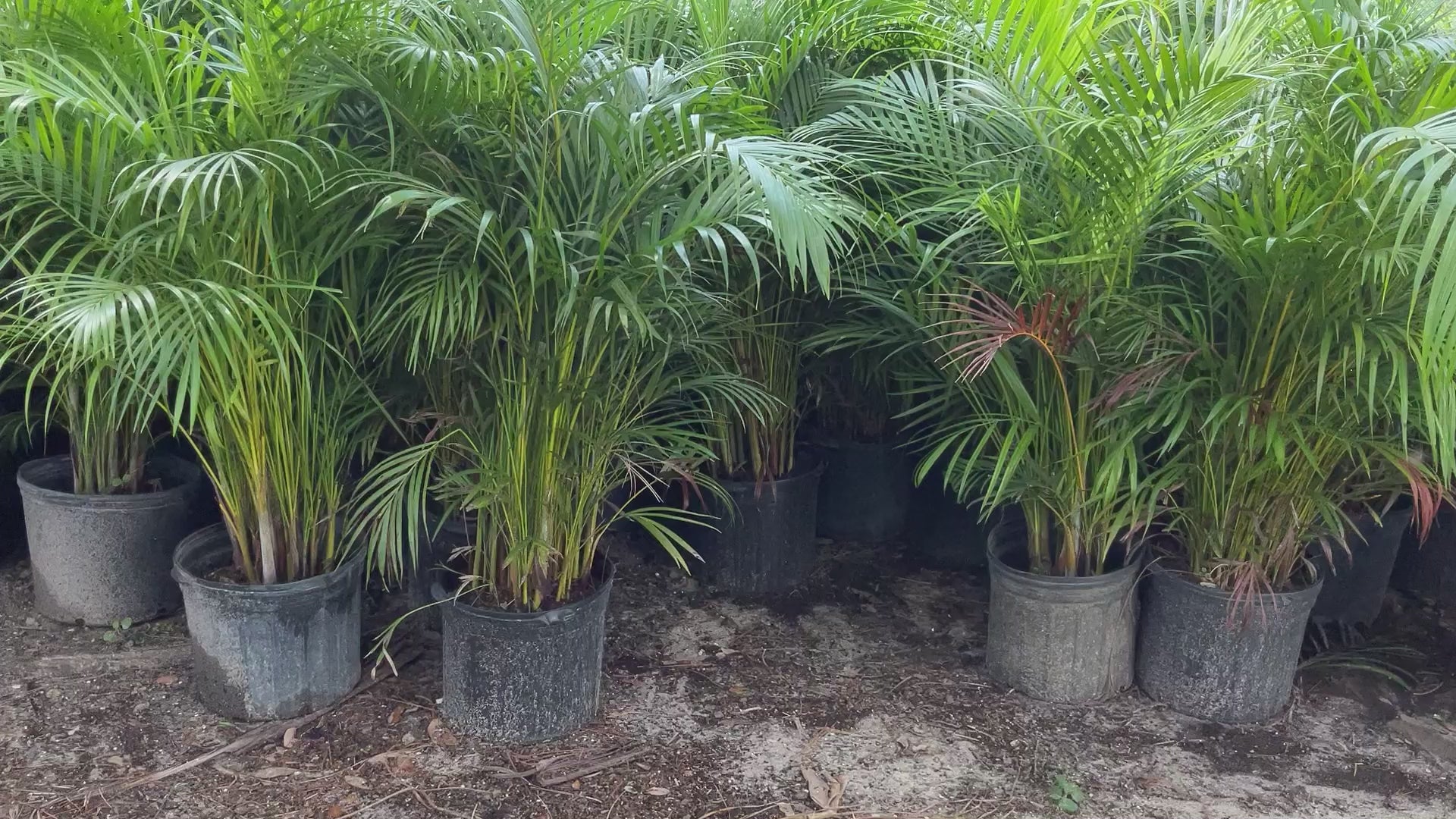
areca palm trees

areca palm trees Areca Palm

Sale price$21.01 Regular price$23.34
Save 10%

Pay in installments of $5.83 with ShopPay, AfterPay and Klarna

Shipping Estimate
USA
  • USA
  • CAN

Ships within 48 hours · Estimated delivery Aug 4 - Aug 9

Promo Codes Available:

For Your Every Summer RSVP, with Code: SUMMER15

Description

areca palm trees Areca PalmAreca Palm The Areca palm trees are a favorite palm for privacy, screening and garden backdrops in many Cape Coral landscaping projects. We recommend using the Butterfly Palm Trees as a living fence to provide privacy from neighbors, or block the view from the street into your home. Once they reach a taller height, with a little trimming they can be thinned out to display their bamboo looking trunks. Either left completely full and lush, or a little

Areca Palm

The Areca palm trees are a favorite palm for privacy, screening and garden backdrops in many Cape Coral landscaping projects. We recommend using the Butterfly Palm Trees as a living fence to provide privacy from neighbors, or block the view from the street into your home. 

Once they reach a taller height, with a little trimming they can be thinned out to display their bamboo-looking trunks. Either left completely full and lush, or a little manicured, the Areca palm tree is a beautiful addition to a tropical landscape.

  • These palms are a great choice for natural privacy screening.
  • Not just another pretty face, the dramatic areca palm can double duty as a spectacular tropical privacy screen.
  • It is sometimes called the "Butterfly Palm"-because they are full and dense.
  • Areca palms are slow to moderate growers for sun and shade and can reach heights of 15 to 20 feet. 
  • Zone 10 is best, though winter in warmers areas or Zone 9B that border 10A, you can use an Areca in a protected spot. You may see leaf tip burn after most winters, even in Zone 10. Areca are clustering palms.
WE ONLY SHIP TO LOCAL FL COUNTIES (Hillsborough, Pinellas, Manatee and Pasco Counties ONLY)

    More Details


    Advantages:

    Easy To Grow

    Low Maintenance

    Good For Containers

      Grows Best:

        Landscape

        House Plant

        House Plant

      Ideal position:

      Full Sun

      6 + Hours best

      Growth Outlook:

      Height : 10-30

      Wide: 8 - 10'

      Growth Rate: Fast

      Plant Spacing: 12' - 18'

      Pet Friendly - yes

      Toxicity: Safe for pets

      Caring For:

      Position Water Temps Food


      Caring for an Areca Palm tree involves several important steps to ensure its health and vitality:

      1. Sunlight: Areca Palms thrive in bright, indirect sunlight. Place your palm near a window with filtered light or provide it with dappled shade outdoors. Avoid exposing it to direct sunlight, as it can scorch the leaves.

      2. Watering: Keep the soil consistently moist but not waterlogged. Water your Areca Palm thoroughly when the top inch of soil feels dry to the touch. Ensure proper drainage to prevent root rot. During winter, reduce watering frequency slightly as the plant's growth slows down.

      3. Humidity: Areca Palms prefer high humidity levels. Mist the leaves regularly with water or place a humidifier nearby to create a humid environment. This helps prevent the tips of the leaves from turning brown.

      4. Fertilization: Feed your Areca Palm with a balanced, water-soluble fertilizer specifically formulated for indoor plants. Apply the fertilizer every two to three months during the growing season (spring and summer). Follow the package instructions for proper dilution and application.

      5. Pruning: Remove any yellow or brown fronds as they age or become damaged. Trim off any dead or brown leaf tips to maintain the plant's appearance. Avoid excessive pruning, as it can stress the palm.

      6. Pests: Monitor your Areca Palm for common pests like spider mites and mealybugs. If you notice any infestations, treat them promptly with an appropriate insecticidal soap or neem oil spray.

      7. Repotting: As the Areca Palm grows, it may require repotting every two to three years. Choose a pot that is one size larger and use well-draining soil. Repotting in spring allows the palm to establish itself before the active growing season.

      By following these care guidelines, you can ensure that your Areca Palm remains healthy, vibrant, and a beautiful addition to your indoor or outdoor space. Regular attention to watering, light, and humidity will help your palm thrive for years to come.

      Shipping Notes
      • Free Standard Shipping on $100+ Orders to the USA.
      • Except Preorder products are shipped in 48 hours.
      • Delivery to the USA:
      1. Standard Shipping : 3-10 business days
      • If time is of the essence, please consider selecting expedited delivery for faster service.
      Exchange/Return Notes
      • We offer a 30-day return/exchange service after receiving.
      • Final sale items are not eligible for returns or exchanges.
      • To process your return/exchange, please contact us at [email protected]
      • Please click here for more details>>> Return & Exchange Policy
      SKU: 91255134722

      Discover Niche Categories That Outsell areca palm trees

      Top-Converting Item to Boost Your Average Order

      4.1 ★★★★★
      Based on 30 reviews
      Sort
      Highest Rating
      Newest First
      Oldest First
      Product Reviews
      N
      Verified Purchase
      N. Vance
      Los Angeles, US
      ★★★★★ 5
      Simple and efficient
      Size: 1 Pack, Style: USB Receiver, Color: Swift Grey
      This is a dandy little item. Easy to use straight out of the box, No fancy bells and whistles.but why should a mouse try to replicate commands that are on the laptop?
      WAS THIS REVIEW HELPFUL?YesReportShare
      Reviewed in the United States on May 16, 2026
      D
      Verified Purchase
      Devora Blane
      Fort Morgan, US
      ★★★★★ 4
      Simple, Reliable, and Works Great
      Size: 1 Pack, Style: USB Receiver, Color: Swift Grey
      The Logitech M185 has been exactly what I needed for everyday computer use. Setup took less than a minute—just plug in the tiny USB receiver and it was ready to go. The mouse responds smoothly, tracks accurately, and feels comfortable in my hand even after several hours of use. What I appreciate most is the reliability. The wireless connection has been stable with no noticeable lag or dropouts, and the battery life has been excellent. For browsing, office work, and general daily tasks, this mouse delivers solid performance at a very reasonable price. I'm extremely happy with it.
      WAS THIS REVIEW HELPFUL?YesReportShare
      Reviewed in the United States on June 11, 2026
      A
      Verified Purchase
      Amazon Customer
      Lowell, US
      ★★★★★ 5
      Great.
      Size: 1 Pack, Style: USB Receiver, Color: Swift Grey
      Great deal. Works great.
      WAS THIS REVIEW HELPFUL?YesReportShare
      Reviewed in the United States on May 24, 2026
      P
      Verified Purchase
      Price Loftin
      Lexington, US
      ★★★★★ 5
      Great mouse
      Size: 1 Pack, Style: USB Receiver, Color: Swift Grey
      It synced right up and is working great
      WAS THIS REVIEW HELPFUL?YesReportShare
      Reviewed in the United States on June 7, 2026
      R
      Verified Purchase
      R. Howell
      Natrona Heights, US
      ★★★★★ 5
      Basic mouse that works - - for now.
      Size: 1 Pack, Style: USB Receiver, Color: Blue
      I ordered this mouse (in blue) to replace the recently deceased exact same model that I've used for the past 2 or 3 years. I like the simplicity of the M185 mouse and mostly the best bang for your buck! I caught this one on sale for less than a ten-spot, so I thought, "why not." I'm hoping that this one will last a bit longer than my two previous M185 models, that averaged about 3 years each. This model seems plagued by a short life span and is predisposed to mysteriously and suddenly dying, without any obvious symptoms or warning of any kind - - you're working and clicking along, going about your day, when suddenly the cursor on the computer screen freezes and that's it. Nothing, zero, nada. Funny thing, I'm very careful not to abuse or drop the mouse, and keep a fresh battery installed and watch for leakage and all that stuff - - they just stop working, and I assume it is caused by some sort of inherent electronic fault in the circuitry of the previous M185's. Due to my loyalty to the brand and model (and since it was on sale) I decided to give it one more shot. They say that "third time's a charm". I like the fact that the M185 is simple and uncluttered with extra buttons that I would never use for my purpose, which is simple web-browsing and the occasional text document production. The feel is solid, not heavy, but not cheap feeling, either. I'm used to the shape of this mouse, which to me is quite comfortable for long sessions, another reason why I kind of wanted to stay with this model. The buttons have an audible "click", which doesn't bother me at all, and the wheel moves smoothly and also has a clicking operation (which I rarely ever use). The overall surface of the mouse has a matte finish, but like my previous models I'm sure it will eventually wear shiny spots where my fingers reside and will attain a more "well-used" look in time. Connecting it was a breeze, too. I just plugged the dongle into a spare rear usb port of my desktop, and the mouse connected instantly, no problem. The dongle can be stored safely inside the battery compartment, so you can take the whole thing out of the house if needed for use elsewhere. The speed of 1000 dpi seems just right for my purposes. The one I ordered even came with its own AA Duracell battery, which I wasn't really expecting. This mouse also enters "sleep mode" when you don't use it for a while, and I can't say how many times I've got up and left it on all night. And that's not hard to do, as I'll explain next. The only real negative to this mouse is the absence of any easily visible status indicator of it's on / off switch. The rear housing of this mouse is matte black, including the tiny switch where you turn it on and off with your fingernail, with only a very faint "on" lettering (also black), and very hard to see with my aging eyes. The laser is not lighted or visible when on, also adding to the confusion, especially in a darkened room. So, as a workaround, I took a tiny drop of green paint and placed it down inside the switch slider to visibly help indicate the "on" position, and likewise a dot of bright orange for the "off" position. Many of Logitech's more expensive models (and a few other manufacturers) include this color-coded switch indication. I guess for the $$, they had to cut corners somewhere - - a minor complaint. In summary, this is a good basic mouse that works - - let's hope that this one will last longer than its two predecessors.
      WAS THIS REVIEW HELPFUL?YesReportShare
      Reviewed in the United States on February 17, 2023

      recommand products