SKU: 35372669504
mtg scan cards

mtg scan cards Scanstand for Standard Size Unsleeved Cards

Sale price$24.57 Regular price$27.30
Save 10%

Pay in installments of $6.83 with ShopPay, AfterPay and Klarna

Shipping Estimate
USA
  • USA
  • CAN

Ships within 48 hours · Estimated delivery Aug 7 - Aug 12

Promo Codes Available:

For Your Every Summer RSVP, with Code: SUMMER15

Description

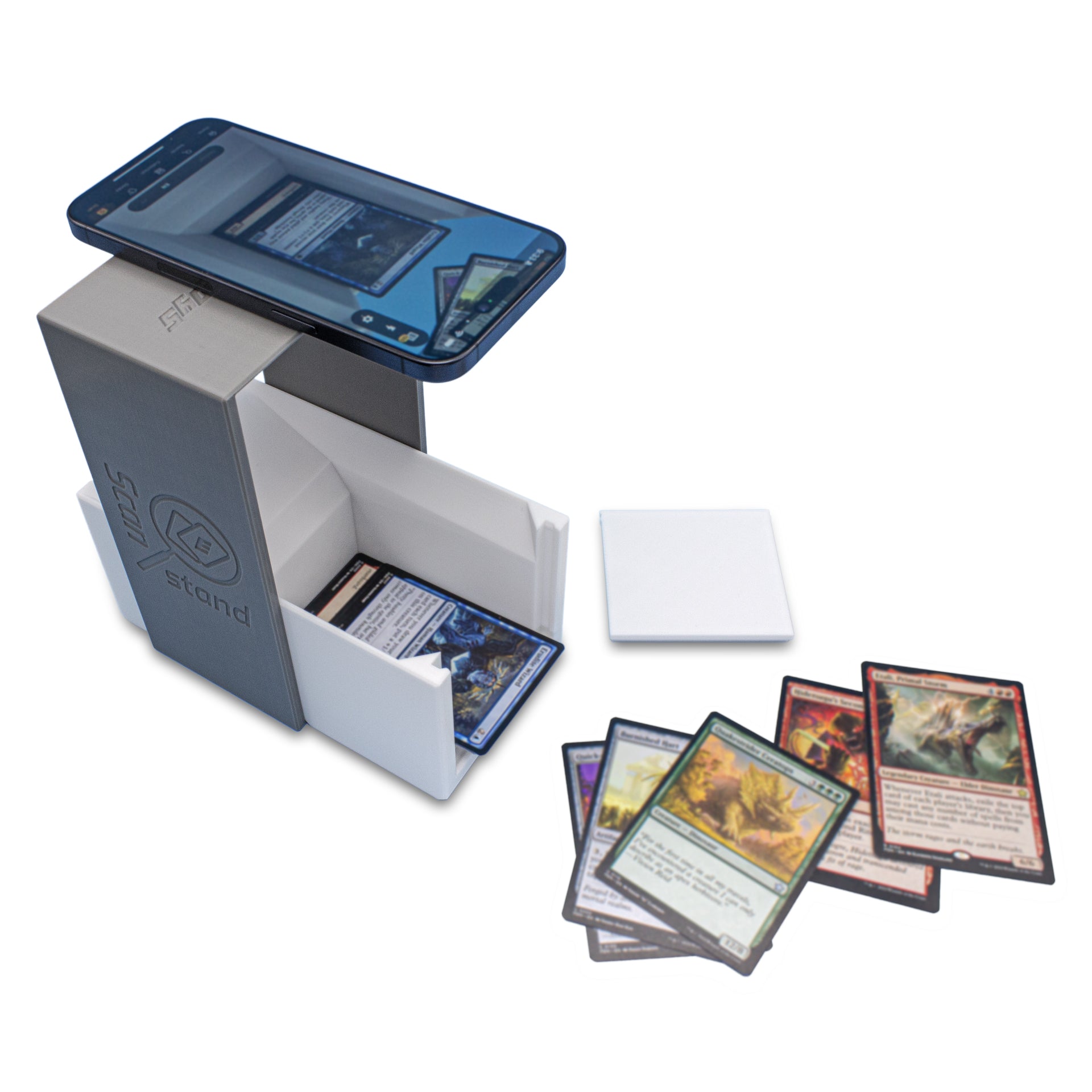
mtg scan cards Scanstand for Standard Size Unsleeved CardsProduct features Scanstand is the number one solution and ideal aid for scanning, cataloging, and price checking your trading card collection quickly and efficiently. Our nested design allows for convenient storage and travel. Complete setup or teardown in seconds! Simply slide out the card chute from the phone holder, rotate and interlock the two parts, then place your smartphone atop and orient your camera as needed. A removable door allows you to

Product features

  • Scanstand is the number one solution and ideal aid for scanning, cataloging, and price checking your trading card collection quickly and efficiently.
  • Our nested design allows for convenient storage and travel. Complete setup or teardown in seconds! Simply slide out the card chute from the phone holder, rotate and interlock the two parts, then place your smartphone atop and orient your camera as needed.
  • A removable door allows you to easily pull rare cards from the pile while scanning without hassle. The tray where cards land features a tilted bed which puts the cards slightly off level, allowing them to fall and stack evenly while maintaining a sufficient viewing angle for your camera. Receptacle accommodates approximately 130 unsleeved standard size cards (2.5 x 3.5" or 64 x 89mm).
  • Use with ManaBox, TCGplayer, and other card scanning phone apps. Phone mount is fixed at an ideal height for scanning, made wide enough for stability and universal compatibility across makes & models.
  • Made in the USA! Professionally 3D printed in Las Vegas, NV by experts in the trade using PLA, an eco-friendly plastic. Colors may slightly vary depending on available material. Use in a well lit area with ambient or indirect light for best results.

Scanstand is an all-in-one portable solution for TCG scanning. Quickly and efficiently scan, catalog and price check cards at home or on the go using ManaBox, TCGplayer or similar apps (not included; eligible smartphone with compatible software required for use). Make tracking your sets and decks a more enjoyable experience.

To start, remove the chute by pushing it out of the holder. Rotate the frame 90 degrees then re-insert the box perpendicular to the frame and interlock them in the designated position. An angled notch at the bottom tells how to orient the two parts. Place your phone atop and adjust as needed based on the position of its camera. It is best to have your scanner app open during this process and use the associated viewfinder as a guide.

Now you're ready to roll! Start throwing cards in with a flick of the wrist. If cards get stuck or don't travel the whole way, static buildup may be the culprit. Reduce cling by wiping down the ramp with a lightly damp cloth—allow to dry before use. If the problem persists you may need to use a tad more muscle or work on your aim. Alternatively, if it sounds loud every time a card hits against the plastic you may be using unnecessary force and potentially causing damage to the edges of your cards. Start light and dial up your strength as needed until cards fall into the receptacle with ease.

For best results use in a well lit area with ambient or indirect light. Optimal conditions may differ based on your phone's camera and the selected app's recognition software. If trouble arises while scanning holographic, foil or otherwise highly reflective cards we recommend a simple diffuser (e.g. a sheet of paper) to block excess light.

3D printed in the United States using an eco-friendly plastic, your purchase will help support our small business and contributes to a greener domestic manufacturing on demand model that works to prevent overproduction and eliminate commercial waste.

Product video

Shipping Notes
  • Free Standard Shipping on $100+ Orders to the USA.
  • Except Preorder products are shipped in 48 hours.
  • Delivery to the USA:
  1. Standard Shipping : 3-10 business days
  • If time is of the essence, please consider selecting expedited delivery for faster service.
Exchange/Return Notes
  • We offer a 30-day return/exchange service after receiving.
  • Final sale items are not eligible for returns or exchanges.
  • To process your return/exchange, please contact us at [email protected]
  • Please click here for more details>>> Return & Exchange Policy
SKU: 35372669504

Discover Niche Categories That Outsell mtg scan cards

Top-Converting Item to Boost Your Average Order

4.8 ★★★★★
Based on 19 reviews
Sort
Highest Rating
Newest First
Oldest First
Product Reviews
T
Verified Purchase
The First Noel
West Palm Beach, US
★★★★★ 5
A Smart Upgrade: Seenda’s Ergonomic Mouse Impresses
Color: Blue
As someone who has relied on a traditional wireless mouse for years, I approached the Seenda Ergonomic Mouse with cautious curiosity. I was interested in exploring ergonomic options, but unsure how significant the difference would be. To my surprise, this device made an immediate and positive impression. The mouse is impressively quiet and highly responsive, gliding effortlessly even on a standard desk surface—so much so that I’ve done away with my mousepad altogether. Its ergonomic design provides a natural hand position, which enhances comfort during extended use, especially when browsing or working online. One of the standout features is the inclusion of forward and backward navigation buttons, which streamline web browsing. Additionally, the conveniently placed voice control button on the top of the device adds a modern, user-friendly touch. That said, there are a couple of areas for improvement. While the rechargeable battery is convenient, the mouse does not offer an option for traditional batteries. Furthermore, it appears to lack a clearly visible low battery indicator, which could potentially lead to unexpected downtime. However, I have yet to experience any battery-related issues during use. Overall, the Seenda Ergonomic Mouse is a well-designed and enjoyable tool that significantly enhances the computing experience. It delivers on comfort, functionality, and performance—earning it a strong 4.8 out of 5 in my review.
WAS THIS REVIEW HELPFUL?YesReportShare
Reviewed in the United States on September 30, 2025
J
Verified Purchase
Just Me!
Whiting, US
★★★★★ 5
Amazing mouse! Real wrist saver.
Color: Purple
I do a lots if computer work. This mouse has really relieved the strain on my wrists and hand. It connects via blue tooth or usb remote. Hold a charge for a long time. I usually charge it at least once a month, but sometime I forget and it still works for two, and use it all day long or leave it on. Easy to adapt to. Too knob adjusts volume. Scroll disc on right side and forward back button on left side.
WAS THIS REVIEW HELPFUL?YesReportShare
Reviewed in the United States on May 13, 2026
M
Verified Purchase
M Norman
Port Orchard, US
★★★★★ 5
Easy on the wrist! Cute design!
Color: Purple, Color: Purple
I like it! It’s def helped with work and my wrist is no longer being overextended all day while at my desk! It’s efficient and I love the volume dial!
WAS THIS REVIEW HELPFUL?YesReportShare
Reviewed in the United States on May 7, 2026
D
Verified Purchase
Dog Mom
Draper, US
★★★★★ 4
Responsive and very comfortable!
Color: Blue, Color: Blue
My goals for a mouse are productivity and development, not gaming. Overall, I’m a really big fan of this mouse and will be keeping it as a primary mouse. This is my first ergonomic mouse. This mouse fits perfectly in my hand and does not strain my wrist or fingers. It’s extremely comfortable to use. It worked out of the box with no additional software, a huge plus as I need it to be usable with my work laptop. The clicks are not very loud, which is great. The battery lasts a very long time. The little thing I love the most is that it came in a cute color, instead of just the standard white and black. It’s a cute, responsive, comfortable, affordable everyday house with no extra software and confirmations needed for it to work. I love it. That being said, it has things to note. The scroll wheel is very basic, no fancy scroll features unfortunately. It’s not loud, but just basic. The volume scroll wheel is a little high, sometimes I hit it by mistake. Neither of these are big deals. If I could change anything about this mouse, it would be swapping the volume scroll wheel to a horizontal scroll. I have 4 ways to change volume across all my desk devices, but 0 ways to scroll horizontally. Finding a vertical mouse that provides horizontal scroll functionality without additional software is nearly impossible. That feature would make this mouse a favorite for productivity IMO.
WAS THIS REVIEW HELPFUL?YesReportShare
Reviewed in the United States on October 28, 2025
D
Verified Purchase
Dara
West Palm Beach, US
★★★★★ 5
Very nice and comfortable!
Color: Pink, Color: Pink
I have carpel tunnel syndrome in both hands, and using a regular mouse hurts my hand. My friend told me to buy an ergonomic mouse, so I said sure. I've never used an ergonomic mouse before or one that is turned on the side like this one. However, I bought this one because of its high ratings. I love this mouse! It's comfortable, easy to use, and has high quality. The color is great too for all of you pink lovers. It comes with a USB cord to charge the mouse. All you need to do to charge it is to attach the cord to your mouse and to your laptop and let it charge. You can also use the mouse while charging it. I read someone else’s review. They said that if the mouse isn’t working or communicating for whatever reason, you can still use it with its USB cord, and the mouse still words. It looks like the company put a lot of thought into making this device, and it’s well worth the cost. I'm glad I bought this; my hands don't hurt anymore, and it’s super unique. When I started using this mouse, it took a little time to get used to using it on its side. I couldn’t fully wrap my hand around it, but I’m getting more used to it and it feels great on my hand. The thumb buttons are for going back to the previous page you were on, or going forward to the next page. The button on the very top of the mouse is for the volume. You can also press it down, but I honestly don’t remember what that part is for. The other side of it is the left and right clicks with the scroll wheel. There’s another button above the scroll wheel also called the DPI button that allows you to quickly adjust the mouse sensitivity. You will also find the charging port on the lower part of the mouse where it divides, and there are several other buttons and the USB receiver on under the mouse for connecting the mouse t to your computer. A user manual comes with this device that guides you through the setup. Shipping was on time and packaged nicely. I give this a 5/5 and recommend this product.
WAS THIS REVIEW HELPFUL?YesReportShare
Reviewed in the United States on November 19, 2024

recommand products