Pay in installments of $7.21 with
 ,
,
 and
and

Shipping Estimate
USA
- USA
- CAN
- USA
- CAN
Ships within 48 hours · Estimated delivery Sep 27 - Oct 2
 Promo Codes Available:
For Your Every Summer RSVP, with Code: SUMMER15
Description
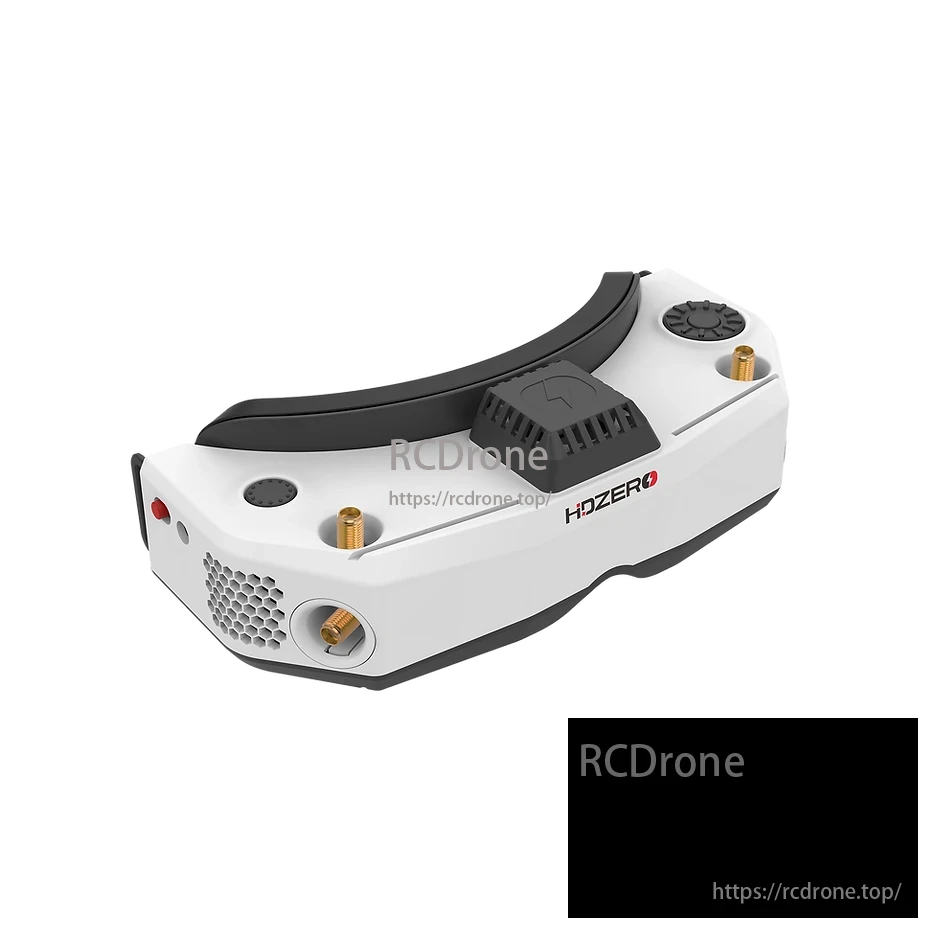
fpv goggles hdmi in HDZero Goggle 2 FPV Goggles – 1080p 90Hz OLED, Built-in Analog RX, HDM – RCDroneOverview The HDZero Goggle 2 is a premium FPV goggles system built for both digital and analog pilots. Featuring dual 1080p 90Hz OLED displays, sub 3ms glass to glass latency, and built in analog receiver with real time deinterlacing, it offers unmatched video clarity and responsiveness. With open source Linux firmware, adjustable IPD and diopter, HDMI input output, and WiFi livestreaming, the HDZero Goggle 2 is ideal for freestyle, racing, and
Overview
The HDZero Goggle 2 is a premium FPV goggles system built for both digital and analog pilots. Featuring dual 1080p 90Hz OLED displays, sub-3ms glass-to-glass latency, and built-in analog receiver with real-time deinterlacing, it offers unmatched video clarity and responsiveness. With open-source Linux firmware, adjustable IPD and diopter, HDMI input/output, and WiFi livestreaming, the HDZero Goggle 2 is ideal for freestyle, racing, and cinematic FPV use. Comes in white or red shell, packed in a protective hard case.
Key Features
-
Stunning OLED Displays: Dual 1920x1080p micro OLED screens with 90Hz adaptive refresh for ultra-smooth visuals.
-
Ultra-low Latency: <3ms for HDZero input, <2ms for analog, <1ms for HDMI – perfect for high-speed FPV response.
-
Digital + Analog Ready: Built-in analog receiver with deinterlacer, analog 3.5mm AV input, HDMI I/O, and HDZero support.
-
Modular & Customizable: Open-source software, 6-axis IMU for head tracking, analog module bay, and rail antenna mounts.
-
Improved Optics: Fully enclosed dust-resistant module, sharper <1.5% edge distortion, and wide 46° field of view.
-
Enhanced Comfort: Adjustable IPD (58–72mm), focus (+4 to –7 diopter), two face plates, and quiet triple-fan cooling system.
-
Wireless Mirroring: Built-in 2.4GHz WiFi module for live video streaming and HDMI DVR recording.
Specifications
| Parameter | Value |
|---|---|
| Display | 1920x1080p OLED, 90Hz refresh rate |
| Latency (HDZero / Analog / HDMI) | <3ms / <2ms / <1ms |
| IPD Adjustment Range | 58–72mm |
| Focus Adjustment | +4 to -7 diopter |
| FOV | 46 degrees |
| Input Voltage | 7V – 25.2V (2S–6S LiPo) |
| HDMI Input/Output | Supported |
| Analog AV Input | 3.5mm jack |
| Audio Support | 3.5mm combo headphone/mic jack |
| Operating System | Open-source Linux |
| Streaming & DVR | Built-in H.265 DVR and WiFi module |
| Colors Available | White / Red |
Package Includes by Option
Note: Red and White color options include the same package contents. Package contents vary by the selected Options package.
Race V3 + Nano90 + Cherry Antenna
- HDZero Race V3 board
- Nano90 camera
- Camera mounting bracket
- Rubber grommets
- Metal antenna/bracket plate
- Mounting screws
- Wiring harness / connector cable
- HDZero / Divimath sticker or paper insert
- Cherry Y IPEX-1 antenna, 87mm
Standard Package [No Antenna]
- HDZero Goggle 2 FPV goggles
- Goggle storage case
- Quick start guide
- VTX programming cable
- Goggle foam pad
- Power cable
- Face gasket / faceplate
- Original head strap
- Lens cleaning cloth
- Stickers
Standard [No Antenna] + Battery Data Cable
- HDZero Goggle 2 FPV goggles
- Goggle storage case
- Quick start guide
- VTX programming cable
- Goggle foam pad
- Power cable
- Face gasket / faceplate
- Original head strap
- Lens cleaning cloth
- Stickers
- 4800mAh battery
- HDMI adapter cable
Standard [No Antenna] + Foam Pad + Head Strap
- HDZero Goggle 2 FPV goggles
- Goggle storage case
- Quick start guide
- VTX programming cable
- Goggle foam pad
- Power cable
- Face gasket / faceplate
- Original head strap
- Lens cleaning cloth
- Stickers
- Spare foam replacement pads
- Extra head strap
Standard Package + Original Antenna Set
- HDZero Goggle 2 FPV goggles
- Goggle storage case
- Quick start guide
- VTX programming cable
- Goggle foam pad
- Power cable
- Face gasket / faceplate
- Original head strap
- Lens cleaning cloth
- Original antenna set
- Stickers
Standard + Original Antenna Set + Battery Data Cable
- HDZero Goggle 2 FPV goggles
- Goggle storage case
- Quick start guide
- VTX programming cable
- Goggle foam pad
- Power cable
- Face gasket / faceplate
- Original head strap
- Lens cleaning cloth
- Original antenna set
- Stickers
- HDMI adapter cable
Standard + Original Antenna Set + Foam Pad + Head Strap
- HDZero Goggle 2 FPV goggles
- Goggle storage case
- Quick start guide
- VTX programming cable
- Goggle foam pad
- Spare foam replacement pads
- Power cable
- Face gasket / faceplate
- Original head strap
- Lens cleaning cloth
- Original antenna set
- Stickers
Standard Package + 4 Short Black Antennas
- HDZero Goggle 2 FPV goggles
- Goggle storage case
- Quick start guide
- VTX programming cable
- Goggle foam pad
- Power cable
- Face gasket / faceplate
- Original head strap
- Lens cleaning cloth
- 4 short black antennas
- Stickers
Standard + 4 Short Antennas + Foam Pad + Head Strap
- HDZero Goggle 2 FPV goggles
- Goggle storage case
- Quick start guide
- VTX programming cable
- Goggle foam pad
- Spare foam replacement pads
- Power cable
- Face gasket / faceplate
- Original head strap
- Extra head strap
- Lens cleaning cloth
- 4 short black antennas
- Stickers
Standard + 4 Short Black Antennas + Battery Data Cable
- HDZero Goggle 2 FPV goggles
- Goggle storage case
- Quick start guide
- VTX programming cable
- Goggle foam pad
- Power cable
- Face gasket / faceplate
- Original head strap
- Lens cleaning cloth
- 4 short black antennas
- Stickers
- 4800mAh battery
- HDMI adapter cable
Standard Package + Maple Leaf Antenna Set [22cm]
- HDZero Goggle 2 FPV goggles
- Goggle storage case
- Quick start guide
- VTX programming cable
- Goggle foam pad
- Power cable
- Face gasket / faceplate
- Original head strap
- Lens cleaning cloth
- Maple Leaf antenna set, 22cm
- Stickers
Standard + Maple Leaf Antenna Set 22cm + Battery Data Cable
- HDZero Goggle 2 FPV goggles
- Goggle storage case
- Quick start guide
- VTX programming cable
- Goggle foam pad
- Power cable
- Face gasket / faceplate
- Original head strap
- Lens cleaning cloth
- Maple Leaf antenna set, 22cm
- Stickers
- 4800mAh battery
- HDMI adapter cable
Standard + Maple Leaf Antenna Set 22cm + Foam Pad + Head Strap
- HDZero Goggle 2 FPV goggles
- Goggle storage case
- Quick start guide
- VTX programming cable
- Goggle foam pad
- Spare foam replacement pads
- Power cable
- Face gasket / faceplate
- Original head strap
- Extra head strap
- Lens cleaning cloth
- Maple Leaf antenna set, 22cm
- Stickers
Standard Package + Maple Leaf Flat Antenna + 2 Short Antennas
- HDZero Goggle 2 FPV goggles
- Goggle storage case
- Quick start guide
- VTX programming cable
- Goggle foam pad
- Power cable
- Face gasket / faceplate
- Original head strap
- Lens cleaning cloth
- Maple Leaf flat antenna
- 2 short black antennas
- Stickers
Standard + Maple Leaf Flat Antenna + Short Antenna + Foam Pad + Head Strap
- HDZero Goggle 2 FPV goggles
- Goggle storage case
- Quick start guide
- VTX programming cable
- Goggle foam pad
- Spare foam replacement pads
- Power cable
- Face gasket / faceplate
- Original head strap
- Extra head strap
- Lens cleaning cloth
- Maple Leaf flat antenna
- 2 short black antennas
- Stickers
Standard + Maple Leaf Flat Short Antenna + Battery Data Cable
- HDZero Goggle 2 FPV goggles
- Goggle storage case
- Quick start guide
- VTX programming cable
- Goggle foam pad
- Power cable
- Face gasket / faceplate
- Original head strap
- Lens cleaning cloth
- Maple Leaf flat antenna
- 2 short black antennas
- Stickers
- 4800mAh battery
- HDMI adapter cable
Applications
Ideal for FPV freestyle, racing, and long-range flying, the HDZero Goggle 2 supports analog and digital systems in one sleek design. With its advanced optics, ultra-low latency, and robust connectivity, it's a top choice for drone pilots demanding precision and adaptability.
Details
HDZero Goggle offers 1080p 90Hz OLED displays, smooth digital link, friend fly mode, clear video, and open-source software for customizable, community-driven use.
Goggle vs Goggle 2: Both have HDZero, expansion module, ELRS backpack. Goggle 2 adds analog receiver, WiFi, improved, and fully enclosed optics.
Built-in analog RF receiver with shared antenna for HDZero and analog. Improved video resolution with real-time deinterlacer.
Built-in HDZero and analog RF receivers, HDMI in/out, analog AV input, DVR, head tracker, microphone enable versatile use.
Open source HDZero Goggle software and CAD files for customization. Runs Linux, design documents on Github.
Enclosed optical module, sharper edges, dipter lens insert, adjustable focus, rail mounting system, smooth dial controls. Compares V1 and V2 versions.
Unmatched latency performance: HDMI 100fps in (1ms, 11ms), HDZero 90 (3.9ms, 15ms), Analog 60 (3ms, 19ms), DJI O4 Pro Race mode (18ms, 27ms).
HDZero Goggle with ELRS Backpack and WiFi Screen Mirroring. Features include set channel number, wireless head tracking, and DVR control via radio switch.
TrueRC X-AIR 5.8GHz MK II Antenna Stubby Combo - HDZERO Goggles
Shipping Notes
- Free Standard Shipping on $100+ Orders to the USA.
- Except Preorder products are shipped in 48 hours.
- Delivery to the USA:
- Standard Shipping : 3-10 business days
- If time is of the essence, please consider selecting expedited delivery for faster service.
Exchange/Return Notes
- We offer a 30-day return/exchange service after receiving.
- Final sale items are not eligible for returns or exchanges.
- To process your return/exchange, please contact us at [email protected]
- Please click here for more details>>> Return & Exchange Policy