SKU: 28686175383
self watering pots for indoor plants

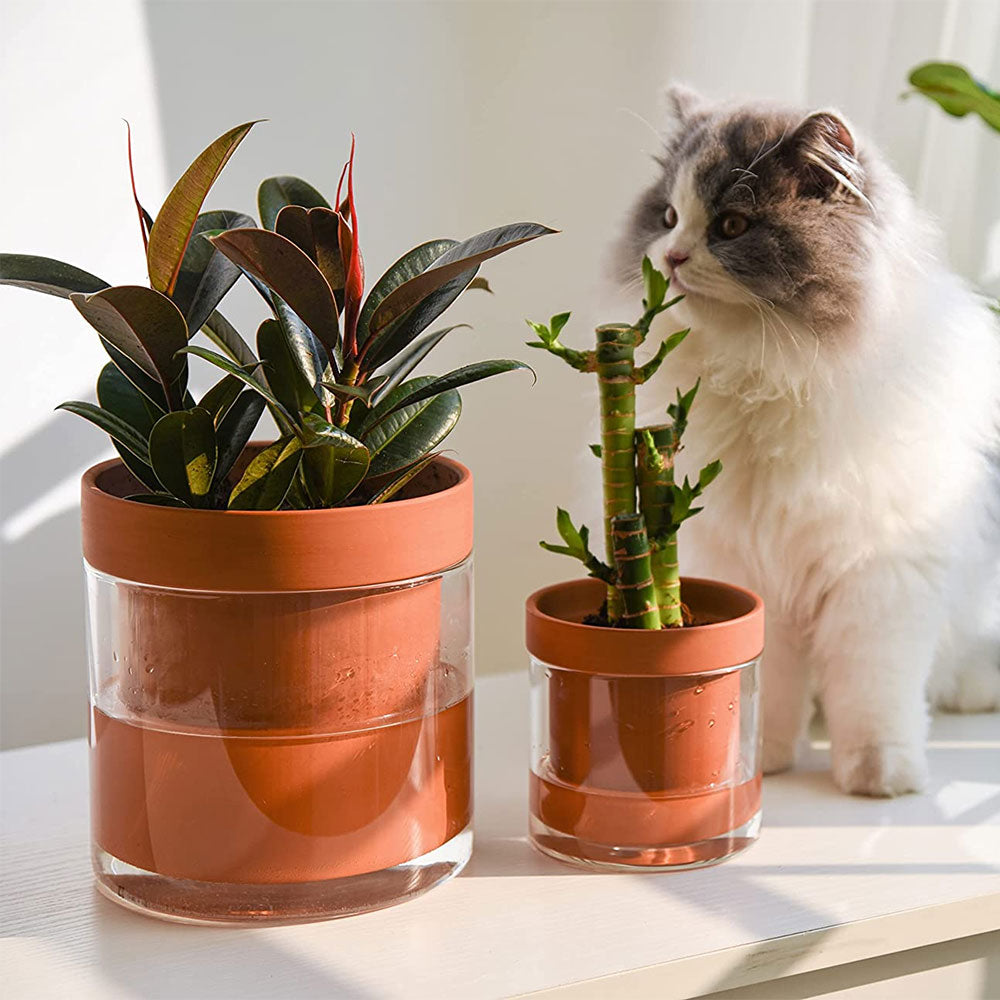
self watering pots for indoor plants Self Watering Planter Pots 2 Pcs

Sale price$26.94 Regular price$29.93
Save 10%

Pay in installments of $7.48 with ShopPay, AfterPay and Klarna

Shipping Estimate
USA
  • USA
  • CAN

Ships within 48 hours · Estimated delivery Aug 7 - Aug 12

Promo Codes Available:

For Your Every Summer RSVP, with Code: SUMMER15

Description

self watering pots for indoor plants Self Watering Planter Pots 2 PcsSelf watering planters, a perfect blend of functionality and aesthetics! Crafted with high quality terracotta, these planters utilizes ancient irrigation techniques to provide optimal moisture to your plants. The inner unglazed terracotta pot absorbs water from the glass reservoir and gradually releases it into the soil, ensuring your plants stay hydrated for up to 10 days without daily care. With an easy to refill design and a clear view of the water

Self-watering planters, a perfect blend of functionality and aesthetics! Crafted with high-quality terracotta, these planters utilizes ancient irrigation techniques to provide optimal moisture to your plants. The inner unglazed terracotta pot absorbs water from the glass reservoir and gradually releases it into the soil, ensuring your plants stay hydrated for up to 10 days without daily care. With an easy-to-refill design and a clear view of the water level, you'll always know when it's time for a refill. The clean and tidy construction eliminates the need for drainage holes, preventing water and soil leakage. With its minimalist design and classic orange color, these planters effortlessly complement any decor style. Plus, it makes a fantastic gift for your mom and friends!

2 Units

  • Materials: Terracotta, Glass
  • Dimensions: 4+6 inches

How to use:
1. Fill the outer glass vase of the planter with water, filling it up to approximately one-third of its capacity. This will serve as the water reservoir.
2.Take the inner unglazed terracotta pot and place it inside the glass vase. The terracotta pot will absorb water from the reservoir and gradually release it to the plant's roots.
3. Add your chosen plant to the terracotta pot, ensuring it is properly positioned and surrounded by the soil or potting mix.
4. Monitor the water level in the glass vase. The transparent design allows you to easily see when it's time to refill the reservoir. Keep an eye on the water level to ensure your plant receives the right amount of moisture.
5. Refill the water reservoir when needed, typically every 7 to 10 days depending on the plant's water requirements. Add water to the reservoir, allowing the terracotta pot to absorb it and provide a steady supply to the plant.

Enjoy the convenience of the self-watering system as it takes care of your plant's hydration needs, providing them with consistent moisture for healthy growth.

Shipping Notes
  • Free Standard Shipping on $100+ Orders to the USA.
  • Except Preorder products are shipped in 48 hours.
  • Delivery to the USA:
  1. Standard Shipping : 3-10 business days
  • If time is of the essence, please consider selecting expedited delivery for faster service.
Exchange/Return Notes
  • We offer a 30-day return/exchange service after receiving.
  • Final sale items are not eligible for returns or exchanges.
  • To process your return/exchange, please contact us at [email protected]
  • Please click here for more details>>> Return & Exchange Policy
SKU: 28686175383

Discover Niche Categories That Outsell self watering pots for indoor plants

Top-Converting Item to Boost Your Average Order

4.7 ★★★★★
Based on 19 reviews
Sort
Highest Rating
Newest First
Oldest First
Product Reviews
S
Verified Purchase
S. A. Hughes
Lake Worth, US
★★★★★ 4
Installation instructions are flaky, but unit works well when installed
I bought this because I wanted a simple way to upgrade an old tower PC to support 2.5gig Ethernet and I thought it would be easy. Well, it wasn't. The user manual that came with the unit had instructions to download drivers. After a lot of work, I found them, but the files were empty. Then I noticed that a new USB device, a CD rom drive, had been added to my PC. I unplugged the adapter and went into device manager and deleted the device and its files. When I plugged the unit back in, it was recognized as a NIC and started working. The unit runs at 2.5gig and seems to work well but I keep wondering if, the next time I have to unplug it, it will go back to looking like a CD drive. Oh, I did not need drivers. The unit is installed automatically under Windows 10.
WAS THIS REVIEW HELPFUL?YesReportShare
Reviewed in the United States on March 12, 2026
R
Verified Purchase
RA Deleon
Houston, US
★★★★★ 5
Say Goodbye to Wi-Fi Woes—This Adapter Delivers
I couldn’t be happier with this UGREEN USB C to Ethernet Adapter! As someone who needed a reliable solution to hardwire my laptop to an Ethernet wall outlet, this adapter has been flawless. The setup was truly plug-and-play—no drivers or complicated installations required—and I was connected in seconds. Not only does it deliver an impressive 2.5Gbps speed, but it also provides a rock-solid connection that’s perfect for streaming, large file downloads, and stable video calls. The sleek aluminum design is a bonus, as it feels sturdy and looks great alongside my tech setup. It’s compact enough to toss into my bag without taking up much space, making it easy to use on the go. This adapter is a fantastic investment for anyone seeking fast and dependable wired internet connectivity. I’m thrilled with its performance and highly recommend it. Five stars all the way!
WAS THIS REVIEW HELPFUL?YesReportShare
Reviewed in the United States on April 10, 2025
D
Verified Purchase
Deluxe
Lowell, US
★★★★★ 5
Great dock, bought another
This was the cheapest option with everything I needed. It has worked well for a few months so I bought another.
WAS THIS REVIEW HELPFUL?YesReportShare
Reviewed in the United States on June 10, 2026
J
Verified Purchase
JG
Lowell, US
★★★★★ 5
Make sure you use a quality power supply
Works well but make sure you use a quality power supply. I've only had this for a couple weeks. At first I was having some weird problems with it randomly disconnecting. I didn't exactly blame the dock because that laptop has had problems with other USB devices. But the way it was disconnecting made me think maybe it was a power issue. I was using a 65w Dell charger which should have been sufficient. When I traded it out for a 65w Lenovo charger, the problems went away for the most part. Power requirements will vary based on the equaiment you have plugged in so I can't really blame the dock for this. I should be using more than 65 watts, at least 10 watts higher, but I don't have a more powerful adapter lying around. If you're having problems, this is worth considering.
WAS THIS REVIEW HELPFUL?YesReportShare
Reviewed in the United States on March 20, 2025
T
Verified Purchase
theminker
Fort Morgan, US
★★★★★ 5
Great solution for 1 USB C laptop
Works well for my laptop with only one USB C port that I wanted to have an external monitor and a monitor extender. Having two HDMI ports was the perfect solution to now have 3 monitors to work from.
WAS THIS REVIEW HELPFUL?YesReportShare
Reviewed in the United States on May 19, 2026

recommand products